

Why distributor orders still get typed by hand
Order processing automation matters most where orders arrive in every shape at once. A retailer sends a WhatsApp text, another sends a photo of a handwritten list, a third forwards a PDF by email, and a salesman records a voice note from the shop floor. Someone in the office reads each one, works out which product the customer means, and types it into Tally or Zoho line by line.
That person is also the one who checks whether the item is in stock, whether the customer is over their credit limit, and what rate applies to them. Every check means switching screens. When the day gets busy, orders queue up in the chat, a line gets missed, the wrong pack size goes out, and the retailer calls to ask why the order was never confirmed.
This workflow reads every incoming order with an AI model, matches each line to your item master, checks stock and credit, posts the sales order to your accounting system and sends the retailer a confirmation on WhatsApp. Anything unclear goes to a person with the question already written. Your team handles the exceptions. The routine orders run on their own.
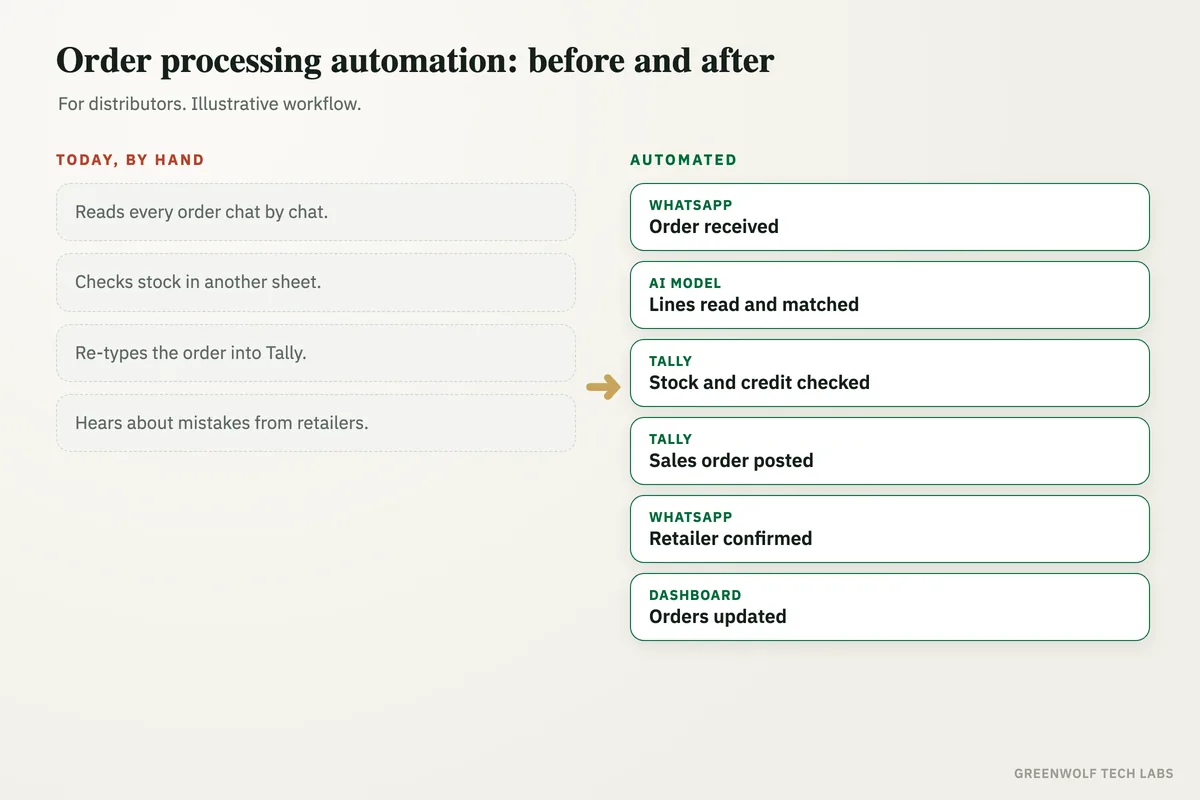
What gets automated
Orders read from any format
Text messages, photos of handwritten lists, PDFs, Excel sheets and voice notes are read and turned into clean order lines.
- WhatsApp and email
- Photos and PDFs
- Voice notes transcribed
Items matched to your master
Short names, local names and typos are matched to the right SKU and pack size in your item master, with past orders used as a guide.
- Matched by SKU
- Pack size checked
- Learns customer shorthand
Stock and credit checked
Each order is checked against current stock and the customer's credit limit and outstanding balance before it is posted.
- Live stock lookup
- Credit limit check
- Customer rate applied
Sales order posted
A clean sales order is created in Tally, Zoho Books or your ERP, so nobody types the same order a second time.
- Tally, Zoho or Busy
- Correct ledger and rates
- No double entry
Confirmation sent back
The retailer gets a WhatsApp confirmation with the order number, the items accepted and anything short or on hold.
- Order number shared
- Short items flagged
- Expected dispatch stated
Exceptions routed to a person
Unclear lines, credit holds and out-of-stock items go to the right person with the question ready, instead of sitting in a chat.
- Credit holds to accounts
- Unclear items to sales
- Nothing silently dropped
How the workflow runs
WhatsApp or Gmail: order received
Every order message, photo, PDF or voice note on your business number or order inbox is picked up as it arrives.
AI model: order lines read
The order is read and split into product, pack size and quantity, with each line matched to your item master.
Tally or Zoho: stock and credit checked
Current stock and the customer's credit position are checked, and the right price list is applied.
Tally or Zoho: sales order posted
Clean orders are posted as sales orders automatically. Anything on hold is routed to a person with the reason.
WhatsApp: retailer confirmed
The retailer receives the order number, the confirmed items and any shortfall, usually within moments of sending the order.
Dashboard: orders on one screen
Orders received, posted, on hold and pending dispatch show on one view for the owner and the warehouse.
Who it is for
What you need to start
You keep the tools you already run: a WhatsApp Business number or the order inbox in Gmail or Outlook, and Tally, Zoho Books, Busy or the ERP you post orders in today. The workflow sits between them, built on tools such as n8n or Make with an AI model for reading the orders.
The data is what you already have: your item master with SKU codes and pack sizes, customer list with credit limits and price lists, and a few weeks of past orders so the matching learns how your customers write. If your item names are messy, cleaning the master is the first part of the build.
A first version that reads WhatsApp text orders and drafts sales orders for a person to approve usually takes a couple of weeks. Photos, voice notes, automatic posting for trusted customers and the dashboard follow once the team trusts the drafts.
Questions about order processing automation
Can it read handwritten order photos and voice notes?
Does it work with Tally?
What happens when an item is out of stock or the customer is over credit?
Will our retailers need to change how they order?
Do we need to replace our order software?
Where do your orders get stuck?
Book a digital audit. Tell us how orders reach you today and which system you post them in, and we will map what automating order entry would look like for your business.
Part of our Business Process Automation hub. Start with our business automation services.