


Healthcare
ABA Practice Management, Built Around Your Clinic
Sessions, authorizations, caseloads and reports for ABA clinics, in one system you own.
Get a free proposal
Tell us what you need. A consultant replies within one working day.
01
ABA practice management that fits how your clinic works
Off-the-shelf ABA practice management software asks your clinic to work its way. Many smaller and growing practices end up paying for modules they do not use while still tracking authorizations in a spreadsheet and assembling reports by hand.
We build ABA practice management systems around your clinic instead: sessions logged against authorized hours, each clinician's caseload, Behavior Support Plans and quarterly reports generated from the record, and billing documents ready for your biller. It runs on Google Workspace, which your practice may already cover under a Business Associate Agreement, and you own it outright.
02
What the system covers
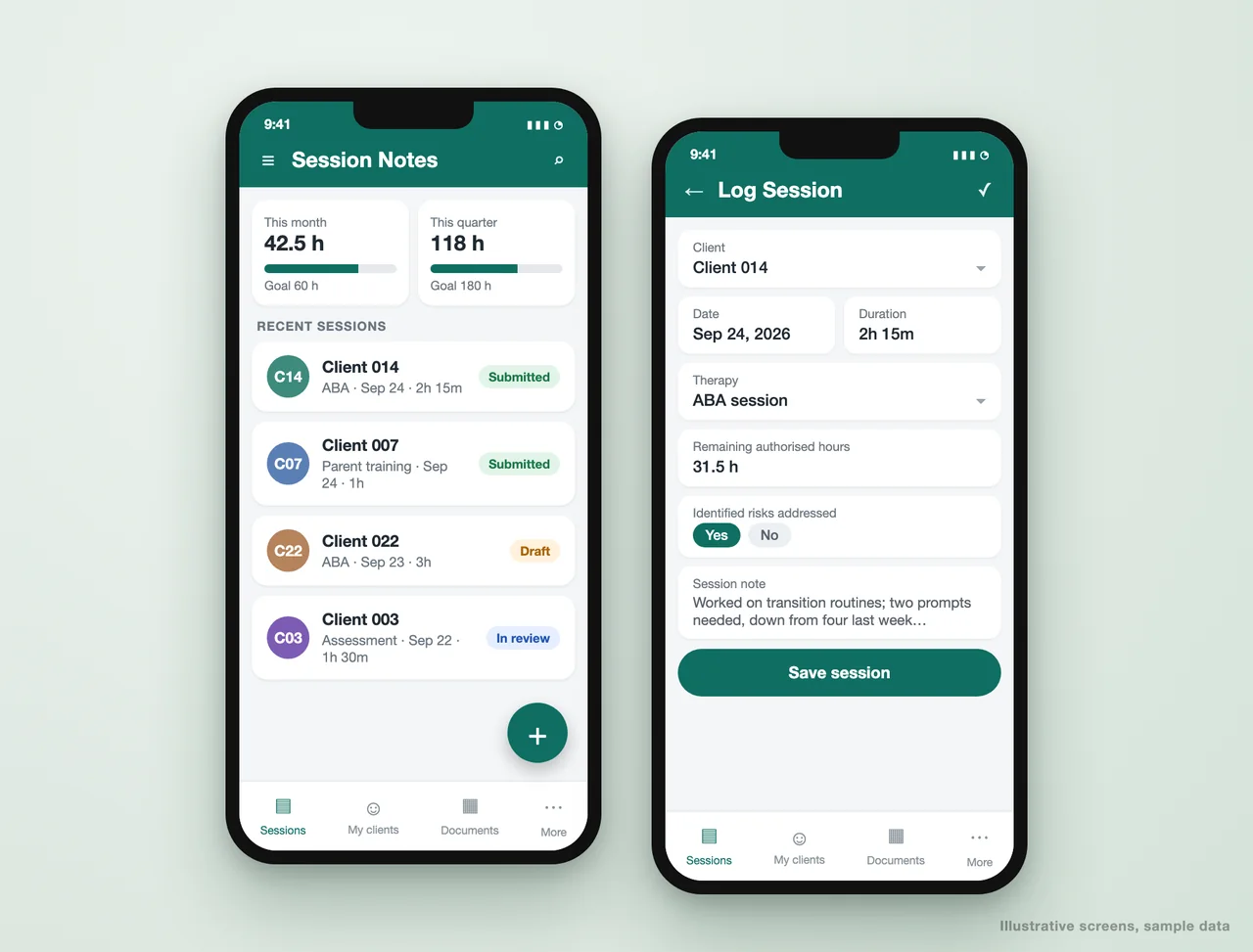
Session notes against authorizations
Every session logged against the right client and authorization, with remaining hours shown before the note is saved.
- Remaining authorized hours per client
- Required fields before a note saves
- Risk and goal fields as flags, not free text
Caseloads by clinician
RBTs and BCBAs see their own clients; supervisors and admins see the team.
- Row-level access by role
- Shared client directory for the team
- Handoffs without losing history
BSPs and quarterly reports
Behavior Support Plans, quarterly reports and discharge summaries generated from structured data in one click.
- Templates your BCBAs approve
- Due dates flagged 45 days ahead
- Stored with the client record
Authorizations and renewals
Authorized hours tracked against delivered hours, so renewals start before coverage lapses, not after a denial.
- Expiry alerts by client
- Hours used against hours approved
- Renewal requests tracked to approval
Billing-ready records
Sessions exported with the service codes, units and provider identifiers your billing team or billing system needs.
- Units calculated from session times
- NPI and payer details pre-filled
- Non-billable time logged separately
Hours and utilization
Monthly and quarterly hour goals per clinician, and authorization utilization per client, on one dashboard.
- Progress against goals
- Under-utilized authorizations flagged
- Reimbursements tracked in the same app
03
Built for a practice like yours
Client management portal for a US therapy practice
A clinical practice ran sessions, caseloads and billing documents across spreadsheets and email. We replaced them with one portal its clinicians use every day, with nine modules from session notes to reimbursements.
- Session notes logged against authorized hours, with monthly and quarterly goals
- Each clinician sees only their own caseload; admins see the team
- Behavior Support Plans, quarterly and discharge reports generated from the record
- Call logs, reimbursements and non-billable time in the same app
Time clinicians spent entering data fell from 10-15 minutes a day to under 3. Read the case study.
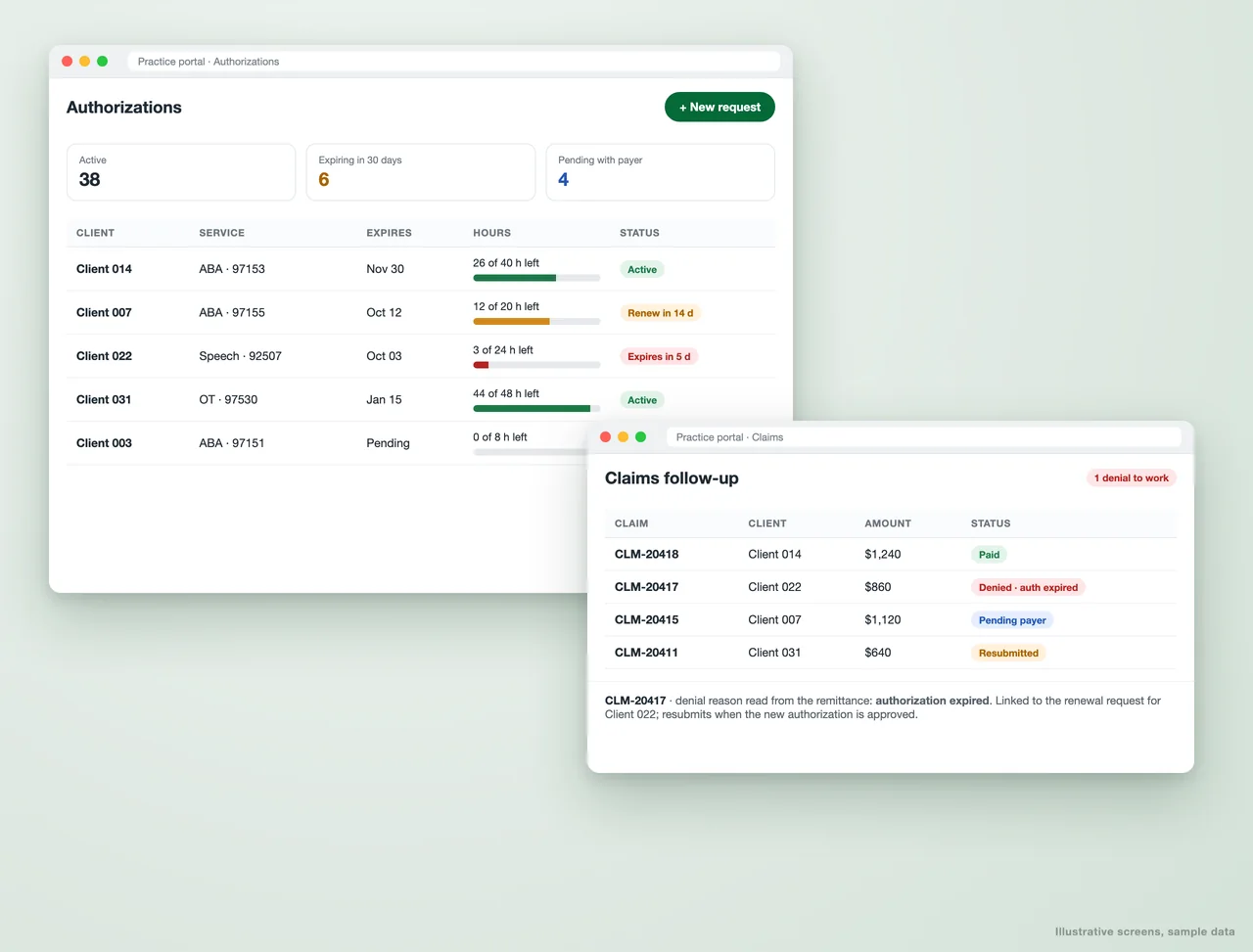
Authorization and claims tracking
Authorizations tracked against the hours actually delivered, and claims followed to payment, so a lapsed authorization is caught before it becomes a denial.
- Hours used against hours approved, per client and service code
- Renewal alerts before expiry
- Denials linked to their cause and the fix
04
Custom-built or off-the-shelf ABA software?
Off-the-shelf suits some clinics
If a packaged product fits your workflow and budget, use it. We will say so on the first call.
Custom fits the rest
Clinics with their own report formats, payer mix or workflows usually spend less fighting a custom system than a packaged one.
You own it
The app and the data sit in your own Google account. No per-seat licence to a vendor, no export fee to leave.
It changes when you do
A new payer, a new report or a new role is a change to your system, not a feature request to a software company.
05
Questions ABA practices ask
Is a custom ABA system HIPAA compliant?
Can it replace CentralReach or a similar product?
Does it handle billing?
Can clinicians use it on a phone or tablet?
How long does a build take?
Tell us how your clinic runs today
Which spreadsheets, forms and reports your team lives in. We will come back with what an ABA system built around them would include.
A reply from a consultant, usually within one working day. Please do not include any client information.
Part of our Healthcare Practice Automation hub. Start with our healthcare workflow automation.
Healthcare Practice Automation
More on healthcare workflow automation
AppSheet Developer for Business Apps and Automation
AppSheet developer for AppSheet app development and automation on Google Sheets or a database: field forms, approvals, invoicing and reports.
Case Study - Clinician Submission Portal (PTC Portal)
Metric Before After Submission errors High Significantly reduced Time clinicians spent entering data 10-15 mins/day < 3 mins/day Admin review effort Heavy Lightweight & structured...
Dental Appointment Reminders That Cut No-Shows and Fill the Chair
Automated dental appointment reminders over WhatsApp and SMS that confirm visits, fill recall gaps and cut no-shows, using the tools your clinic already runs.
Link EMR/EHR Data with Insurance Claims Through Automation
Link EMR/EHR Data with Insurance Claims Through Automation Healthcare providers and insurers often face the challenge of fragmented data. While Electronic Medical Records (EMR) and Electronic...
Medical Records Organization and Indexing, Automated
Automate medical records organization: PDFs read, renamed by condition or provider, and filed into the right folders, with PHI kept in your BAA-covered drive.