


n8n
n8n Agency: n8n Automation Developers
Production n8n workflows and AI automations, self-hosted or cloud, monitored and documented.
Get a free proposal
Tell us what you need. A consultant replies within one working day.
01
n8n automations built to run in production
n8n is the most flexible workflow automation tool available: open source, self-hostable, with code wherever you need it and first-class AI nodes. That flexibility is also why many n8n setups become fragile, with credentials scattered, errors ignored and workflows only one person understands.
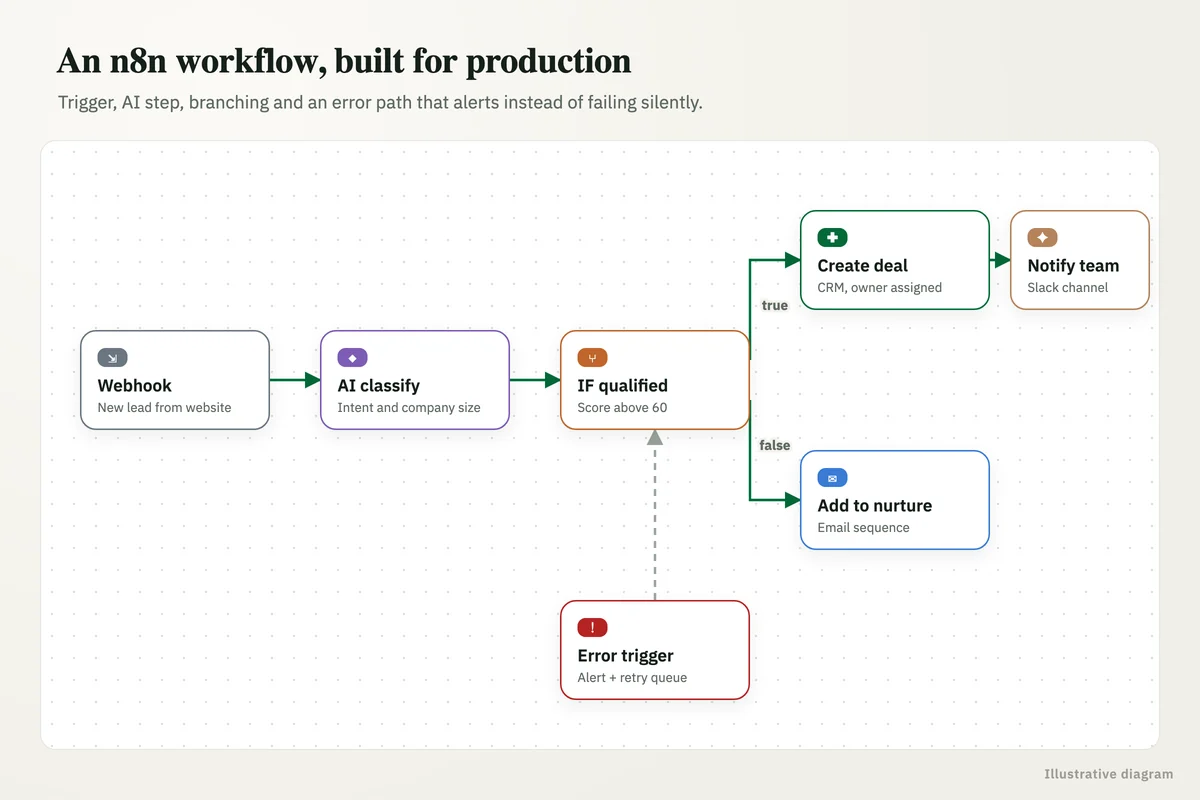
As an n8n agency, we build n8n workflows the way production software should be built: designed around your process, with error handling and retries, credentials managed properly, runs monitored, and every workflow documented so your team can own it.
02
What our n8n developers build
Business process automation
Lead routing, order processing, approvals, invoicing and reporting across the tools you already use.
- CRM, ERP and accounting
- Email, Slack and Teams
- Google Workspace and Microsoft 365
AI workflows and agents
n8n AI nodes connected to OpenAI, Anthropic or Gemini models for classification, extraction, drafting and agents.
- Document and email processing
- AI agents with tool use
- Human approval steps
Data pipelines
Data moved, cleaned and loaded between APIs, databases and warehouses on a schedule.
- APIs to database or sheet
- Webhooks and schedules
- Deduplication and validation
Self-hosted n8n setup
n8n deployed on your own AWS, Google Cloud or server, with backups, updates and access control.
- Docker or Kubernetes
- SSL, auth and secrets
- Queue mode for scale
Monitoring and error handling
Failed runs caught, retried or alerted, so nothing breaks silently.
- Error workflows and alerts
- Retry and dead-letter handling
- Execution logs retained
Migration to n8n
Zapier or Make scenarios moved to n8n when task costs or limits start to hurt.
- Workflow inventory
- Rebuilt and tested side by side
- Cost comparison
03
n8n cloud or self-hosted?
04
n8n Cloud vs self-hosted n8n
The same workflows run on either. The choice comes down to volume, data sensitivity and who maintains the servers.
| n8n Cloud | Self-hosted n8n | |
|---|---|---|
| Setup | Minutes, no servers | A server or container on your AWS, Google Cloud or VPS |
| Running cost | Monthly plan based on workflow executions | Free community edition; you pay for hosting |
| Where data lives | n8n's cloud | Your own cloud account |
| Maintenance | Handled by n8n | Updates, backups and monitoring are on you (or us) |
| Scaling | Plan limits | Queue mode and workers, as far as you need |
| Best for | Getting started, moderate volume | High volume, sensitive data, cost control |
05
n8n agency questions
What does an n8n agency do?
n8n, Zapier or Make?
Can you work with our existing n8n workflows?
Do you use n8n templates?
Tell us what you want n8n to do
Describe the process and the tools involved. We will come back with how it would work in n8n, cloud or self-hosted, and what it takes.
A reply from a consultant, usually within one working day.
Part of our Business Process Automation hub. Start with our business automation services.
Business Process Automation
More on business automation services
AI Workflow Automation, Built and Run for You
AI workflow automation services: we build AI workflows that read, classify and act across your systems, then run, monitor and improve them for a monthly fee.
AI Agent and Chatbot Development
We build AI agents and chatbots that do real work: reading documents, answering from your knowledge base and acting in your systems, with guardrails.
Zapier and Make Automation Agency
Zapier agency and Make.com experts building reliable automations between your apps: multi-step Zaps, scenarios, AI steps and error alerts, documented.
AWS and Google Cloud Consulting for Data, Automation and AI
AWS and Google Cloud consulting for data, automation and AI workloads: pipelines, warehouses, serverless automation and AI services, built and run cost-aware.
Interview Scheduling Automation for Recruitment Agencies: Every Shortlisted Candidate Booked Without the Back and Forth
Interview scheduling automation for recruitment agencies: candidates get slots on WhatsApp, replies are read, interviews booked and silent ones called.