


RPA
RPA Services: Robotic Process Automation
Software bots for the systems that will not integrate, built to fail loudly and recover.
Get a free proposal
Tell us what you need. A consultant replies within one working day.
01
Robotic process automation for the systems that will not integrate
Some work only happens through a screen: a supplier portal with no API, a legacy ERP, a government website, a desktop application from 2009. Robotic process automation (RPA) puts a software bot in front of those screens to do the clicking, copying and checking your team does today.
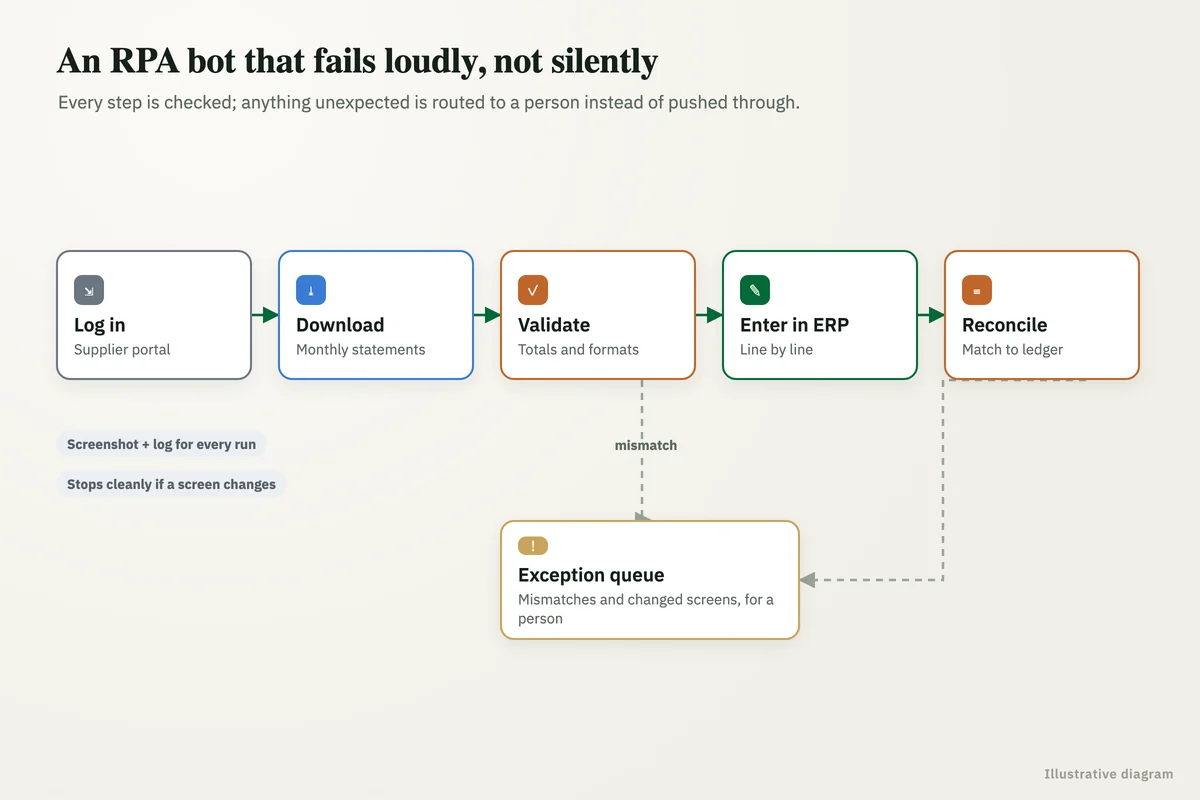
Our RPA services start with a question most RPA companies skip: does this need a bot at all? Where an API or a direct integration exists, it is faster and far less fragile. Where it does not, we build bots that are designed to fail loudly, log everything, and recover without someone babysitting them.
02
What our RPA bots handle
Data entry across systems
Orders, invoices and records keyed from one system into another, checked as they go.
- Validation before submission
- Exceptions queued for a person
- Full audit log
Portal and website tasks
Downloading statements, submitting forms and checking statuses on portals without an API.
- Scheduled or on demand
- Secure credential storage
- Screenshots of every run
Reconciliations
Bank, supplier and ledger records matched, with only the mismatches left for your team.
- Matching rules you agree
- Mismatch report by exception
- Runs daily or at month-end
Reports and extracts
Reports pulled from legacy systems and reshaped into the format the next step needs.
- Legacy and desktop systems
- Output to Excel or a database
- Delivered by email or drive
Reliable by design
Bots that detect when a screen changes and stop cleanly instead of entering bad data.
- Checks at every step
- Alerts on failure
- Safe restart
RPA consulting
An assessment of which processes suit RPA, which suit an API integration, and which should simply be redesigned.
- Process suitability scoring
- Build versus integrate advice
- Business case per process
03
How an RPA project runs
Assess the process
Volume, rules, exceptions and the systems involved, and whether RPA is the right tool.
Design for failure
Every step checked, every exception routed, every run logged.
Build and test
Tested against real cases, including the awkward ones, before it runs unattended.
Run and monitor
Scheduled runs, alerts on failure, and a support option when a system changes.
04
RPA, API integration or process redesign?
RPA is one tool among three. Choosing the right one is most of the value.
| RPA bot | API integration | Process redesign | |
|---|---|---|---|
| What it is | Software that operates screens like a person | Systems exchange data directly | Removing or changing the steps themselves |
| Use it when | A system has no API and the process is stable | Both systems offer an API or export | The process has unnecessary steps or hand-offs |
| Reliability | Good if designed to detect screen changes | High | Highest: fewer steps to fail |
| Maintenance | Updates when screens change | Low | None beyond normal operations |
05
RPA questions
What is robotic process automation?
Which RPA tools do you use?
When is RPA the wrong choice?
What happens when a screen changes?
Tell us which task your team repeats all day
Describe the process and the systems involved. We will tell you honestly whether RPA, an integration or a redesign is the better answer.
A reply from a consultant, usually within one working day.
Part of our Business Process Automation hub. Start with our business automation services.
Business Process Automation
More on business automation services
AI Workflow Automation, Built and Run for You
AI workflow automation services: we build AI workflows that read, classify and act across your systems, then run, monitor and improve them for a monthly fee.
Business Process Automation
How Business Process Automations can Benefit Businesses How Business Process Automation Works Business Process Automation involves the use of advanced technology to streamline and automate...
Operations Automation Services
How Operations Automation Service can Benefit Businesses Operations Automation Services How Operations Automation Works Operations Automation leverages advanced technologies and software solutions...
Interview Scheduling Automation for Recruitment Agencies: Every Shortlisted Candidate Booked Without the Back and Forth
Interview scheduling automation for recruitment agencies: candidates get slots on WhatsApp, replies are read, interviews booked and silent ones called.
Construction Daily Report Automation: Site Updates From WhatsApp to One Report
Construction daily report automation: site photos, labour counts and material notes from WhatsApp, turned into one report, with delays flagged to the office.