

Why document collection eats the whole season
Accounting workflow automation usually starts with the least glamorous job in the firm: getting documents out of clients. Every filing season someone on the team sends the same requests, waits, sends them again, and files the returns that came in complete while the rest sit half done. The work is not hard. It is just endless, and it lands on the people you would rather have preparing returns.
The bottleneck is almost never the preparation. It is the collection. Bank statements arrive in three formats, one client sends a photo of a photo, another swears the rent receipts already went across, and the tracker that is meant to hold all of this is a spreadsheet only one person understands. By the time a file is complete, half the deadline is gone.
This workflow takes the chasing off your team. It sends each client a clear request for exactly what their filing needs, collects what comes back in one place, ticks off what has arrived, and follows up on what is missing until the file is complete. Your staff still review the documents and prepare the return. The system runs the collection.
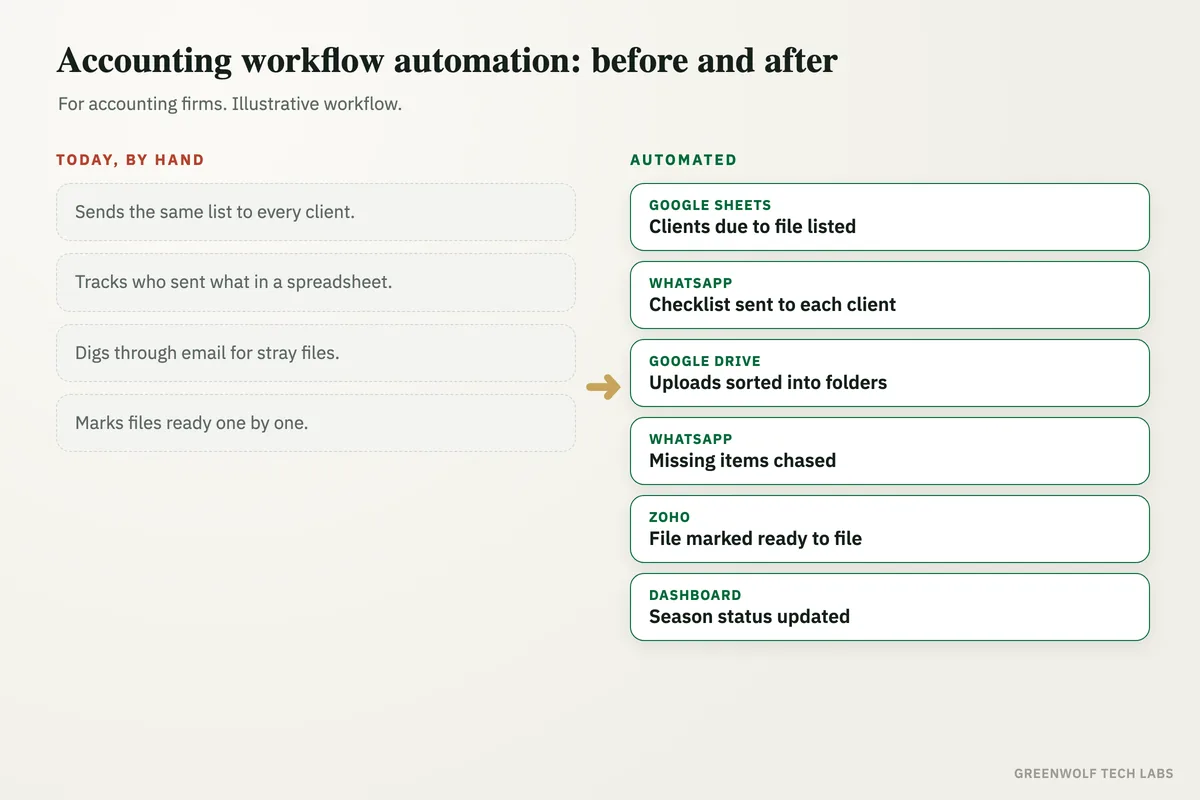
What gets automated
Document requests sent
Each client gets a clear list of exactly what their return needs, on the channel they actually reply to, without anyone drafting it by hand.
- A checklist matched to the filing
- Sent on WhatsApp, email or an upload link
- No generic one-size ask
Everything in one place
Files come back to a single folder per client instead of being scattered across inboxes, chats and phones.
- One folder per client
- Renamed and sorted on arrival
- Nothing lost in a thread
A checklist that updates itself
As each document arrives it is ticked off, so the team sees at a glance which files are complete and which are still short.
- Received against required
- Live status per client
- No manual ticking
Missing items chased
Clients who have not sent everything get a reminder naming exactly what is still outstanding, on a schedule, until the file is complete.
- Names the missing document
- Follows up on its own
- Stops when the file is complete
Deadlines surfaced early
Filings at risk because documents are still outstanding are flagged while there is time to act, not the night before.
- At-risk files highlighted
- Sorted by due date
- The partner sees the gap in time
The season on one screen
Collected, pending and at-risk across every client on a single view the partner can check without asking the team.
- Complete against total
- By preparer and by due date
- Status that matches the folder
How the workflow runs
Reads the client list
The workflow pulls the clients due to file from your practice sheet, Tally or Zoho, with the documents each one needs.
Sends the request
Each client gets a personalised checklist on WhatsApp or email with a link to upload, so they know exactly what to send.
Collects and sorts
Documents that come back are saved to that client's folder, renamed and matched against the checklist automatically.
Chases what is missing
Clients still short of documents get a reminder naming the outstanding items, repeated on a schedule until the file is complete.
Flags the file as ready
Once everything is in, the file is marked complete and handed to the preparer, and at-risk deadlines are surfaced for the partner.
Who it is for
What you need to start
You do not need new practice management software. Most firms start with what they already run: the client list from Tally, Zoho or a Google Sheet, a WhatsApp Business number or a shared mailbox, and a folder structure in Google Drive or OneDrive where documents already live.
The data is simple. A client list with contact numbers, the filing each client is due for, and the documents that filing needs. From that the workflow knows who to ask, what to ask for, and what has still not arrived. If your software can export the list, the workflow reads it directly. If not, a shared sheet the team already keeps works fine.
A first version, requests and reminders for one filing type, is usually a matter of days. Sorting, folder handling and a partner dashboard come next, once the team sees complete files landing without the chasing.
Questions about accounting workflow automation
What documents can it collect?
How do clients send their documents?
Does it work with Tally or Zoho?
What about clients who never respond?
Is client data kept private?
Where does your filing season slip?
Tell us how documents are collected today and we will map it in a short digital audit, then show what automating the chasing would look like for your firm.
Part of our Business Process Automation hub. Start with our business automation services.