

Why client intake slows a law firm down
Law firm client intake is the first thing a new client experiences, and in many firms it still runs on an inbox and a spreadsheet. Enquiries arrive through the website form, email, phone and WhatsApp. Someone reads each one, works out what kind of matter it is, searches the conflicts list by hand and then phones the person back to find a time for a consultation.
Every step waits for a person. An enquiry that lands on Friday evening gets a reply on Monday, by which point the client has often called another firm. The conflict check depends on whoever searches the sheet spelling the name the same way. Once a consultation is booked, the same details are typed again into the practice management software, and the engagement letter and ID documents are chased one email at a time.
This workflow takes the routine part of intake off the front desk. It captures every enquiry in one place, sorts it by matter type and urgency, runs the conflict check against your client and opposing party records, lets the prospective client book a consultation, sends the engagement letter for e-signature and opens the matter in your practice software. Lawyers still decide which matters to take. They just stop losing enquiries to the wait.
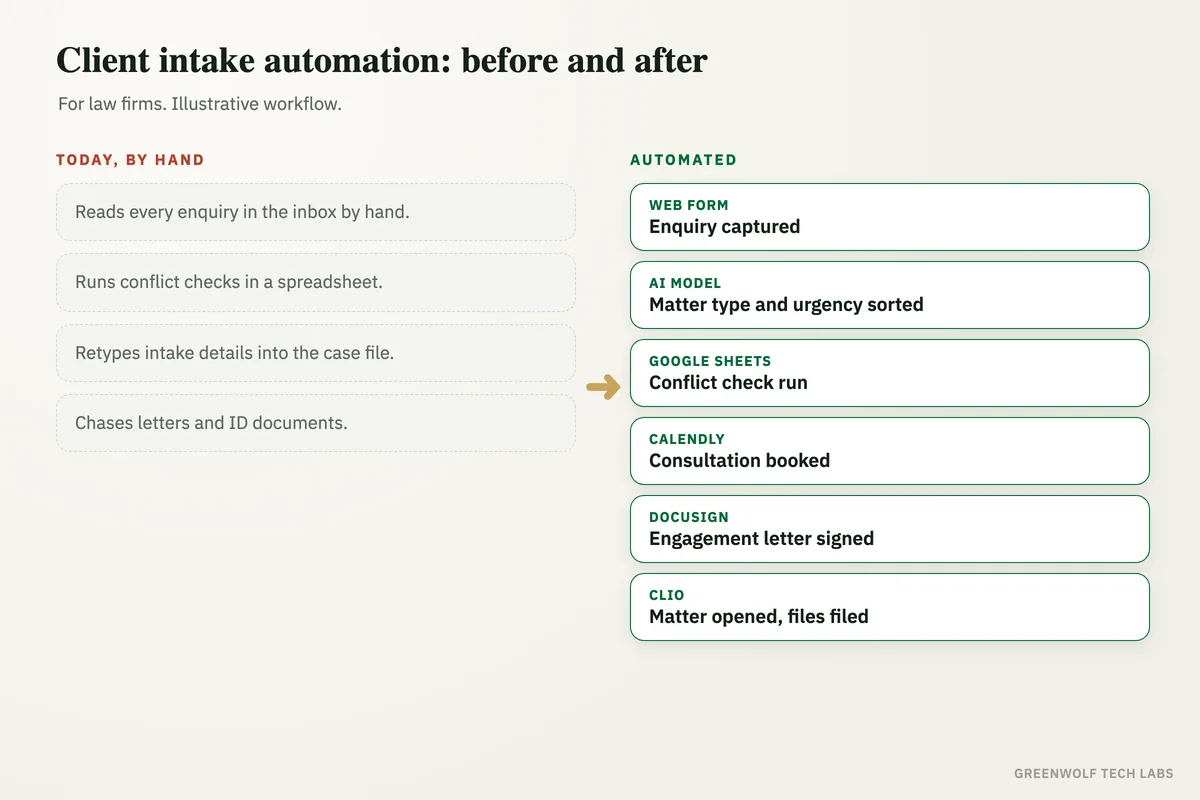
What gets automated
Enquiry capture
Website forms, emails, voicemail transcripts and WhatsApp messages land in one intake list, so no enquiry sits unread in someone's inbox.
- One list for every channel
- Contact details pulled out
- Instant acknowledgement sent
Matter type and urgency
An AI model reads each enquiry and tags the practice area, the key facts and any deadline mentioned, then routes it to the right lawyer or team.
- Practice area tagged
- Deadlines and limitation dates flagged
- Routed by your own rules
Conflict check
Names of the prospective client and the other side are checked against your client and opposing party records, including close spellings, before anyone books a meeting.
- Clients and opposing parties
- Close name matches surfaced
- Possible conflicts sent to a partner
Consultation booking
Cleared enquiries get a booking link for the right lawyer's calendar, with reminders before the meeting, so nobody plays phone tag to find a slot.
- Live calendar slots
- Reminders by email or WhatsApp
- Reschedule link included
Engagement letter and documents
After the consultation the engagement letter goes out for e-signature with your fee terms filled in, and the client uploads ID and case documents to one folder.
- Letter built from your template
- E-signature with status tracking
- Missing documents chased on schedule
Matter opened and tracked
Once signed, the matter is created in your practice management software with the intake details, and the pipeline from enquiry to signed client shows on one dashboard.
- No retyping into the case file
- Enquiries by source and practice area
- Open items visible to partners
How the workflow runs
Web form or inbox: enquiry captured
A new enquiry from the website, Outlook, Gmail or WhatsApp is added to the intake list within seconds and the person gets an acknowledgement.
AI model: matter type and urgency sorted
The enquiry is read, tagged by practice area and urgency, and assigned to the right lawyer or intake team member.
Conflict check run
The client and opposing party names are checked against your records in Google Sheets, Excel or your practice software. Clear matches pass, possible conflicts go to a partner.
Calendly or Outlook: consultation booked
Cleared enquiries receive a booking link for the assigned lawyer, and reminders go out before the meeting.
DocuSign: engagement letter signed
The engagement letter is generated from your template, sent for signature, and ID and case documents are collected into the client's folder.
Clio or MyCase: matter opened
The matter is created with the intake details, the documents are linked, and the intake dashboard updates for the partners.
Who it is for
What you need to start
You keep the tools the firm already uses. Most firms start with their website form, a shared inbox in Outlook or Gmail, a calendar for each lawyer, and either a practice management system such as Clio, MyCase or PracticePanther or a simple matter list in Excel or Google Sheets.
The data is what you already hold: past and current clients, opposing parties and matter types for the conflict check, your engagement letter and fee terms as a template, and the rules for who handles which kind of matter. We agree with you which decisions stay with a lawyer, such as accepting a matter or clearing a possible conflict, and the workflow only prepares those for review.
A first version that captures every enquiry, replies at once and books consultations is usually a matter of days. Conflict checks, engagement letters, document collection and opening the matter in your practice software follow once the first part is running smoothly.
Questions about law firm client intake
What is client intake in a law firm?
Can a conflict check be automated safely?
Do we need new client intake software for our law firm?
How is client information kept confidential?
What should a law firm intake form ask?
Where do your enquiries wait today?
Tell us how enquiries reach the firm and what happens next, and we will map your intake in a short digital audit, then show what automating capture, conflict checks and booking would look like for your practice.
Part of our Business Process Automation hub. Start with our business automation services.