

Why the Monday report still eats a morning
Weekly report automation starts with a file every business knows: the raw export from the billing system, the CRM or the shop software. It comes out of Tally, QuickBooks, Zoho, HubSpot or Shopify with merged cells, the same customer spelled three ways, duplicate rows, blank lines and dates in three different formats. Before anyone can say how the week went, someone has to clean it.
So every Monday, the same person copies, deletes, fixes dates, removes duplicates and rebuilds the same pivot table. On a busy week the report is late or skipped. When it does arrive, it is a wall of numbers, and the one figure that actually changed, such as overdue money climbing while sales look fine, is easy to miss. The shop, the clinic, the agency, the factory and the distributor all live with the same Monday.
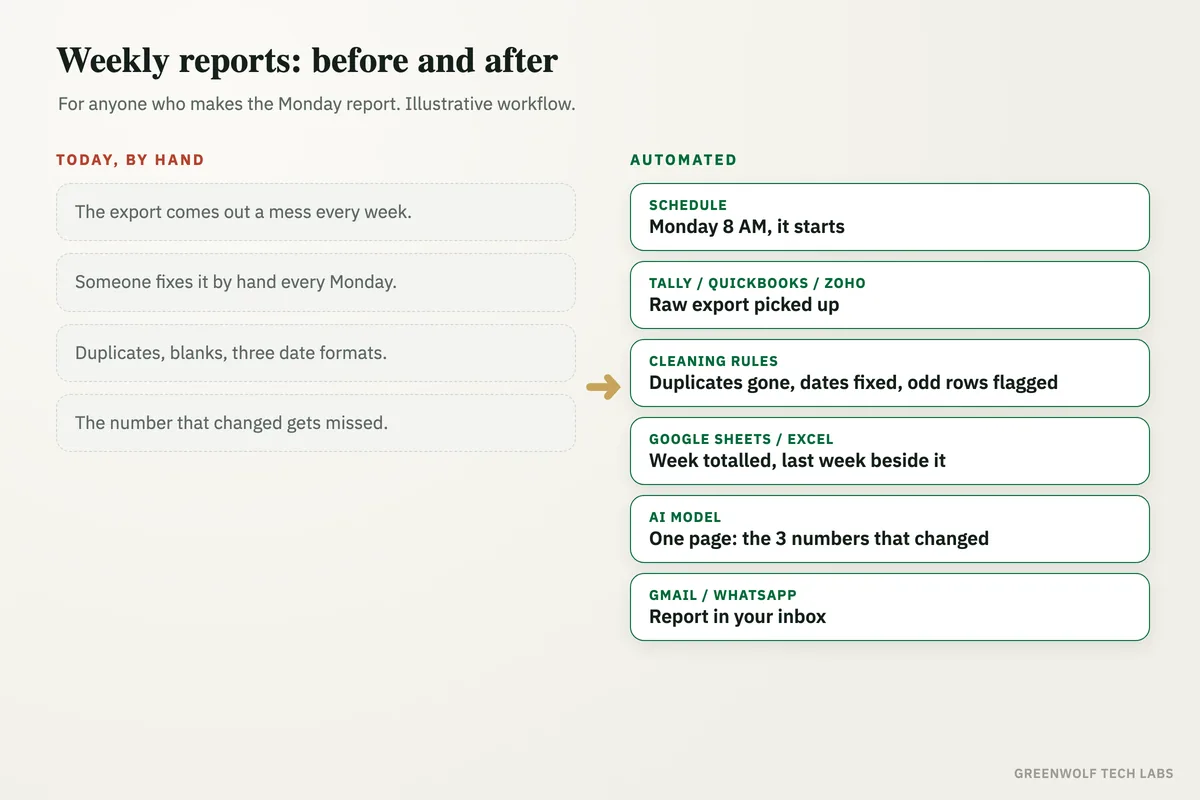
This workflow takes that export as it is, cleans it the same way every time, totals the week, compares it with last week and sends a one-page report every Monday morning. The report leads with the three numbers that changed the most, and names the customers or items behind them.
What gets automated
Picking up the export
The weekly export is collected from your system, a shared folder or an email inbox, in whatever shape it comes out.
- Excel or CSV
- Shared folder
- Email attachment
Cleaning the data
Duplicate rows are removed, customer names are matched, dates are put into one format and blank or broken rows are flagged, not silently dropped.
- Duplicates
- Name spellings
- Date formats
Weekly totals
Sales, money collected, overdue amounts and orders are totalled for the week and set beside last week and the month so far.
- This week
- Last week
- Month so far
The three numbers that changed
An AI model reads the totals and writes a short summary that leads with the biggest changes and the customers or products behind them.
- Biggest change first
- Names behind it
- Plain words
Sent every Monday
A one-page report reaches the owner and the team at the same time each week, by email and WhatsApp, with the cleaned sheet attached.
- Same time weekly
- Email and WhatsApp
- Clean sheet attached
Problems flagged
Rows that could not be cleaned with confidence are listed separately for a person to check, so the totals can always be trusted.
- Unclear rows listed
- Nothing guessed
- Easy to review
How the workflow runs
Schedule: every Monday morning
The workflow starts at a set time, for example 8 AM on Monday, before the weekly meeting.
Tally, QuickBooks, Zoho, HubSpot or Shopify: the raw export
Last week's sales, invoices or orders are exported from your system or picked up from a shared folder in Google Drive or OneDrive.
Cleaning step: one tidy table
Duplicates are removed, customer names matched to your customer list, dates put into one format and broken rows flagged for review.
Google Sheets or Excel: the weekly totals
The clean rows land in one sheet that totals sales, collections, overdue money and orders, with last week beside each number.
AI model: the one-page summary
ChatGPT or Claude writes a short report from the totals, leading with the three numbers that changed the most and who is behind them.
Gmail, Outlook or WhatsApp: the report goes out
The one-pager reaches the owner and team by email, with a short version on WhatsApp through an approved template (WATI or Twilio).
Who it is for
What you need to start
You keep the system you already use: Tally, QuickBooks, Zoho, HubSpot, Shopify or any software that can export to Excel or CSV. The export lands in Google Drive, OneDrive or an inbox, a Google Sheet or Excel workbook holds the clean data and totals, and the workflow runs on n8n, Make or Zapier, with ChatGPT or Claude writing the summary. Email goes through Gmail or Outlook; a WhatsApp copy needs the WhatsApp Business API through a provider such as WATI or Twilio.
The most important part of the build is agreeing the cleaning rules with you: which spellings are the same customer, what counts as collected, which rows should be flagged rather than fixed. Once those rules are written down, the report is built the same way every week. If you also want the same numbers every morning, see daily sales report automation, and for a live view the clean sheet can feed a business performance dashboard.
A typical build is planned around your real exports, tested against several past weeks so the totals match the figures you already trust, and goes live over a few weeks.
Questions about weekly report automation
How do I automate a weekly report in Excel?
Can AI clean messy Excel data?
Will the AI change my numbers?
What should a weekly business report include?
Does this work with Tally or QuickBooks exports?
How long does your Monday report take to build?
Book a digital audit. Send us one of your real exports and we will map what a clean Monday report would look like for your business.
Part of our Business Process Automation hub. Start with our business automation services.