

Why interview scheduling still eats a recruiter's day
Interview scheduling automation matters most in the gap between a shortlist and a booked interview, because that is where recruitment agencies lose good candidates. A recruiter finds a strong profile, the client likes it, and then the back and forth starts: a WhatsApp message with a time, a reply asking for another day, a check with the hiring manager, a calendar invite typed by hand. Multiply that by every candidate on every open role and it fills the day.
While the times are being swapped, the best candidates are talking to other agencies and other employers. Some take another offer before a slot is fixed. Some forget the time and miss the call, and the client hears about it first. The shortlist sheet goes out of date, so nobody is sure who has been asked, who has replied and who is booked.
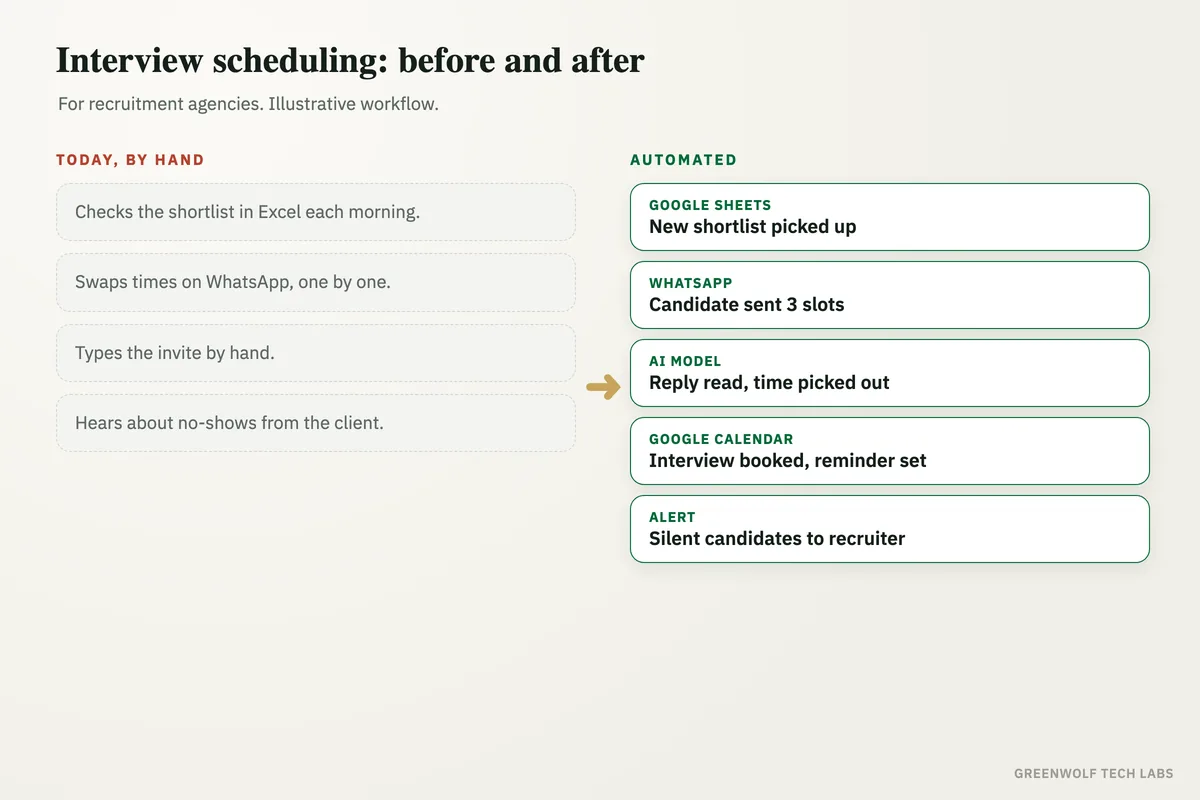
This workflow picks up new names from the shortlist every morning, sends each candidate a few open interview times on WhatsApp, reads the reply with an AI model, books the chosen time in Google Calendar or Outlook with the call link and a reminder, and hands silent candidates to a recruiter as a short call list. Recruiters spend their time on candidates and clients. The booking runs on its own.
What gets automated
New shortlists picked up daily
Every morning the candidates marked as shortlisted in your Google Sheet, Excel file or recruitment software are picked up, with the role, the client and the interview panel.
- Role and client attached
- Panel free times read
- Already booked skipped
Candidates sent open times on WhatsApp
Each candidate gets a short WhatsApp message with three open interview times that suit the client's panel, and a polite repeat if they stay silent.
- Three real slots
- Role and client named
- One gentle repeat
Replies read and times picked out
Replies such as Tuesday works, or only after 5 PM, are read by an AI model, and the chosen time or the new request is picked out.
- Free text understood
- New time requests caught
- Withdrawals flagged
Interviews booked with reminders
The chosen time is booked in Google Calendar or Outlook for the candidate and the panel, with the video call link, and both get a reminder the day before.
- Invite to both sides
- Call link added
- Day-before reminder
Silent candidates sent to a recruiter
Candidates who do not reply after two messages go on a short call list for their recruiter, with the role and the past messages ready.
- Short daily call list
- History in one place
- Wrong numbers flagged
Every interview on one screen
Shortlisted, booked, done and no-show interviews show on one dashboard, by client, role and recruiter.
- Booked vs waiting
- No-shows by role
- Time from shortlist to interview
How the workflow runs
Google Sheets: new shortlist read
Every morning the newly shortlisted candidates are picked up from the shortlist sheet or a daily export from your recruitment software.
WhatsApp: candidate sent three times
Each candidate gets a message with three open interview times that match the client's panel.
AI model: reply read
The reply is read and the chosen time, a request for another day, or a withdrawal is picked out of it.
Google Calendar or Outlook: interview booked
The interview is booked for the candidate and the panel with the call link, and both get a reminder the day before.
Alert: call list to the recruiter
Candidates who do not reply go to their recruiter as a short call list with the details ready.
Dashboard: every interview on one screen
Shortlisted, booked, done and missed interviews show on one view for the agency owner.
Who it is for
What you need to start
You keep the tools you already use: the shortlist in Google Sheets or Excel, or the recruitment software your team works in, such as Zoho Recruit or HubSpot. Messages go out from a WhatsApp Business number, interviews are booked in Google Calendar or Outlook with Google Meet, Zoom or Microsoft Teams links, and the workflow sits between them, built on tools such as n8n or Make with an AI model to read the replies.
The data is what you already have: each candidate's name, mobile number, role and client, plus the times each client's panel is free. Candidates should agree to be contacted on WhatsApp, which most already have when they apply. If the shortlist lives in several personal sheets, bringing it into one is the first part of the build.
A first version that picks up shortlists, sends times and books interviews for a recruiter to check usually takes a couple of weeks. The call list, reschedule handling and the dashboard follow once the team trusts the bookings.
Questions about interview scheduling automation
What is interview scheduling automation?
Can candidates book interviews on WhatsApp?
Does it work with our recruitment software?
What happens when a candidate wants to reschedule?
Will this reduce interview no-shows?
How many good candidates took another offer while you swapped times?
Book a digital audit. Tell us how your team shortlists and books interviews today, and we will map what interview scheduling automation would look like for your agency.
Part of our Business Process Automation hub. Start with our business automation services.