

Why donation receipts are still made by hand
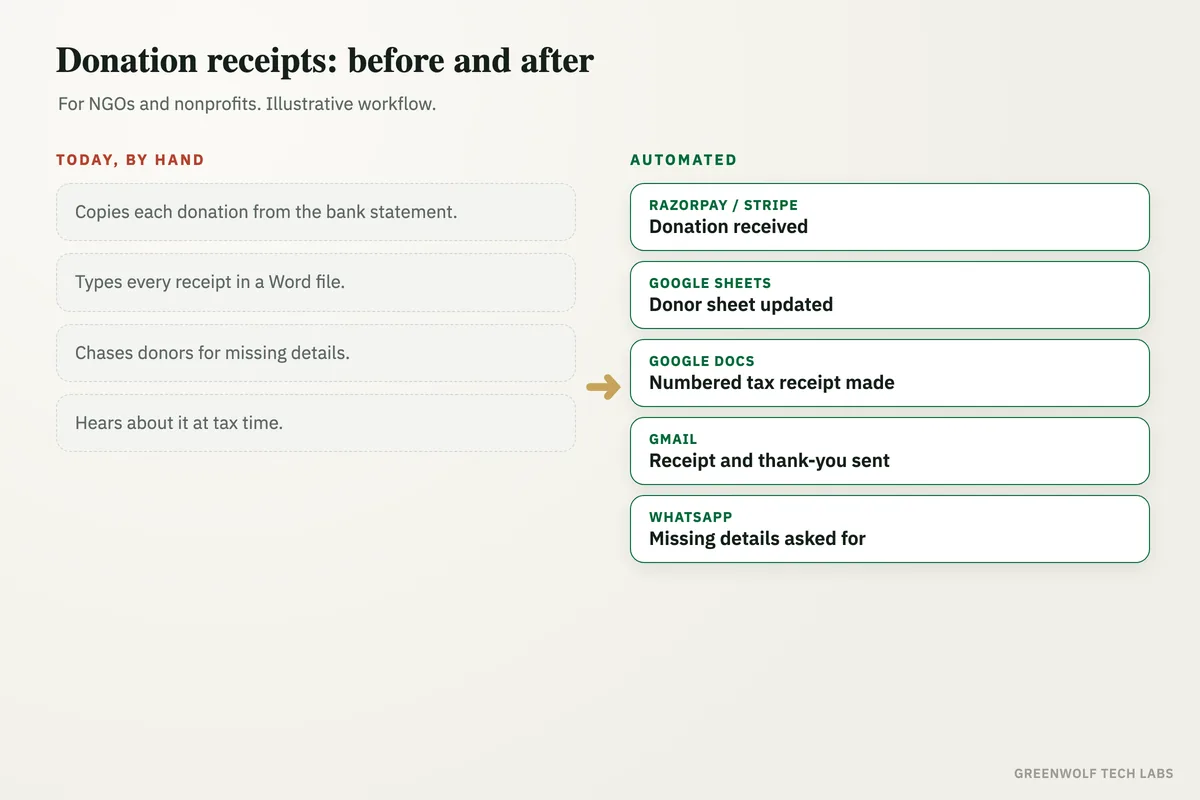
Donation receipt automation decides whether a donor hears back from you in minutes or in weeks. A gift made online lands in the bank at once, but in many NGOs and nonprofits the receipt still waits for a volunteer or an accounts person to copy the payment into a donor sheet, type the receipt in a Word file, pick the next receipt number and email it out.
That is where things slip. Receipts go out late, a number gets used twice, a donor's name is spelt wrong, and tax IDs or addresses are missing until someone chases them on WhatsApp. At tax time, donors ask for receipts they never got, and the auditor finds receipts that do not match the bank. Meanwhile the donor who gave last month never got a real thank-you, and is less likely to give again.
This workflow picks up every online donation from Razorpay, Stripe or your payment gateway, adds the donor to one donor sheet, makes a numbered tax receipt as a PDF, and emails it with a thank-you note. If the donor's details are not complete, it asks them on WhatsApp or email and sends the receipt once the reply comes in. Your team spends its time on donors and programmes, not on paperwork.
What gets automated
Every donation picked up
Each online gift is read from Razorpay, Stripe, PayPal or your donation form the moment it is paid, with the donor's name, amount, date and payment reference.
- One-time and monthly gifts
- Payment reference kept
- Bank transfers added from a sheet
One donor sheet
Each gift lands as a row in one donor sheet in Google Sheets or Excel, and repeat donors are matched to their earlier gifts instead of being added twice.
- Repeat donors matched
- Total given per donor
- Programme or campaign noted
Numbered tax receipts
A receipt in your format is made as a PDF with the next receipt number, so no number is skipped or used twice, and a copy is filed in Google Drive.
- Your letterhead and wording
- Numbers in order
- Copy filed by year
Receipt and thank-you sent
The donor gets the receipt by email with a short thank-you note, and a WhatsApp thank-you too if they shared their number.
- Sent within minutes
- Thank-you by programme
- Larger gifts flagged to a trustee
Missing details asked for
If the tax ID, address or full name the receipt needs is missing, the donor is asked on WhatsApp or email, and the receipt goes out once they reply.
- Polite reminder if silent
- Reply read by an AI model
- Call list for your team
Donations on one screen
Gifts, receipts sent, details missing and repeat donors show on one dashboard, with a year-end summary ready for donors and the auditor.
- Receipts vs bank
- Year-end donor statements
- Monthly donor trend
How the workflow runs
Razorpay or Stripe: new donation
A donor gives online and the payment is picked up the moment it succeeds.
Google Sheets: donor sheet updated
The donor's name, amount, date and payment reference are added as a row, matched to earlier gifts.
Google Docs: numbered tax receipt made
A receipt in your format is filled in with the next number, saved as a PDF and filed in Google Drive.
Check: are the donor's details complete?
The workflow checks that the receipt has everything it needs, such as the full name, address and tax ID where your country asks for one.
Gmail: receipt and thank-you sent
Complete receipts are emailed to the donor with a short thank-you note, within minutes of the gift.
WhatsApp: donor asked for missing details
If something is missing, the donor gets a short message asking for it, and the receipt follows once they reply. Donors who stay silent go to your team as a short list.
Who it is for
What you need to start
You keep the tools you already use: your payment gateway such as Razorpay, Stripe or PayPal, a donor sheet in Google Sheets or Excel, your receipt wording in a Google Docs or Word template, and Gmail or Outlook for sending. If your books are in Tally, QuickBooks or Zoho Books, donations can be posted there too. The workflow sits between these tools, built on n8n or Make, with an AI model to read donor replies.
The data is what you already collect: the donor's name, email, phone number, amount and date, plus the details your receipts must show in your country, such as an address or a tax ID. Your receipt format and numbering rules are set once with your accountant, so every receipt follows them.
A first version that picks up online donations, fills the donor sheet and emails numbered receipts usually takes a couple of weeks. Asking donors for missing details, bank transfers and the dashboard follow once your team trusts the receipts.
Questions about donation receipt automation
How do I automate donation receipts?
What should a donation receipt include?
Can it handle donations made by bank transfer or cash?
How does it stop duplicate receipt numbers?
Can donors get a yearly summary of their gifts?
How long do your donors wait for a receipt today?
Book a digital audit. Tell us how donations reach you and how receipts are made today, and we will map what donation receipt automation would look like for your organisation.
Part of our Business Process Automation hub. Start with our business automation services.