

Why owners still ask for yesterday's numbers
Daily sales report automation fixes a question every owner asks each morning: how did we do yesterday? The answer sits in three or four places. Sales are in Tally, QuickBooks, Zoho or the shop system, money received is in the bank or Razorpay or Stripe, and new orders are in a sheet or someone's WhatsApp. So the owner calls the accounts person, or waits for a report that someone builds by hand.
That report is often late, skipped on busy days, or built a little differently each time. By the time the numbers arrive, the day has started, and a slow week is only noticed when it has already become a slow month. The shop, the clinic, the agency, the factory and the distributor all live with the same gap.
This workflow sends yesterday's sales, collections and orders to your WhatsApp every morning, at the same time, in five plain lines. It compares them with the same day last week, points out one thing worth checking, and sends a separate alert only when something is clearly off.
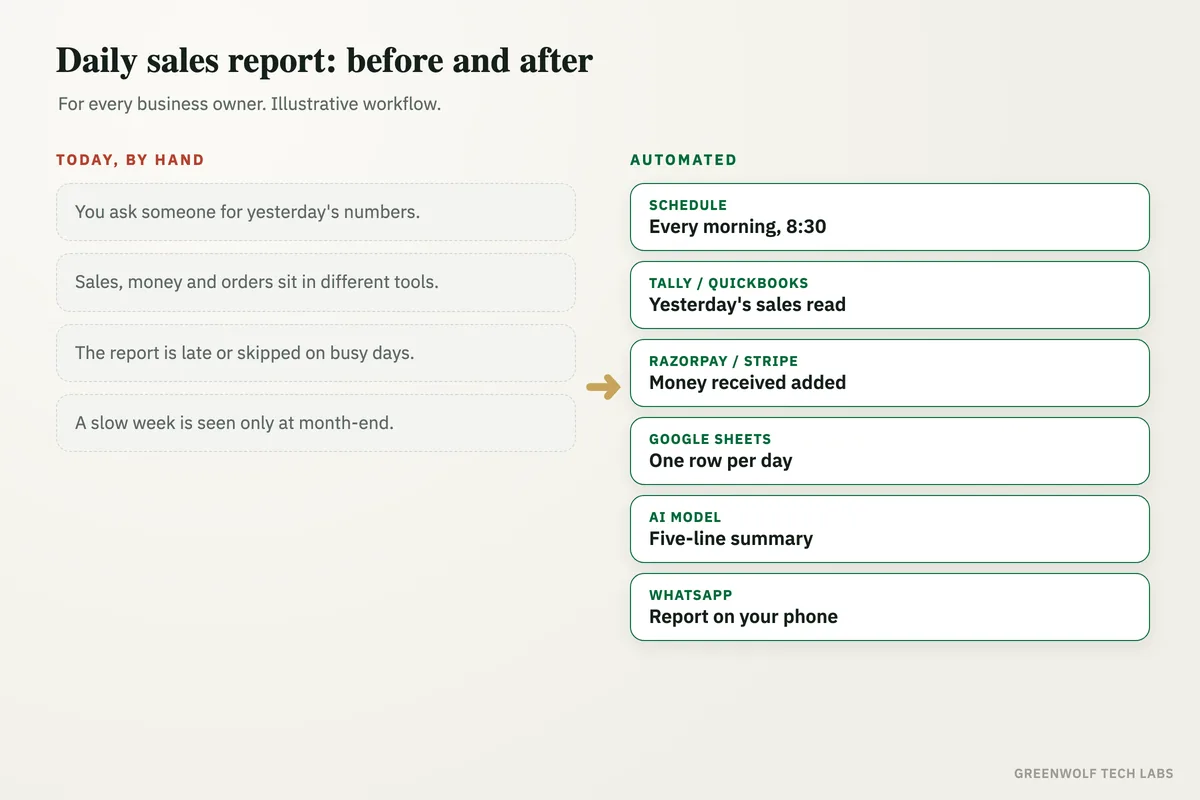
What gets automated
A report at the same time daily
Every morning before work starts, the workflow collects yesterday's numbers on its own. Nobody has to remember to build it.
- Every morning
- Same time
- Weekends included
Numbers from every system
Sales, money received and new orders are pulled from the tools you already use and put into one row per day.
- Sales
- Collections
- New orders
Compared with last week
Each number is shown next to the same day last week, so a drop or a jump is clear without opening a spreadsheet.
- Same day last week
- Up or down
- Month so far
A summary in plain words
An AI model writes five short lines from the numbers and names one thing worth a look, such as a big customer who did not order.
- Five lines
- Numbers first
- One thing to check
Sent to the right people
The summary reaches the owner and partners on WhatsApp, with a copy by email that links to the full sheet.
- Owner
- Partners
- Accounts head
Alerts only when it matters
If sales fall well below last week or a large invoice goes overdue, one clear alert is sent, not a stream of messages.
- Sales drop
- Big overdue invoice
- One alert
How the workflow runs
Schedule: every morning
The workflow starts at a set time, for example 8:30 AM, every day of the week.
Tally, QuickBooks, Zoho or Shopify: yesterday's sales
Invoices raised and orders taken yesterday are read from your sales system. Tally users usually connect through a scheduled export or a Tally connector.
Razorpay, Stripe or the bank: money received
Payments that came in yesterday are added, so the report shows cash collected, not only sales made.
Google Sheets: one row per day
Sales, collections and orders are saved in a daily sheet with the same day last week and the month so far beside them.
AI model: the five-line summary
ChatGPT or Claude turns the row into five plain lines and points out one thing to check today.
WhatsApp and Gmail: the report goes out, alerts if needed
The summary is sent on WhatsApp through an approved template (WATI or Twilio) and by email. If sales fall below a set level or a big invoice is overdue, a separate alert follows.
Who it is for
What you need to start
You keep the tools that already hold your numbers: Tally, QuickBooks, Zoho Books or Shopify for sales, and Razorpay, Stripe or your bank statement for money received. A Google Sheet holds one row per day, and the workflow runs on n8n, Make or Zapier, with ChatGPT or Claude writing the summary. To receive the report on WhatsApp, the business number needs the WhatsApp Business API through a provider such as WATI or Twilio, with one approved message template; email works through Gmail or Outlook.
The most important part of the build is agreeing what each number means: whether sales include tax, which payments count as collected, and what level of drop should send an alert. For a fuller view beyond the morning message, the same sheet can feed a business performance dashboard in Power BI or Looker Studio.
A typical build is planned around your systems and the numbers you check, tested against a few weeks of past figures so the totals match your books, and goes live over a few weeks.
Questions about daily sales report automation
Can I get a daily sales report on WhatsApp automatically?
Can Tally send a daily sales report automatically?
How do I get a daily sales report from QuickBooks?
What should a daily sales report include?
Will the AI change my numbers?
How long does it take you to find out how yesterday went?
Book a digital audit. Show us where your sales, payments and orders live today, and we will map what a morning report would look like for your business.
Part of our Sales and Marketing Automation hub. Start with our marketing automation services.