

Why happy customers never leave a review
Google review request automation fixes a simple problem: your happy customers would leave a review, but nobody asks them at the right moment. The job ends, the customer says thank you, everyone is busy, and the moment passes. A week later a quick "please review us" message feels odd, so nobody sends it.
Meanwhile the one unhappy customer always finds the review page. That is why so many good businesses sit at a handful of reviews and a rating that does not match their work. The shop, the clinic, the agency, the workshop and the distributor all face the same gap between how good they are and how good they look on Google.
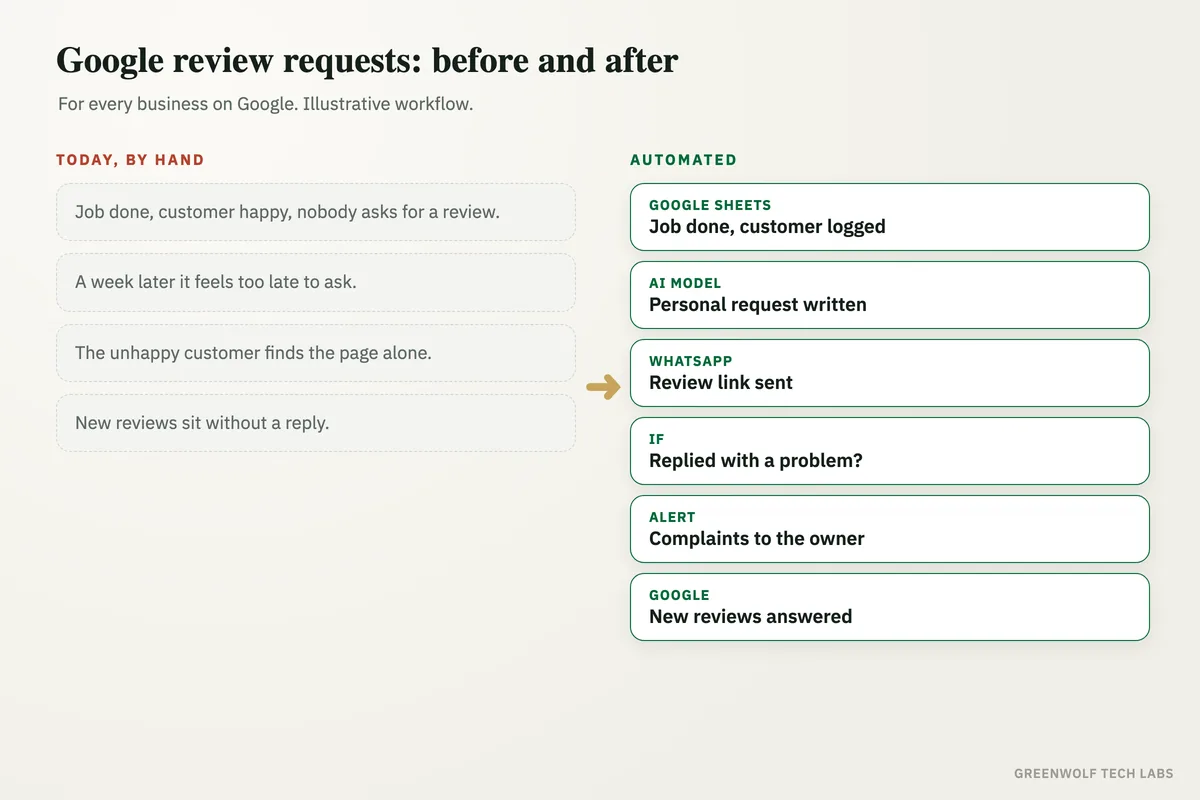
This workflow asks every customer, every time, a few hours after the job is done or the order arrives. The message is short, personal and carries your direct Google review link. Customers who do not respond get one polite reminder. Anyone who replies with a problem reaches you straight away, so you can fix it while it is still small. New reviews get a reply drafted for you to approve.
What gets automated
A request after every job
When an order is delivered, an invoice is paid or a job is marked done, the customer is added to the review list on their own.
- Order delivered
- Invoice paid
- Job marked done
Sent at the right moment
The request goes out a few hours after the job, while the experience is fresh, and never late at night.
- A few hours after
- Working hours only
- One message per visit
A personal message
An AI model writes a short note with the customer's name and what they bought, so it reads like you wrote it, with your direct review link.
- Their name
- What they bought
- One-tap review link
One polite reminder
Customers who do not reply or review get one gentle reminder after a few days. Then the system stops, so nobody feels chased.
- One reminder only
- Then it stops
- No pressure
Problems reach you first
If a customer replies with a complaint, the owner or manager gets an alert with the full message to call them back the same day.
- Instant alert
- Full message
- Same-day call back
Every review answered
New Google reviews are picked up, an AI model drafts a reply in your tone, and you approve it before it goes live.
- Draft reply ready
- You approve it
- Rating trend in one sheet
How the workflow runs
Shopify, QuickBooks, Zoho or Google Sheets: a job is done
An order marked delivered, an invoice marked paid or a row set to Done starts the workflow. Tally users can send a daily export to Google Sheets.
Google Sheets: the customer is logged
Name, phone, email, what they bought and the date go into one review sheet, with a check so nobody is asked twice for the same visit.
AI model: the message is written
ChatGPT or Claude writes a short, warm request with the customer's name and purchase, plus your Google review link from your Business Profile.
WhatsApp or Gmail: the request goes out
The message is sent a few hours later on WhatsApp through an approved template (WATI or Twilio) or by Gmail or Outlook.
If: did they reply?
An AI model reads any reply. A thank-you or "done" closes the row; a complaint goes straight to the owner on WhatsApp. Silent customers get one reminder after three days.
Google Business Profile: reviews answered
Each new review is picked up, a reply is drafted in your tone for you to approve, and the review count and rating are tracked week by week.
Who it is for
What you need to start
You need a verified Google Business Profile, where you copy your direct review link from the "Ask for reviews" option. You keep the tool that already knows when a job is done: Shopify, QuickBooks, Zoho, Tally with a daily export, or a simple Google Sheet. To message customers on WhatsApp, your number needs the WhatsApp Business API through a provider such as WATI or Twilio, with an approved message template; email works through Gmail or Outlook. The workflow runs on n8n, Make or Zapier, with ChatGPT or Claude writing the messages and draft replies.
Google's rules shape the build. Ask every customer, not only the ones you expect to be happy, and never offer a discount or gift for a review. The system follows both: everyone gets the same request, and complaints are handled as service, not hidden. For more on the profile itself, see our Google Business Profile checklist.
A typical build is planned around how your jobs end, tested on real past customers and your own phone first, and goes live over a few weeks. The message wording and timing are then tuned on the replies that come in.
Questions about Google review request automation
How do I get my Google review link?
Is it allowed to automate Google review requests?
Can I send review requests on WhatsApp automatically?
When is the best time to ask for a review?
Can AI reply to my Google reviews?
How many happy customers left last month without being asked?
Book a digital audit. Show us how your jobs and orders end today, and we will map what a review request system would look like for your business.
Part of our Sales and Marketing Automation hub. Start with our marketing automation services.