

Why the inbox still runs your morning
AI email triage fixes a problem every business has, whatever it sells: an inbox with hundreds of unread emails where the three that matter sit between newsletters, supplier updates, invoices, tool alerts and copies of copies. The owner opens it in the morning, scrolls, answers whatever is on top, and the customer who asked a real question on Tuesday is still waiting on Friday.
Filters and folders help a little, but they sort by sender, not by what the email actually asks. A complaint from a regular customer and a newsletter from the same domain end up in the same place. So the real sorting still happens in someone's head, every morning, one email at a time.
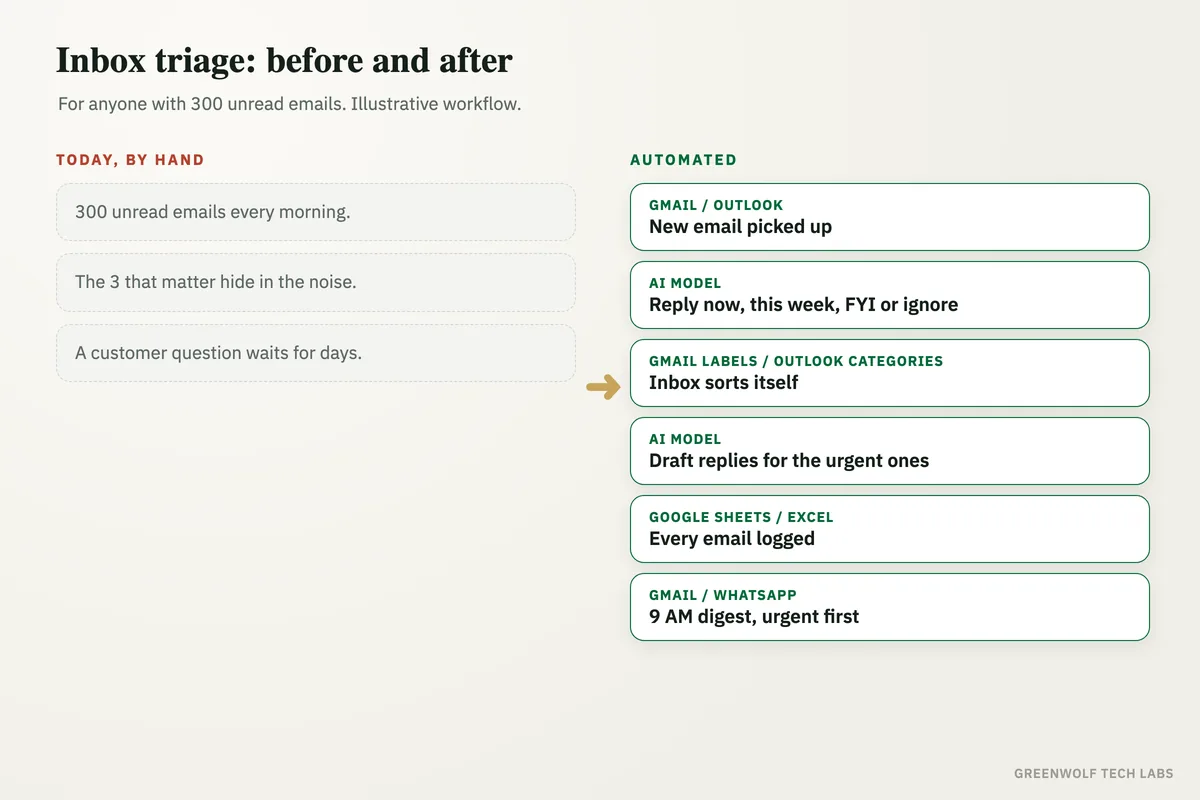
This workflow reads every new email as it arrives, decides whether it needs a reply now, this week, is just for your information or can be ignored, writes a one-line summary, and prepares a draft reply for the urgent ones. At 9 AM you get one short digest. Nothing is sent without you.
What gets automated
Reading every new email
Each email that lands in Gmail or Outlook is picked up as it arrives, including the attachments' names and the thread it belongs to.
- Gmail
- Outlook
- Shared inboxes
Four clear labels
An AI model reads what the email asks and labels it reply now, this week, FYI or ignore, using rules you agree, such as which customers always count as urgent.
- Reply now
- This week
- FYI or ignore
One-line summaries
Every email gets a one-line summary of who it is from and what they want, so you can scan fifty emails in the time it takes to read one.
- Who
- What they want
- By when
Draft replies, not sent replies
For reply-now emails, a draft answer is saved in your drafts folder in your own tone, using your price list or FAQ. You read it, edit it and press send.
- Saved as draft
- Your tone
- You press send
The 9 AM digest
One short message each morning lists what needs a reply today, what can wait and what was filed away, by email or WhatsApp.
- Same time daily
- Email or WhatsApp
- Urgent first
Unsure emails go to a person
When the AI is not sure which label fits, the email is marked for a person to look at instead of being filed away.
- Nothing hidden
- Easy to review
- Rules improve
How the workflow runs
Gmail or Outlook: a new email arrives
The workflow watches your inbox, or a shared one such as info@ or accounts@, and picks up each new email with its thread.
AI model: reads and labels it
ChatGPT or Claude reads the email against your rules and gives it one label: reply now, this week, FYI or ignore, plus a one-line summary.
Gmail labels or Outlook categories: the inbox sorts itself
The label is applied in your own inbox, so the emails that need you sit together and the noise is filed away, not deleted.
AI model: draft replies for the urgent ones
For reply-now emails a draft answer is written from your price list, FAQ or past replies and saved in your drafts folder. Nothing is sent on its own.
Google Sheets or Excel: one log
Every email, its label and summary are logged in one sheet, so you can see what came in, what was answered and what is still waiting.
Gmail or WhatsApp: the 9 AM digest
Each morning a short digest lists today's replies first, then this week's, then a count of what was filed away. A WhatsApp copy uses an approved template through a provider such as WATI or Twilio.
Who it is for
What you need to start
You keep the email you already use: Gmail through Google Workspace, or Outlook through Microsoft 365. The workflow runs on n8n, Make or Zapier, an AI model such as ChatGPT or Claude does the reading and drafting, and a Google Sheet or Excel workbook holds the log. A WhatsApp digest needs the WhatsApp Business API through a provider such as WATI or Twilio; otherwise the digest arrives by email.
The most important part of the build is writing down your sorting rules with you: which customers and suppliers always count as urgent, what can always wait, which emails need a person every time, and what the draft replies may and may not promise. We test those rules on a few weeks of your real emails before anything goes live. If your team also chases replies on WhatsApp, see WhatsApp auto reply for business, and for wider email work see our email automation service.
A typical build is planned around your real inbox, tested on past emails until the labels match how you would sort them yourself, and goes live over a few weeks.
Questions about AI email triage
What is AI email triage?
Will the AI send emails without me?
Does it work with Gmail and Outlook?
Is it safe to let AI read business emails?
How does it know which emails are urgent?
How many unread emails are in your inbox right now?
Book a digital audit. We will look at how email comes into your business and show what a sorted inbox with a 9 AM digest would look like for you.
Part of our Sales and Marketing Automation hub. Start with our marketing automation services.