

Why chasing payments by hand keeps you short of cash
Payment reminder automation takes the most awkward job in any business off your plate: asking customers to pay what they owe. A shop, a clinic, an agency, a factory and a distributor all live with the same routine. Someone opens Tally or QuickBooks, exports the list of unpaid invoices, scrolls through it, and then types the same polite WhatsApp message to each customer, one at a time, when they find a free hour.
That free hour rarely comes in a busy week. Reminders go out late or not at all, the same customer is chased twice while another is forgotten, and nobody is sure who already paid because the bank credit has not been matched to the invoice yet. The owner ends up making the uncomfortable calls on a Friday evening, and cash that was earned weeks ago still sits with the customer.
This workflow reads the unpaid invoices from your accounting software every morning, sends each customer a friendly reminder on WhatsApp and email at the right moment with the invoice and a payment link, checks the bank or payment gateway for money that came in, marks paid invoices and sends a thank-you, and gives your accounts person a short list of the customers who still have not paid, so a human calls only the ones that need a call.
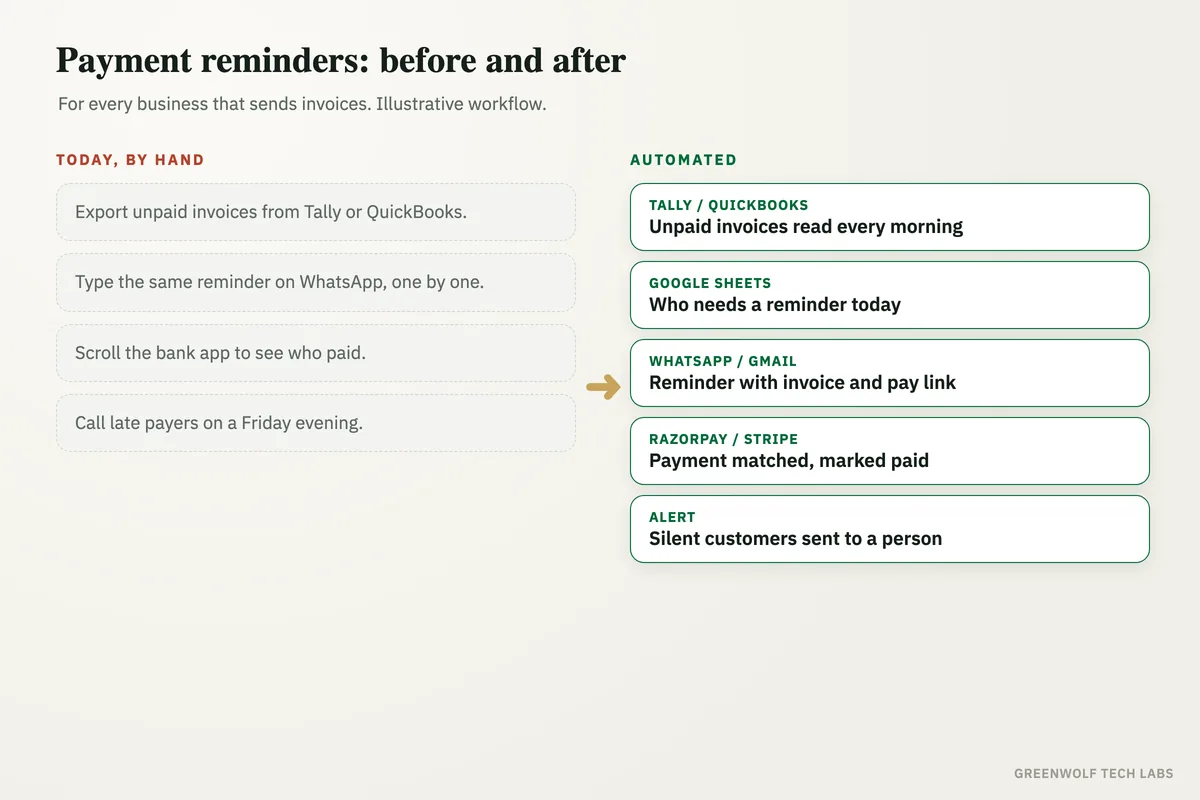
What gets automated
Unpaid invoices read every morning
Open invoices with their due dates and amounts are pulled from Tally, QuickBooks, Zoho Books or your invoice sheet, so the list is always current.
- Due date and amount
- Customer contact details
- Part payments included
Reminders on a fixed rhythm
Each customer gets a friendly note before the due date, on the due date and a few days after, with firmer wording only when it is needed.
- Before the due date
- On the due date
- After it is late
Invoice and payment link attached
Every reminder carries the invoice PDF and a Razorpay, Stripe or UPI payment link, so paying takes one tap instead of a search for bank details.
- Invoice PDF
- One-tap payment link
- WhatsApp and email
Payments matched to invoices
Money that arrives through the payment link or the bank is matched to the right invoice, the invoice is marked paid and the reminders stop at once.
- No reminder after payment
- Thank-you sent
- Receipt on request
Replies read by an AI model
When a customer replies "paid yesterday", "next Friday" or "wrong amount", an AI model reads it, pauses the reminders and logs the promised date.
- Promised dates saved
- Disputes sent to a person
- No robotic replies
Call list for the ones who stay silent
Customers still unpaid after the last reminder go to your accounts person or the owner as a short call list, with the full history of what was sent.
- Only the real problems
- History in one place
- Top debtors on a dashboard
How the workflow runs
Tally or QuickBooks: unpaid invoices read
Every morning the open invoices, due dates and customer contacts are pulled from your accounting software or invoice sheet.
Google Sheets: who is due today
Each invoice is checked against the reminder rhythm, so only the customers who need a message today get one.
WhatsApp and Gmail: reminder with a payment link
The customer gets a polite reminder with the invoice PDF and a Razorpay or Stripe link, on WhatsApp and email.
Check: has the customer paid?
The payment gateway and bank credits are checked against the invoice, and the invoice takes one of two paths.
Tally or QuickBooks: marked paid, thank-you sent
Paid invoices are marked in your books, reminders stop and the customer gets a short thank-you.
Alert: call list for the accounts person
Customers still silent after the last reminder go to a person as a call list, with every message already sent.
Who it is for
What you need to start
You keep the tools you already use: Tally, QuickBooks or Zoho Books for invoices, WhatsApp Business and Gmail or Outlook for messages, and Razorpay, Stripe or your bank for payments. A simple Google Sheet holds the reminder rhythm and the wording you are happy with. The workflow sits between these tools, built on n8n, Make or Zapier, with an AI model to read customer replies.
The data is what you already have: invoice numbers, amounts, due dates and the customer's phone number and email. You decide the tone of each message and how many days apart they go, and you can mark key customers as "never auto-remind" so a person always handles them.
A first version that reads unpaid invoices and sends reminders with a payment link usually takes a couple of weeks. Payment matching, reply reading and the dashboard follow once the reminders are running smoothly.
Questions about payment reminder automation
What is payment reminder automation?
Can payment reminders be sent on WhatsApp automatically?
Will automatic reminders annoy my customers?
Does it work with Tally and QuickBooks?
How many reminders should I send for an unpaid invoice?
How much is sitting unpaid in your books today?
Book a digital audit. Show us how you send invoices and chase payments today, and we will map what payment reminder automation would look like for your business.
Part of our Sales and Marketing Automation hub. Start with our marketing automation services.