

Why sent quotes go quiet
Quote follow up automation fixes a leak every business has: you send a quote, the customer says "looks good, let me check", and then nothing. A shop quoting a bulk order, a clinic quoting a treatment plan, an agency quoting a project and a distributor quoting a price list all lose deals the same way. Nobody said no. Nobody followed up either.
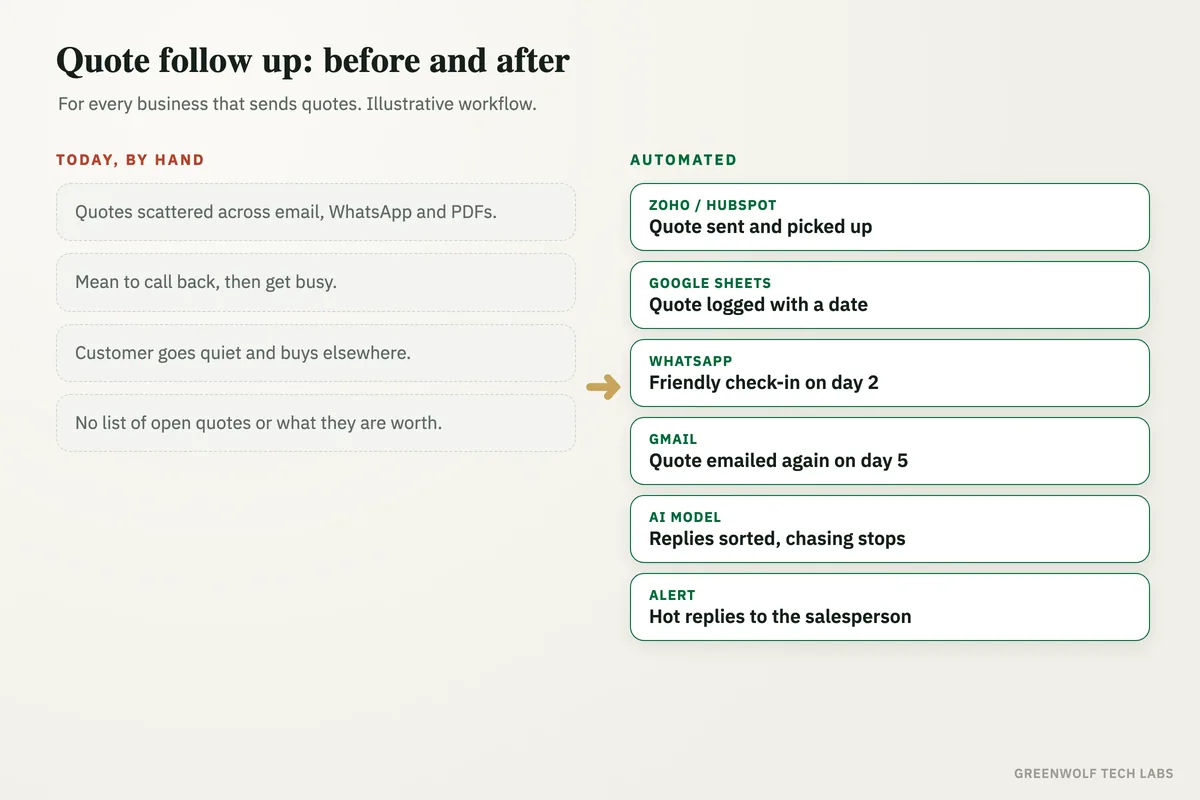
The quotes sit in sent emails, WhatsApp chats and PDFs on someone's laptop. The salesperson means to call back on Friday, gets busy with new enquiries, and by the time anyone checks, the customer has bought elsewhere. The owner has no single list of which quotes are open, how much they are worth, or who promised to follow up.
This workflow logs every quote the moment it goes out, sends polite follow ups on WhatsApp and email on a set timetable, reads the replies, and stops as soon as the customer answers. Hot replies reach the salesperson at once, quiet ones become a short call list, and the owner sees every open quote in one place.
What gets automated
Every quote logged in one list
Quotes from Zoho, HubSpot, Tally, QuickBooks or a Word template are added to one sheet with the customer, amount, salesperson and date sent.
- From your quote tool or email
- Customer and amount
- Who owns it
Follow ups on a set timetable
A friendly WhatsApp after two days, an email with the quote attached after five, and a last check-in after ten. You choose the timing and the words.
- Day 2, 5 and 10
- WhatsApp and email
- Your own wording
Replies read by an AI model
An AI model reads each reply and sorts it: ready to go, has a question, wants a lower price, not now, or no. Follow ups stop the moment someone answers.
- Yes, question, price, later, no
- Stops on any reply
- Reply saved to the quote
Hot replies sent to the salesperson
When a customer says yes or asks a question, the salesperson gets a WhatsApp with the quote and the reply, so they can answer while the customer is still keen.
- Instant alert
- Quote and reply together
- No inbox digging
Quiet quotes become a call list
Quotes with no reply after the last follow up go to the salesperson as a short call list each morning, biggest amounts first.
- Daily call list
- Biggest first
- Nothing forgotten
Open quotes on one screen
The owner sees every open quote, its value, its age and the win rate by salesperson, without asking anyone for an update.
- Open value
- Quote age
- Won and lost reasons
How the workflow runs
Zoho or HubSpot: a quote is sent
Every new quote from your quote tool, accounts software or email is picked up the moment it goes out.
Google Sheets: the quote is logged
Customer, phone, amount, salesperson and date go into one quotes sheet, with a follow up date set.
WhatsApp: a friendly check-in
Two days later the customer gets a short WhatsApp asking if they have questions about the quote.
Gmail or Outlook: the quote again
If there is no reply, an email with the quote attached follows a few days later, then a last check-in.
AI model: replies sorted
Each reply is read and marked as yes, question, price, later or no, and the follow ups stop.
Alert: hot ones to sales, the rest to a list
Yes and question replies go to the salesperson at once. Quotes that stay quiet become a morning call list.
Who it is for
What you need to start
You keep the tools you already use: Zoho, HubSpot, Tally, QuickBooks or a simple Word or Excel template to make quotes, WhatsApp Business and Gmail or Outlook to send them, and Google Sheets or Excel for the quotes list. The workflow sits between them, built on n8n, Make or Zapier, with an AI model to read replies.
The data is simple: each quote's customer name, phone or email, amount, salesperson and date. You also decide the follow up timetable and write the messages in your own voice, so customers hear from you, not from a robot. If quotes live in different places today, gathering them into one list is the first step.
A first version that logs quotes and sends the WhatsApp and email follow ups usually takes a couple of weeks. Reply sorting, the call list and the owner's view follow once the first quotes are flowing through it.
Questions about quote follow up automation
How long should I wait to follow up on a quote?
What should a quote follow up message say?
Can quote follow ups be sent on WhatsApp?
Will automated follow ups annoy my customers?
Does it work with Zoho, HubSpot, Tally and QuickBooks?
How many of last month's quotes did anyone follow up?
Book a digital audit. Show us how quotes go out today, and we will map what quote follow up automation would look like for your business.
Part of our Sales and Marketing Automation hub. Start with our marketing automation services.