

Why check-in turns into a queue
Hotel online check-in fixes the busiest ten minutes of a guest's stay: the moment they reach the front desk. Five guests walk in at once after a long trip, and each one waits while the desk asks for ID, photocopies it, types the name, address and nationality into the register, asks for the arrival time they could have shared days ago and hunts for the booking from the online travel site.
None of this needs the guest to be standing there. The booking arrived days earlier, through the channel manager, a booking site, the website or a phone call. The details could have been collected, checked and filed before the guest left home. Instead the front desk does it all in the busiest hour, the queue grows, and the first thing the guest remembers is the wait.
This workflow reads the arrivals list every morning, sends each guest arriving in two days a WhatsApp message with a short check-in form, collects the ID photo, arrival time and requests, has an AI model check that the ID matches the booking, fills the guest record, and sends a welcome note when everything is in. Guests who have not finished the form go to the front desk as a short call list. When they arrive, the key is ready and check-in takes a minute.
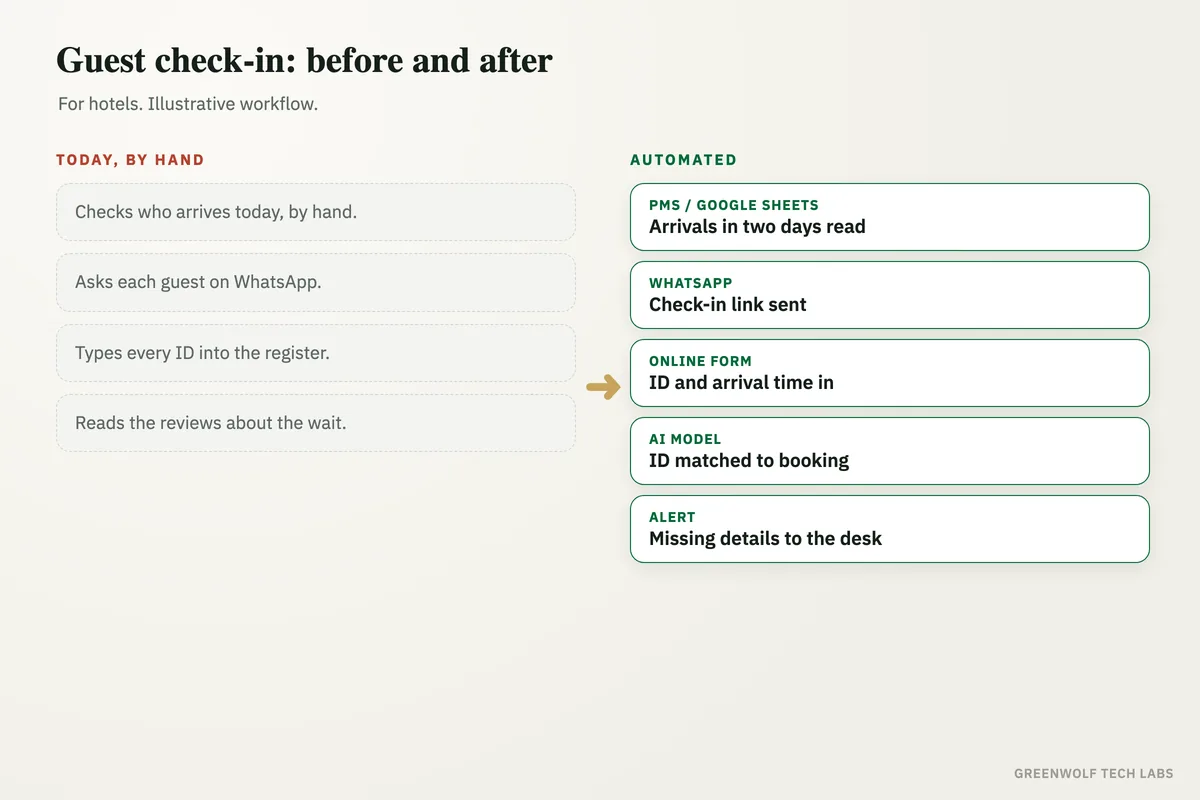
What gets automated
Arrivals read every morning
Each morning the workflow reads the arrivals for the next two days from your property management system export, channel manager or the bookings sheet in Google Sheets or Excel.
- Every booking source
- Two days ahead
- No manual list
Check-in link on WhatsApp
Every guest gets a friendly WhatsApp message with their booking details and a short online check-in form, with an email copy for guests who prefer it.
- Booking details in the message
- One tap to the form
- Email backup
ID and details collected
The guest uploads a photo of their ID or passport and shares their arrival time, number of guests and any requests, such as an early check-in, a cot or airport pickup.
- ID photo upload
- Arrival time
- Special requests
ID checked by AI
An AI model reads the ID, checks that the name matches the booking and that the photo is clear, and asks the guest again if something is missing or unreadable.
- Name matched to booking
- Blurry photos caught
- Details filled for you
Guest record filled
The guest's details are written into the guest register or your property management system, so the front desk does not type anything at arrival.
- Register filled
- Requests on the arrival list
- ID stored safely
Gaps sent to the front desk
Guests who have not finished check-in the day before arrival are sent to the front desk as a short call list, with the booking and what is missing.
- Morning call list
- What is missing
- No guest forgotten
How the workflow runs
PMS or Google Sheets: arrivals in two days
Every morning the workflow reads the guests arriving in the next two days from your property software export or bookings sheet.
WhatsApp: check-in link sent
Each guest gets a WhatsApp message with their booking details and a link to the online check-in form.
Online form: ID and arrival time
The guest uploads their ID and shares the arrival time, number of guests and any requests.
AI model: ID checked
The ID is read, the name is matched to the booking and unclear photos are sent back to the guest.
PMS or Google Sheets: guest record filled
The guest details and requests are written into the register and the front desk arrival list.
If: check-in complete?
The workflow checks that the ID, arrival time and details are all in.
WhatsApp: welcome note, or Alert: front desk call list
Complete guests get a welcome note with directions and Wi-Fi details. Guests still missing details go to the front desk as a call list the day before arrival.
Who it is for
What you need to start
You keep the tools you already use: your property management system or channel manager, or a bookings sheet in Google Sheets or Excel, a WhatsApp Business number and Gmail or Outlook. The workflow sits between them, built on tools such as n8n or Make, with a simple online form and an AI model to read the IDs. Guests do not need to install any app.
The data is what you already collect: guest name, phone number, booking dates and room type, plus the ID details your local rules ask you to record. It helps to agree up front where ID photos are stored, who can see them and how long they are kept, so the setup follows your privacy and guest registration rules from day one.
A first version that sends the check-in link, collects the form and fills the arrival list usually takes a couple of weeks. ID checks by AI, welcome notes, the front desk call list and a dashboard of arrivals follow once the team is happy with the basics.
Questions about hotel online check-in
What is hotel online check-in?
Can we send the online check-in link on WhatsApp?
Is it safe to collect guest IDs online?
Does online check-in work with bookings from online travel sites?
What happens if a guest does not complete online check-in?
How long does your front desk queue get at 2 PM?
Book a digital audit. Tell us how bookings reach you and how check-in works today, and we will map what online check-in would look like for your property.
Part of our Sales and Marketing Automation hub. Start with our marketing automation services.