

Why unconfirmed COD orders cost a D2C brand so much
COD order confirmation is the step most D2C brands know they should do and few do well. A cash on delivery order lands on Shopify, the warehouse packs it, the courier picks it up, and only at the door does anyone find out that the customer changed their mind, gave half an address or never meant to order at all. The parcel comes back, and you pay shipping both ways for a sale that never happened.
Most teams try to fix this by hand. Someone exports the day's COD orders into a sheet, calls or messages each customer, notes who picked up and who did not, and tells the warehouse which orders to hold. On a busy sale day the list runs into hundreds, the calls stop halfway, and the unconfirmed orders ship anyway.
This workflow confirms every COD order on WhatsApp within a minute of it being placed. The customer taps to confirm, cancel or fix the address. Confirmed orders go to packing, cancelled ones never leave the shelf, unclear addresses get corrected before the label is printed, and orders that stay silent are held or passed to a person for one call.
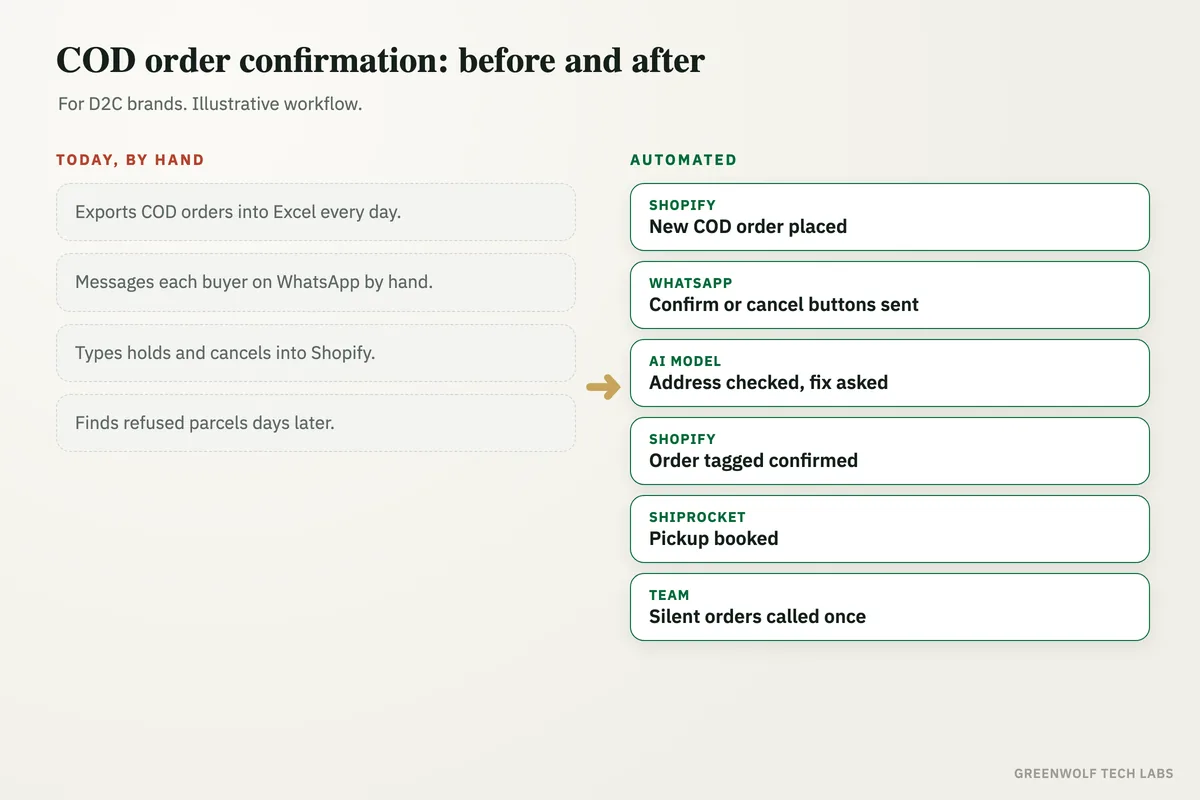
What gets automated
Every COD order picked up
New cash on delivery orders are read from Shopify, WooCommerce or your order sheet the moment they are placed, with the customer, items, amount and address.
- Shopify or WooCommerce orders
- Marketplace or sheet orders if needed
- Prepaid orders skipped
Confirmation on WhatsApp
The customer gets a short WhatsApp message with the order summary and three buttons: confirm, cancel or change the address.
- Order items and amount shown
- One tap to reply
- SMS for numbers not on WhatsApp
Address checked
An AI model reads the address and flags missing house numbers, landmarks or a pincode that does not match the city, then asks the customer to fix it.
- Pincode and city checked
- Courier serviceability checked
- Corrected address saved to the order
Order tagged and routed
Each reply updates the order in Shopify with a tag, so the warehouse packs confirmed orders and holds or cancels the rest.
- Confirmed orders released to packing
- Cancelled orders closed before packing
- Courier booking for confirmed orders only
Silent orders followed up
Customers who do not reply get one reminder, then the order moves to a short call list for your team, or is cancelled after the time you set.
- Reminder after a set gap
- Call list with the order details
- Auto hold or cancel rule
COD and returns on one screen
A dashboard shows confirmed, cancelled and silent orders by day, plus returned parcels by pincode and product, so you can see where COD is costing you.
- Confirmation rate by day
- Returns by pincode
- Repeat no-reply numbers flagged
How the workflow runs
Shopify: new COD order placed
The order is picked up the moment it lands, with the customer's phone number, items, amount and address.
WhatsApp: confirmation sent
The customer gets the order summary with buttons to confirm, cancel or change the address, usually within a minute.
AI model: address checked
Missing details or a wrong pincode are spotted, and the customer is asked to send the correct address on the same chat.
Shopify: order tagged
The reply is written back to the order as a tag and a note, so the warehouse sees confirmed, cancelled or on hold.
Courier panel: confirmed orders booked
Only confirmed orders go to Shiprocket or your courier panel for pickup. Silent orders get a reminder, then a call from your team.
Dashboard: COD tracked
Confirmations, cancellations, silent orders and returned parcels are counted by day, pincode and product.
Who it is for
What you need to start
You do not need a new store platform. The workflow runs on what you already use: Shopify or WooCommerce for orders, a WhatsApp Business number on the official WhatsApp Business platform, and your courier panel such as Shiprocket or a direct courier account. Tools like n8n, Zapier or Make connect the steps, and an AI model reads addresses and free text replies.
The data is what every order already has: order number, customer name, phone number, items, amount, payment type and address. You decide the rules: how long to wait for a reply, when to send the reminder, when an order goes to a person and when it is cancelled.
A first version, the WhatsApp confirmation with buttons and the order tag in Shopify, usually takes a few days to a couple of weeks, mostly waiting on message template approval. The address check, call list and returns dashboard follow once the team is happy with the first part.
Questions about COD order confirmation
How do I confirm COD orders automatically?
Can I send COD confirmation messages on WhatsApp from Shopify?
What happens if the customer does not reply?
Does COD confirmation help reduce RTO?
Can customers switch from COD to prepaid in the same chat?
How many of your COD orders ship without a confirmation?
Tell us how COD orders move from your store to the courier today and we will map it in a short digital audit, then show what confirming every order on WhatsApp would look like for your team.
Part of our Sales and Marketing Automation hub. Start with our marketing automation services.