

Why WhatsApp leads go cold
WhatsApp auto reply for business is not the one-line away message most owners switch on and forget. A lead messages at nine at night asking for a price, gets "Thanks, we will get back to you", and by the morning they have asked three other businesses. The shop, the clinic, the agency and the distributor all lose leads the same way: not to a better offer, but to a faster reply.
During the day it is no better. The owner or the salesperson is with a customer, the phone buzzes, and the message is read and forgotten. Nobody knows which chats are new leads, which are old customers, and which were never answered. There is no list, so nobody can follow up.
This workflow answers every new lead on WhatsApp in seconds, in your own words, with real answers from your price list and FAQ. It asks the one question your team needs, logs the lead, and sends the serious ones to a person straight away. The AI starts the conversation; your team closes it.
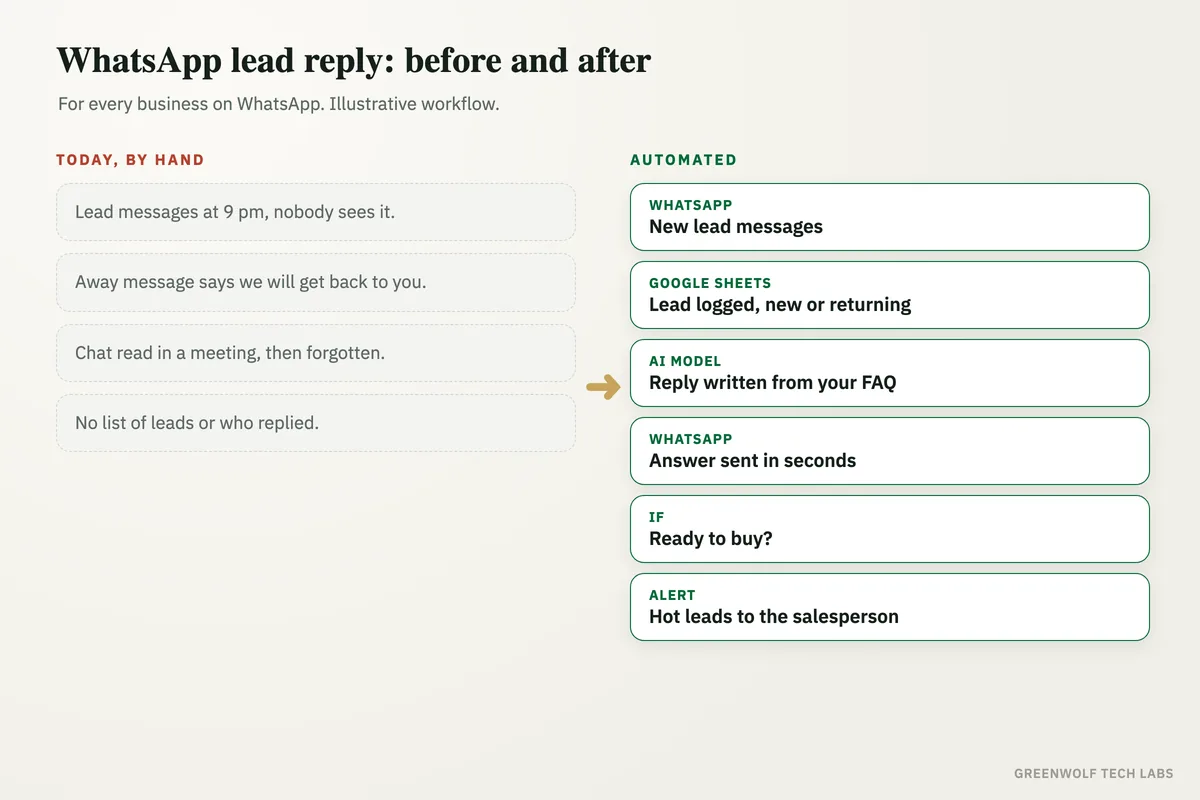
What gets automated
A real reply in seconds
Every new message gets a helpful answer at once, day or night, instead of a generic away message.
- Day and night
- Weekends and holidays
- In your tone
Answers from your own FAQ
An AI model answers from your price list, services, hours and FAQ only. If it is not sure, it says a person will reply and hands over.
- Your facts only
- No made-up prices
- Hands over when unsure
One qualifying question
The reply asks what the lead needs and when, so your team gets a ready lead, not just a hello.
- What they need
- When they need it
- Budget or quantity
Every lead logged
Name, number, message, source and status go into Google Sheets, Zoho or HubSpot, so no chat is lost in the phone.
- One lead list
- New or returning
- Who owns it
Hot leads sent to a person
When a lead is ready to buy or asks for a call, the salesperson gets a WhatsApp or email alert with the whole chat.
- Instant alert
- Full chat attached
- Booking link ready
Silent leads followed up
Leads who go quiet get one polite follow up the next day, using an approved WhatsApp template, then land on a call list.
- Next-day follow up
- Approved template
- Call list for the rest
How the workflow runs
WhatsApp: a new lead messages
Your business number runs on the WhatsApp Business API through a provider such as WATI or Twilio, so every new message can start the workflow.
Google Sheets or CRM: the lead is logged
The number is checked against your lead list in Google Sheets, Zoho or HubSpot. New leads get a row; returning customers are marked as such.
AI model: the reply is written
ChatGPT or Claude reads the message with your FAQ and price list, writes a short answer in your tone and asks one qualifying question.
WhatsApp: the reply goes out
The answer is sent in seconds, with a Calendly or booking link when the lead wants a call or a visit.
If: is the lead ready?
The AI model tags each reply as hot, warm or not a lead. Hot leads go straight to the salesperson on WhatsApp or Gmail with the full chat.
Follow up and owner view
Quiet leads get one polite template message the next day, then go on a call list. The owner sees new leads, reply times and outcomes in one sheet.
Who it is for
What you need to start
You need a business number on the WhatsApp Business API through a provider such as WATI, Twilio or another Meta partner. The phone app alone cannot connect to other tools. You keep Google Sheets, Zoho or HubSpot for the lead list, Gmail or Outlook for alerts, and a booking tool such as Calendly if you take calls or visits. The workflow itself is built on n8n, Make or Zapier, with ChatGPT or Claude writing the replies.
The most important input is your own knowledge: a short FAQ, your price list or price ranges, your hours, and the one question your team always asks first. We write the AI model's instructions from these, test it on your real past enquiries, and set clear rules for when it must hand over to a person.
WhatsApp rules matter too. Replies inside 24 hours of the customer's message can be free text; anything later, like the next-day follow up, uses a template approved by Meta. A typical build, tested on real enquiries before it goes live, runs over a few weeks, and the replies are tuned as real leads come in.
Questions about WhatsApp auto reply for business
How do I set up an auto reply on WhatsApp Business?
Can ChatGPT reply to WhatsApp messages for my business?
Will customers know they are talking to AI?
Can I send follow ups to leads who stop replying?
Does it work with Zoho, HubSpot or Google Sheets?
How many WhatsApp leads waited until morning last week?
Book a digital audit. Show us how enquiries come in today, and we will map what a WhatsApp lead reply system would look like for your business.
Part of our Sales and Marketing Automation hub. Start with our marketing automation services.