

Why a full restaurant still looks half empty on Google
Google review automation is the gap between a packed dining room and a thin, stale profile. Guests love the meal, say so to the waiter, and walk out without ever leaving a review. The few who do post are often the ones who had an off night, so the star rating drifts lower than the room actually feels.
Asking for reviews by hand does not scale on a busy floor. The team cannot remember who to ask, catch them at the right moment, and hand them the right link. So the request either never happens or lands days later in a mass message nobody opens. Worse, a sharp complaint goes straight onto the public profile when a manager could have fixed it at the table.
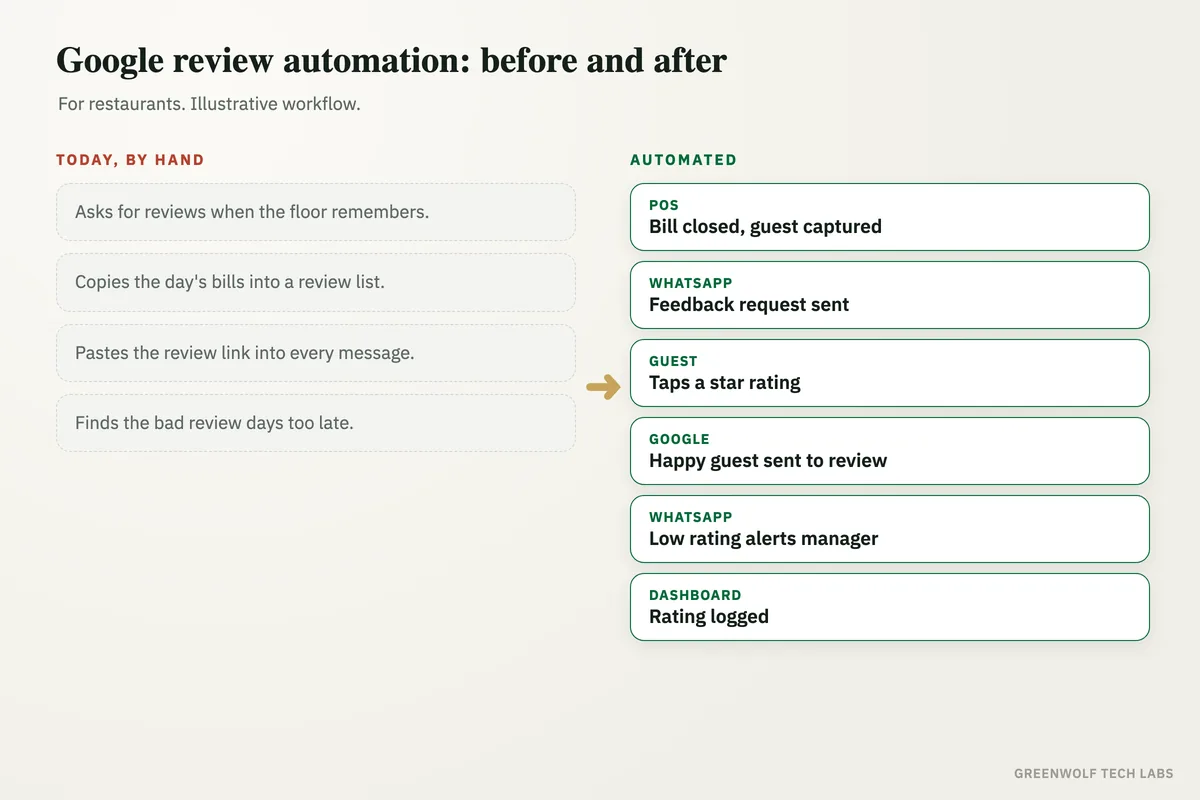
This workflow asks every guest for feedback shortly after the visit, invites all of them to leave an honest Google review in one tap, and flags low in-house ratings to the manager the same evening so the team can make it right. The owner sees the rating trend on one screen. The staff keep serving. The system handles the asking.
What gets automated
Requests at the right moment
Every guest gets a short feedback request shortly after the visit, on the channel they actually reply to, without anyone on the floor remembering to ask.
- Timed from the bill
- WhatsApp, SMS or email
- No manual list to work through
A one-tap path to Google
Every guest is invited to leave an honest review with a direct link to your Google profile, so posting takes seconds instead of a hunt for the right page.
- Direct review link per outlet
- One tap from the message
- Honest reviews, no screening
Complaints caught early
When a guest rates the visit low in the request, the manager is alerted the same evening so the team can reach out and make it right.
- Low ratings surfaced fast
- Alert to the manager on duty
- A chance to recover the guest
Follow-up that does not nag
If a guest does not reply, the workflow sends one polite reminder and then stops, so nobody feels chased after a meal.
- A single reminder
- Then it goes quiet
- Opt-out respected
Every outlet covered
Each branch uses its own Google review link and its own manager alert, so a chain runs the same follow-up everywhere without extra work.
- Own link per branch
- Own alerts per manager
- One setup, many outlets
Ratings on one screen
Average rating, review volume and recent feedback on a single view the owner can check without asking the floor team.
- Rating trend over time
- Requests sent against replies
- By outlet and by week
How the workflow runs
Reads the day's bills
The workflow pulls the day's covers from your POS, billing app or a Google Sheet, with guest name, phone number and outlet.
Sends the feedback request
Each guest gets a short request on WhatsApp or SMS shortly after the visit, while the meal is still fresh.
Invites the review
Every guest is given a one-tap link to leave an honest review on your Google Business Profile for that outlet.
Flags low ratings
If a guest rates the visit low, the manager on duty is alerted the same evening to follow up and recover the guest.
Logs and shows the trend
Every rating and reply is logged, one reminder goes out if there is no response, and the rating trend lands on the dashboard.
Who it is for
What you need to start
You do not need new restaurant software. Most places start with what they already run: a list of the day's bills from your POS or billing app, or a Google Sheet the counter already updates, a WhatsApp Business number or an SMS gateway, and your Google review link for each outlet.
The data is simple. Guest name, phone number, visit date and which outlet they came to. If your POS can export that or connect through an interface, the workflow reads it directly. If not, a shared sheet with the day's covers works fine.
A first version, review requests on one channel with a direct Google link, is usually a matter of days. Manager alerts, the multi-outlet setup and a ratings dashboard come next, once the team sees the first reviews landing.
Questions about google review automation
Does this follow Google's review policy?
Which channels can the request go out on?
When is the request sent?
Do we need to install new software?
How does it handle more than one outlet?
Where do your reviews slip?
Tell us how you ask for reviews today and which tools you run. We will come back with what automating the follow-up would look like for your restaurant.
Part of our Sales and Marketing Automation hub. Start with our marketing automation services.