

Why fee collection eats the office's week
Fee management software should mean the office stops chasing parents, yet in most coaching institutes and schools the fees are still tracked in an Excel sheet. Every month someone filters the installments that are due, copies phone numbers into WhatsApp and sends the same reminder fifty times. Then the payments come in through UPI, bank transfer and cash, and each one has to be matched back to the right student by hand.
The gaps are easy to miss. A parent pays but the sheet is not updated, so they get a second reminder and an awkward call. Another family has not paid for two installments, and nobody notices until the batch is half over. Receipts go out late or not at all, and the owner asks for a collection figure that takes an afternoon to put together.
This workflow takes the chasing off the front office. It reads who is due from your fee sheet or student software, sends each parent a polite reminder with the amount and a payment link, marks the installment paid when the money lands, sends the receipt, and flags the families who stay silent so a counsellor can make one personal call.
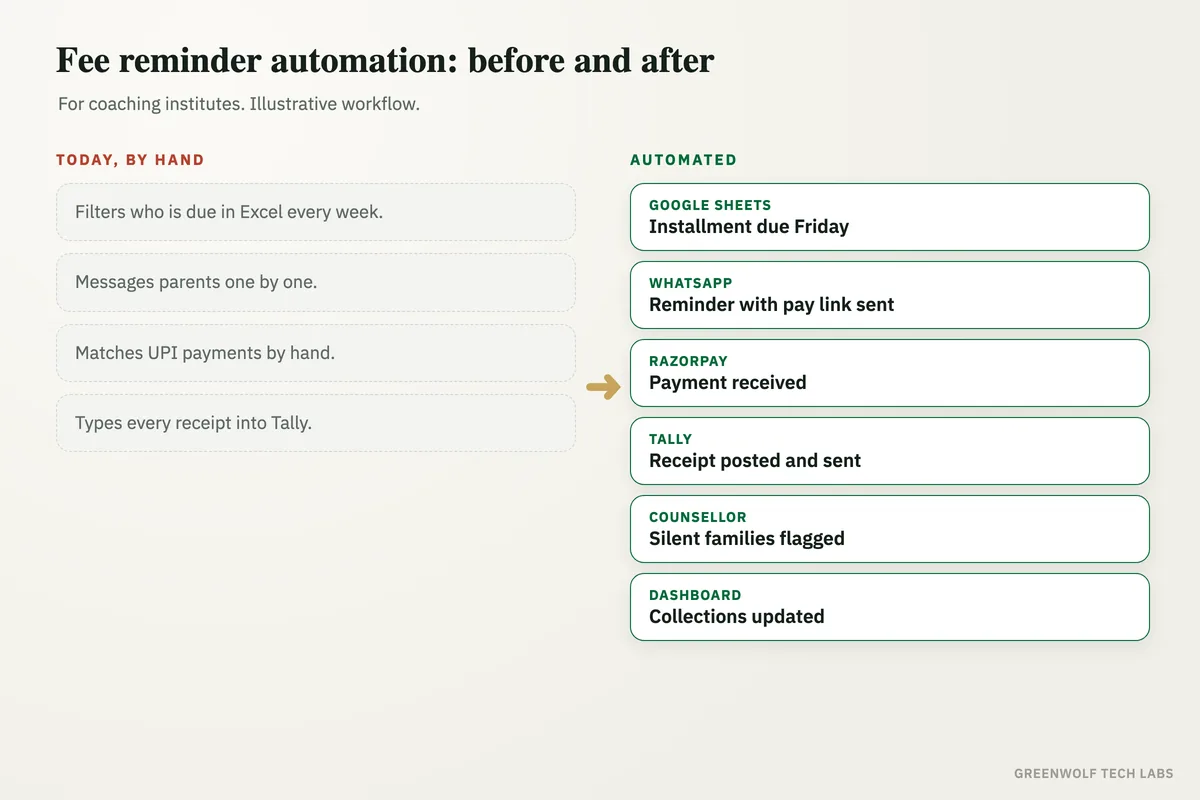
What gets automated
Reminders on schedule
Every installment gets a reminder before the due date and a nudge after it, on WhatsApp, SMS or email, without anyone filtering a sheet.
- Before, on and after the due date
- Student name, batch and amount filled in
- Polite wording you approve once
Payment by link
Each reminder carries a payment link for that exact amount, so parents pay in a couple of taps and nobody types a reference.
- UPI, card or net banking
- Right amount per installment
- Paid status written back
Receipts sent
When a payment lands, a receipt is generated from your template and sent to the parent the same minute, with a copy saved to the student folder.
- Receipt number in sequence
- PDF sent on WhatsApp or email
- Copy filed in Google Drive
Bank transfers matched
Payments that arrive outside the link, by transfer or cash entry, are matched to the right student and installment, with doubtful ones sent for a quick check.
- Matched by amount and name
- Unclear entries queued for review
- No double reminders
Overdue families flagged
Parents who stay silent after the reminders land on a short list for a counsellor to call, grouped by how late they are.
- Overdue by days and amount
- Assigned to a counsellor
- Notes logged against the student
Collections on one screen
Collected, due and overdue by batch and branch, on one dashboard the owner can open without asking the office.
- Collected against due
- By batch, course and branch
- Overdue trend over time
How the workflow runs
Reads who is due
Each morning the workflow reads installments due this week from your Google Sheet, Excel file or student management software.
Sends the reminder
Each parent gets a WhatsApp reminder with the student's name, the amount and a payment link for that installment.
Collects the payment
The parent pays through the link and the payment gateway confirms it, so the installment is marked paid in the sheet on its own.
Sends the receipt
A receipt is generated from your template, sent to the parent and saved in the student's folder in Google Drive.
Flags the silent ones
Families who do not pay after the follow-ups are assigned to a counsellor with the details, so one call replaces ten messages.
Updates the dashboard
Collections, dues and overdue amounts roll up by batch and branch on one dashboard in Power BI or Looker Studio.
Who it is for
What you need to start
You do not need to change how the office works. Most institutes start with what they already have: the fee sheet in Excel or Google Sheets, or an export from their student software, a WhatsApp Business number, and an account with a payment gateway such as Razorpay, Cashfree or Stripe.
The data is simple. Student name, parent phone number, batch, installment amount and due date, plus a column for paid status. From that the workflow knows who to remind, what to ask for and when to escalate. Receipts come from your current receipt format, turned into a template once.
A first version, reminders with payment links and automatic paid status, is usually a matter of days. Receipts, bank transfer matching, counsellor follow-ups and a collections dashboard come next, once the office sees fees landing without the chasing.
Questions about fee management software
Do we need to replace our current student management software?
How do you send fee reminders on WhatsApp automatically?
What should a fee reminder message say?
What happens when a parent pays by bank transfer or cash?
Can it handle installments and different fee plans per student?
Where does your fee collection get stuck?
Tell us how fees are tracked and chased today and we will map it in a short digital audit, then show what automating reminders, payments and receipts would look like for your institute.
Part of our Sales and Marketing Automation hub. Start with our marketing automation services.