

Why missing delivery slips hold up your money
Proof of delivery automation solves a problem every transport company knows: the goods reached the customer days ago, but the signed slip has not reached the office. Customers will not pay without proof, so the invoice waits, and the trip that was finished on Monday turns into cash weeks later than it should.
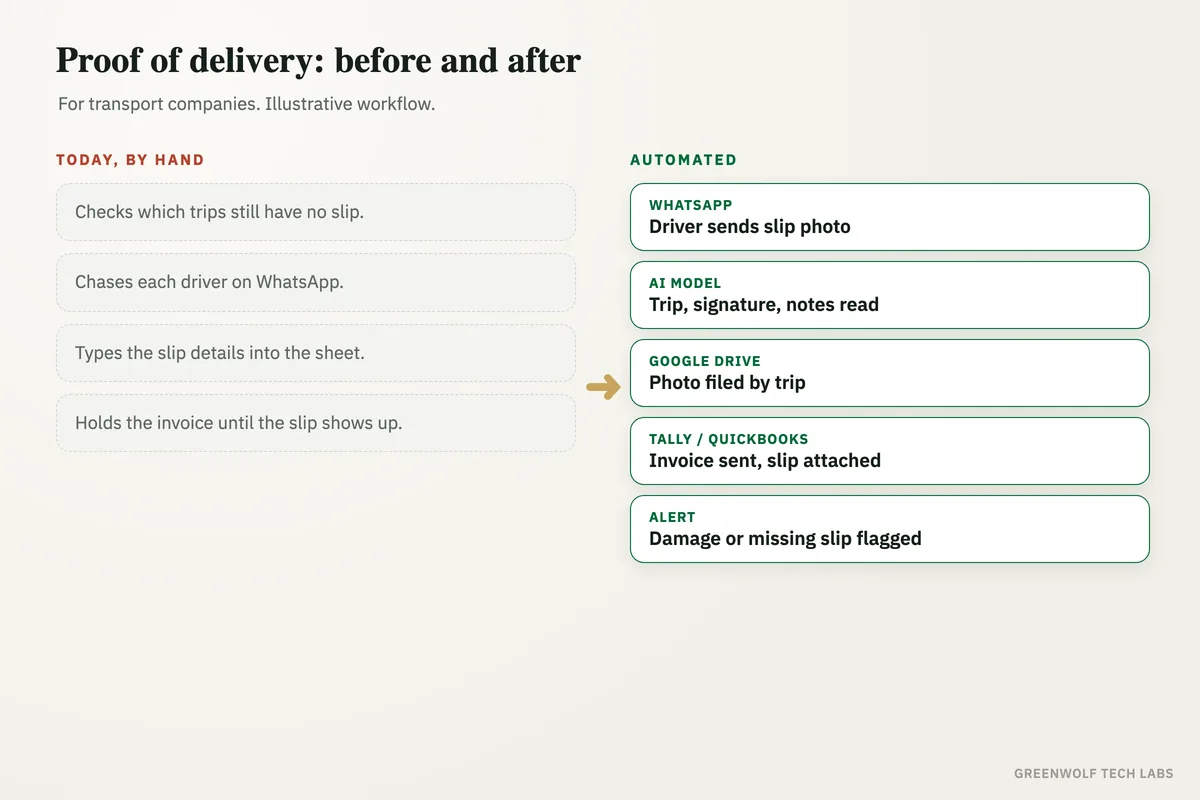
Today the slip lives in the truck, in the driver's pocket or on his phone. Someone in the office checks the trip sheet each evening to see which slips are missing, chases each driver on WhatsApp, gets a blurry photo, asks again, types the receiver name and any shortage notes into the sheet and saves the photo in a folder nobody else can find. When a customer questions a delivery months later, the team searches old chats to find the right picture.
This workflow takes the slip photo straight from the driver's WhatsApp message, reads the trip number, signature and remarks with an AI model, files the photo by trip and customer, sends the invoice with the slip attached when everything is clear, and alerts the operations head the moment a slip shows damage, a shortage or does not arrive. The office stops chasing paper, and every finished trip is ready to bill the same day.
What gets automated
Slips collected from drivers
Drivers send a photo of the signed delivery slip or consignment note to one WhatsApp Business number, as they already do today, and every photo is picked up the moment it arrives.
- One number for all drivers
- No new app for drivers
- Time of delivery logged
Slip details read by AI
An AI model reads the trip or LR number, the receiver's name and stamp, the date and any handwritten remarks, and asks the driver for a clearer photo when it cannot read it.
- Trip number matched
- Signature and stamp checked
- Remarks picked out
Photos filed by trip
Each photo is saved in Google Drive or OneDrive in a folder by customer and month, named by trip number, so anyone can find it in seconds.
- One folder per customer
- Named by trip number
- Linked from the trip sheet
Invoice sent with the slip
When the slip is clean, the trip is marked delivered and the invoice is raised in Tally, QuickBooks or Zoho Books and emailed with the slip attached.
- Same-day billing
- Slip attached to invoice
- Trip sheet updated
Damage and shortages flagged
Slips with damage, shortage or refusal remarks go straight to the operations head on WhatsApp with the photo, before the customer raises it.
- Remarks flagged at once
- Photo in the alert
- Claim notes kept
Missing slips chased
Trips delivered with no slip by the evening are sent to the driver as a reminder, and to the office as a short list the next morning.
- Driver reminder
- Morning missing list
- Dashboard of open trips
How the workflow runs
WhatsApp: slip photo sent by the driver
The driver sends a photo of the signed slip to the company WhatsApp number when the goods are handed over.
AI model: slip read
The trip number, receiver, signature or stamp, date and any remarks are read from the photo and matched to the trip.
Google Drive: photo filed
The photo is saved in the customer's folder, named by trip number, and linked from the trip sheet.
If: all clear?
The workflow checks that the slip is signed and carries no damage, shortage or refusal remarks.
Tally or QuickBooks: invoice sent
Clean trips are invoiced the same day and the invoice is emailed to the customer with the slip attached.
Alert: damage or missing slip to the ops head
Slips with remarks, and trips with no slip by the evening, go to the operations head on WhatsApp and show on one dashboard.
Who it is for
What you need to start
You keep the tools you already use: a WhatsApp Business number for drivers, your trip sheet in Google Sheets or Excel, Google Drive or OneDrive for files, and Tally, QuickBooks or Zoho Books for invoices. The workflow sits between them, built on tools such as n8n or Make with an AI model to read the slips. Drivers do not need to install anything new.
The data is what you already have: the list of trips with their trip or LR numbers, customers and rates, and your slip format. If every branch uses a different slip, agreeing on one format with the trip number printed clearly is the first step, and it makes the reading far more reliable.
A first version that collects, reads and files slips and updates the trip sheet usually takes a couple of weeks. Same-day invoicing, damage alerts, the missing-slip reminders and the dashboard follow once the team trusts what it reads.
Questions about proof of delivery automation
What is proof of delivery automation?
Do drivers need a separate proof of delivery app?
Can AI read handwritten remarks on a delivery slip?
Can the invoice be sent automatically once the slip arrives?
How do we find an old proof of delivery when a customer disputes it?
How many finished trips are waiting on a slip right now?
Book a digital audit. Tell us how slips reach your office and how trips get billed today, and we will map what proof of delivery automation would look like for you.
Part of our Supply Chain and Procurement hub. Start with our supply chain automation.