

Why the front desk still chases every appointment
Dental appointment reminders are still, in most clinics, a job someone does by hand. The front desk works down tomorrow's list in the practice software, sends a few texts, makes a few calls, and hopes the chair does not sit empty at 3pm. When the day gets busy, the reminders are the first thing to slip.
A no-show is not just a missed visit. It is a slot that could have gone to someone on the waitlist, a hygiene recall that quietly lapses, and revenue that does not come back. The recall list is the harder problem. Patients who are due for a six-month check-up drift off, and nobody has the time to work through them one by one.
This workflow takes the reminding off the front desk. It reads the day's schedule, sends reminders and recall messages on WhatsApp, SMS or email, collects the confirmations in one place, and flags the gaps so the team can fill them. The staff still run the clinic. The system runs the follow-up.
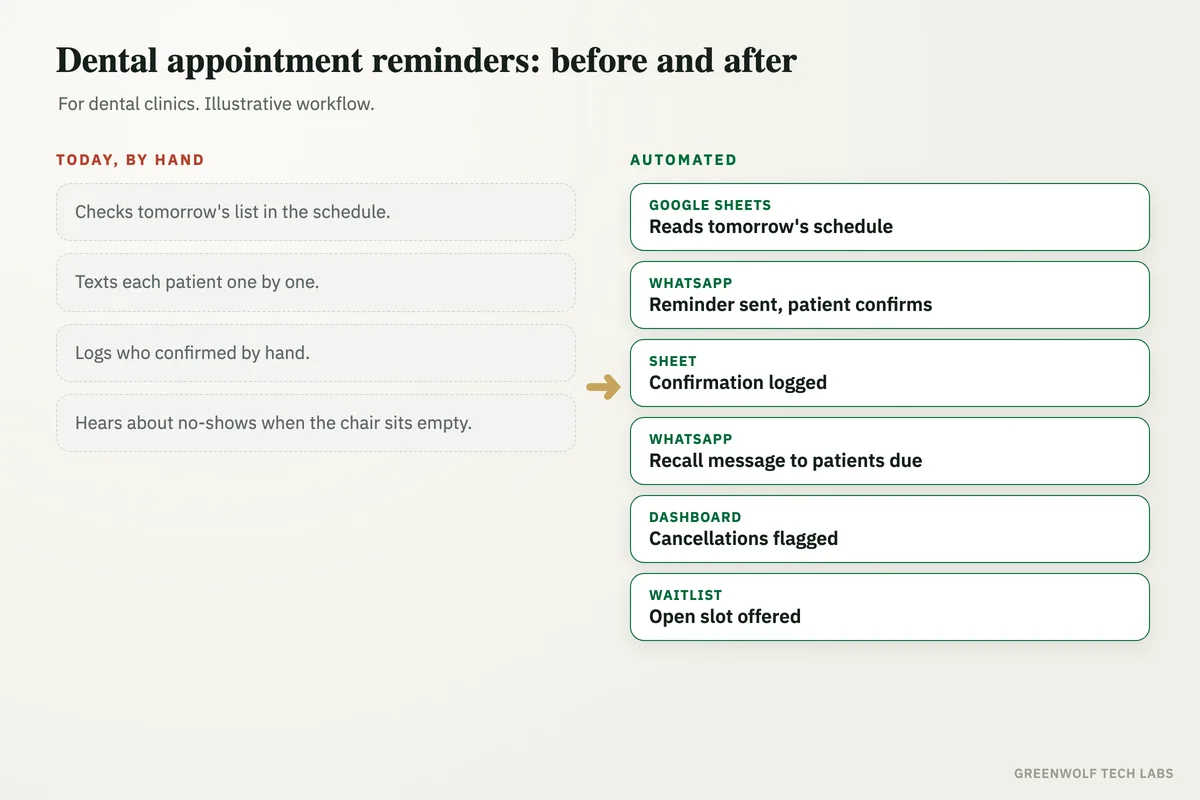
What gets automated
Reminders on schedule
Every booked patient gets a reminder before the visit, on the channel they actually reply to, without anyone opening the schedule to do it.
- A first reminder two days out
- A nudge on the morning of the visit
- WhatsApp, SMS or email
Confirmations collected
Patients reply yes or no in one tap, and the schedule updates so the desk can see at a glance who is coming in.
- One-tap confirm or cancel
- Status written back to the sheet
- No callback needed from the patient
Gaps flagged early
When a patient cancels or does not confirm, the open slot is surfaced the same day instead of being noticed when nobody walks in.
- Unconfirmed visits highlighted
- Cancellations shown as they happen
- The desk sees the gap in time to act
Recalls that chase themselves
Patients due for a check-up or hygiene visit get a recall message with a link to book, worked from their last visit date.
- Six-month recalls sent on time
- A booking link in the message
- Follow-up if there is no reply
Waitlist put to work
When a slot opens, waitlisted patients are offered it in order, so a cancellation becomes a filled chair rather than a hole in the day.
- Open slots offered automatically
- First reply takes the slot
- The list stays current
The day on one screen
Confirmed, pending, cancelled and no-show, on a single view the practice owner can check without asking the front desk.
- Confirmed against booked
- No-show rate over time
- By clinic and by dentist
How the workflow runs
Reads tomorrow's schedule
The workflow pulls the day's bookings from your practice management software or a Google Sheet, with names, times and phone numbers.
Sends the reminder
Each patient gets a reminder on WhatsApp or SMS and confirms or cancels in one tap, no phone call required.
Writes the confirmation back
The reply is logged against the booking so the schedule and the dashboard show who is confirmed and who is not.
Messages the recall list
Patients due for a check-up or hygiene visit are found by last visit date and sent a recall message with a booking link.
Flags the gaps
Cancellations and unconfirmed slots are surfaced for the desk, and open slots can be offered to the waitlist automatically.
Who it is for
What you need to start
You do not need new practice software. Most clinics start with what they already run: the schedule from your practice management system or a Google Sheet, a WhatsApp Business number or an SMS gateway, and a way to look up when each patient last came in for the recall messages.
The data is straightforward. Patient name, phone number, appointment date and time for the reminders, and last visit date for recalls. If your software can export that or connect through an interface, the workflow reads it directly. If not, a shared sheet the desk already updates works fine.
A first version, reminders and confirmations on one channel, is usually a matter of days. Recalls, the waitlist and a dashboard come next, once the clinic sees the confirmations landing and wants to build on them.
Questions about dental appointment reminders
Which channels can reminders go out on?
Do patients have to call back to confirm?
Does this work with our practice management software?
What happens to patients who never reply?
How does it handle the recall list?
Where do your appointments slip?
Tell us how reminders and recalls are handled today. We will come back with what automating the follow-up would look like for your clinic.
Part of our Healthcare Practice Automation hub. Start with our healthcare workflow automation.