

Why the monthly MIS is always late
MIS report automation takes the job that eats the first week of every month: turning the accounts into a report the owner can actually read. Someone exports the trial balance and the sales register from Tally, QuickBooks or Zoho Books, pastes them into last month's Excel file, fixes the formulas that broke, rebuilds the receivables ageing and copies the numbers into a summary.
By the time the MIS reaches the owner it is the 8th or the 10th, and it still only shows numbers. Nobody has written down why sales dipped, which customer is suddenly paying late or why cash is lower when profit is higher. That part waits for a meeting, if it happens at all.
This workflow takes the same export, builds the monthly MIS on the 2nd of every month and adds short notes on what moved and why. Profit and loss against last month, cash, receivables ageing and top customers, in one file and one message, checked by your accounts person before it goes out.
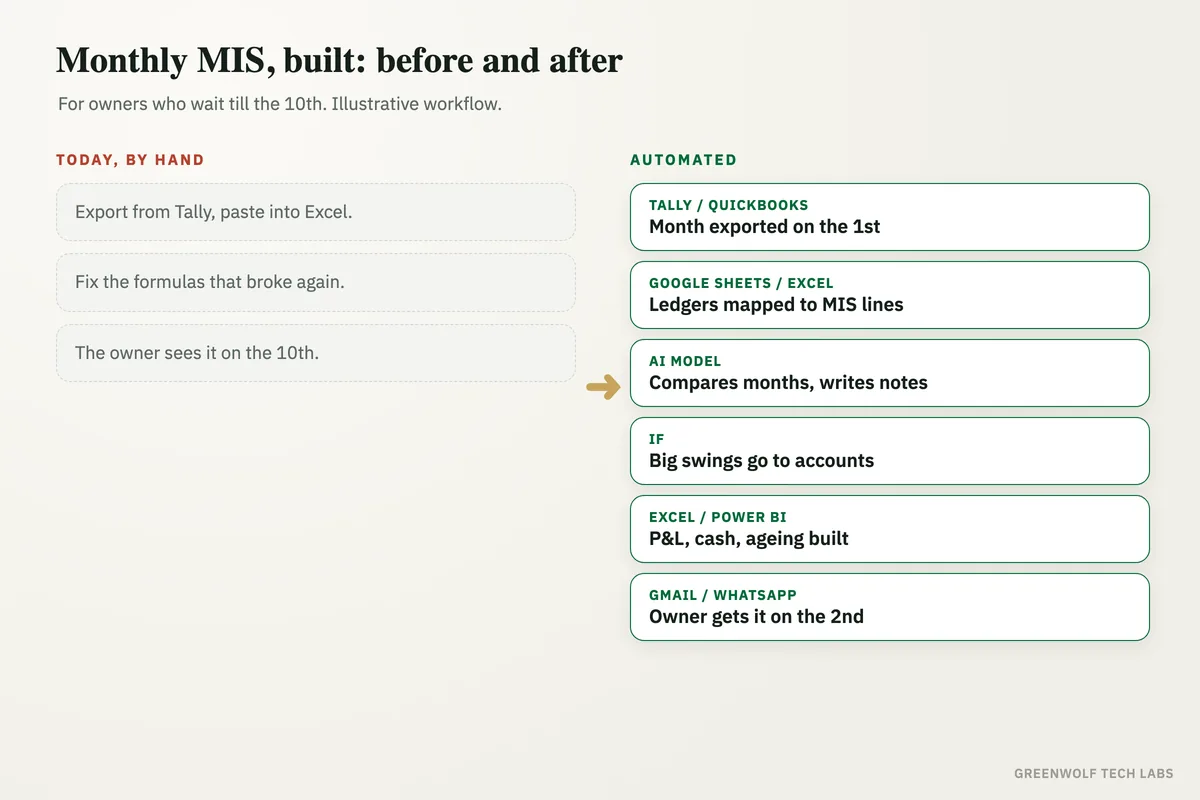
What gets automated
Pulling the export
The trial balance, sales register and receivables list are exported from Tally, QuickBooks or Zoho Books on a fixed day, or picked up from a shared folder.
- Tally
- QuickBooks
- Zoho Books
Cleaning and mapping
Ledger names are mapped to your MIS heads once, so every month lands in the same lines. Duplicate entries and unmapped ledgers are flagged, not guessed.
- Ledger mapping
- Duplicates
- Unmapped
P&L against last month
Revenue, gross margin, expenses and profit are set side by side with last month and the same month last year, with the change in each line.
- This month
- Last month
- Last year
Cash and receivables ageing
Cash in the bank, money owed to you by age band (0 to 30, 31 to 60, 61 to 90, 90+ days) and the customers behind the biggest overdue amounts.
- Cash
- Ageing
- Overdue
Top customers and products
Your top customers and products by sales and margin, and who moved up or down since last month.
- Top 10
- Margin
- Movers
Notes on what moved
AI writes short plain notes under each section: what changed, by how much and the likely reason from the data, so the owner reads a story, not a grid.
- What changed
- Why
- What to check
How the workflow runs
Tally, QuickBooks or Zoho Books: the month is exported
On the 1st, the trial balance, sales register and receivables are exported, either straight from the accounting software or from a file your accountant drops in a shared folder.
Google Sheets or Excel: mapped to your MIS heads
Every ledger is mapped to a line in your MIS format. New or unmapped ledgers are flagged for your accounts person instead of being dropped.
AI model: the numbers are compared and explained
ChatGPT or Claude compares each line with last month and last year and writes short notes on what moved, using only the numbers in the export.
If step: anything unusual is checked
Big swings, negative balances or totals that do not match the trial balance go to your accounts person to confirm before the report is sent.
Excel, PDF or Power BI: the MIS is built
The report is laid out in your format: P&L, cash, receivables ageing, top customers and the notes, as an Excel file, a PDF or a Power BI page.
Gmail, Outlook or WhatsApp: it reaches the owner
On the 2nd, the owner and partners get the MIS with a three-line summary on top, and the file is saved in the month's folder.
Who it is for
What you need to start
You keep the tools you already use: Tally, QuickBooks or Zoho Books for the accounts, Excel or Google Sheets for the report, and Gmail, Outlook or WhatsApp to send it. The workflow runs on n8n, Make or Zapier, an AI model such as ChatGPT or Claude writes the notes, and Power BI can sit on top if you want a dashboard as well as a file.
The most important part of the build is your MIS format: the heads you report on, how each ledger maps to them, what counts as a big swing and who checks the report before it goes out. We test it on your past months until the numbers match the reports your team made by hand. If you also want sales every evening, daily sales report automation covers that, and the month-end close checklist helps get the books ready first.
A typical build is planned around your real MIS format, tested on past months, and goes live over a few weeks.
Questions about MIS report automation
What is an MIS report?
Can the MIS be made straight from Tally or QuickBooks?
Does AI change or invent any numbers?
What should a monthly MIS report include?
Can it send the MIS to partners or investors automatically?
What day of the month do you actually see last month's numbers?
Book a digital audit. We will look at how your MIS is made today and show what MIS report automation would look like on your own accounts and format.
Part of our Data Analytics Consulting hub. Start with our data analytics consulting.