
Why good sales calls turn into late proposals
An AI proposal generator closes the gap between a good sales call and the proposal that should follow it. The call goes well, the client says "send me something", and then the proposal waits. The salesperson has three more calls that day, the notes are half in a notebook and half in their head, and by the time someone opens the template, the client has already heard from two other suppliers.
When the proposal finally goes out, details are often missing or wrong: the timeline the client mentioned, the budget range they hinted at, the one worry they raised twice. Rewriting it from memory takes hours, and a proposal that does not answer what the client actually said reads like everyone else's.
This workflow takes the recording of the call, writes it out, pulls out the scope, budget, timeline, decision-maker and objections, and fills your own proposal template with them, priced from your own rate card. The salesperson gets a draft to review the same day, with a short list of anything the call did not answer.
What gets automated
Picking up the recording
When a Zoom, Google Meet or Teams call ends, or a phone recording is saved, the file is picked up on its own and linked to the right deal.
- Zoom
- Google Meet
- Teams
- Phone
Writing out the call
The recording is turned into a full written transcript with who said what, so nothing depends on someone's notes.
- Transcript
- Speakers
Pulling out what matters
AI reads the transcript and lists the scope, budget, timeline, who decides and every worry the client raised, with the line it came from.
- Scope
- Budget
- Timeline
- Objections
Filling the proposal
Your own proposal template is filled in: the client's problem in their words, the scope, the price lines from your rate card and an answer to each worry.
- Your template
- Rate card
Flagging the gaps
If the call never covered the budget, a date or who signs, the salesperson gets a short list of questions to ask before sending.
- Missing info
- Questions
Review, send, follow up
The salesperson edits and approves the draft, it goes out as a PDF, and the deal in your CRM gets the date for the first follow-up.
- Approve
- CRM
How the workflow runs
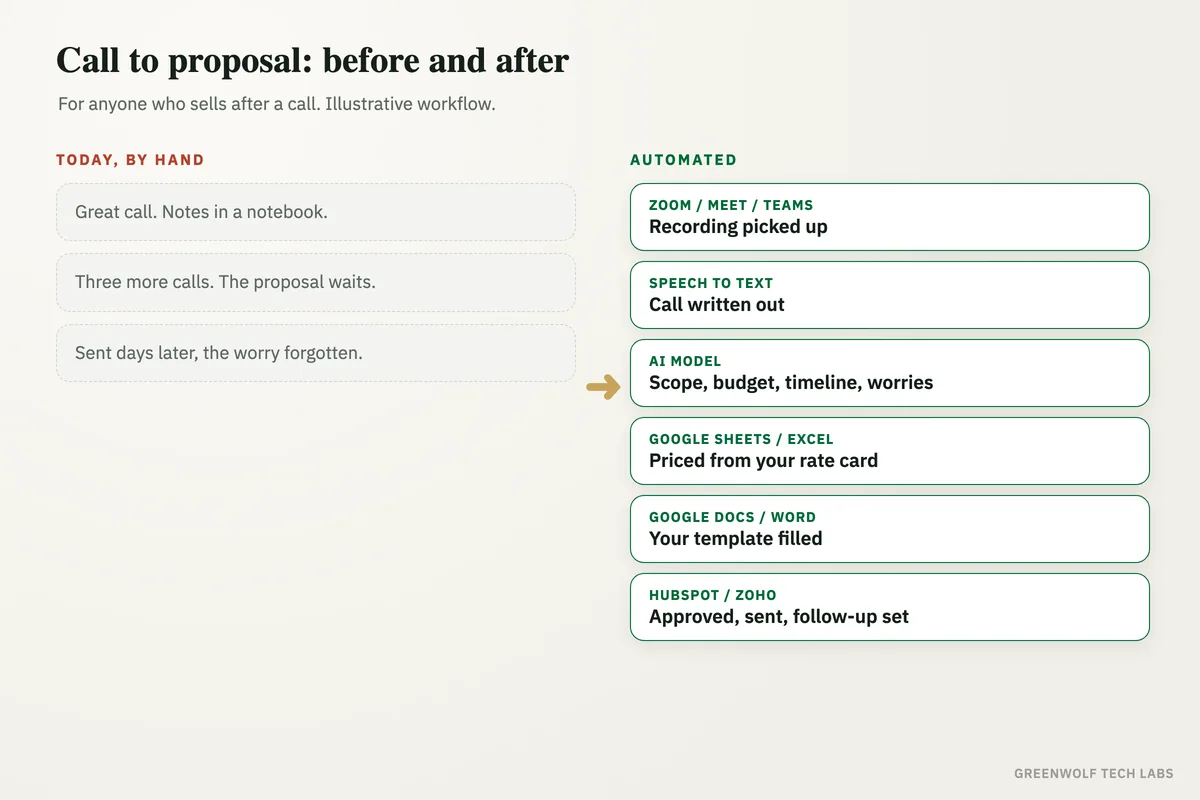
Zoom, Google Meet, Teams or phone: the recording is picked up
When the call ends, the recording (made with the client's consent) is saved and picked up, and matched to the deal in HubSpot or Zoho by the client's email or phone number.
Speech to text: the call is written out
A speech-to-text model turns the recording into a transcript with speaker names and times, in English or a mix of languages.
AI model: scope, budget, timeline and objections are pulled out
ChatGPT or Claude reads the transcript and fills a fixed set of fields: the problem, the scope, the budget range, the deadline, who decides, and each objection with the client's own words.
Google Sheets or Excel: each line is priced from the rate card
Every item in the scope is matched to your rate card, so prices come from your own numbers, never from the AI's guess. Items not on the rate card are marked for a person to price.
Google Docs or Word: the proposal template is filled
Your own template gets the client's problem in their words, the scope, the price table, the timeline and a short answer to each objection, in your tone.
If step: anything missing goes back to the salesperson
No budget, no decision-maker or an unclear scope means the draft is marked incomplete and the salesperson gets the exact questions to ask on WhatsApp or email.
Gmail or Outlook and HubSpot or Zoho: approved, sent and logged
The salesperson reviews and approves the draft, it is sent as a PDF, and the CRM deal is updated with the proposal and a follow-up date.
Who it is for
What you need to start
You keep the tools you already use: Zoom, Google Meet, Teams or a cloud phone line that records calls, your proposal template in Google Docs or Word, your rate card in Google Sheets or Excel, Gmail or Outlook, and a CRM such as HubSpot or Zoho if you have one. The workflow runs on n8n, Make or Zapier, with a speech-to-text model for the transcript and an AI model such as ChatGPT or Claude for the reading and writing.
The most important part of the build is your own material: two or three proposals you were proud of, your rate card, and the fields every proposal must have. We test the drafts on your past call recordings until your sales lead would send them with light edits. Always tell clients the call is recorded. Once the proposal is out, quote follow-up automation makes sure it never goes quiet, and meeting notes to action items does the same job for internal meetings.
A typical build is planned around your real template and rate card, tested on recordings of past calls, and goes live over a few weeks.
Questions about AI proposal generators
What is an AI proposal generator?
Can AI write a proposal from a sales call recording?
Will the AI make up prices?
Which call tools does it work with?
Is it legal to record sales calls?
How many days does your proposal take after a good call?
Book a digital audit. We will look at how your team runs sales calls and writes proposals today, and show what an AI proposal generator would look like on your own template and rate card.
Part of our AI Automation hub. Start with our AI automation agency.