

Why shipment updates eat the day at a forwarding office
Shipment status updates are the one thing every customer of a freight forwarder wants, and in many offices they are still put together by hand. Someone opens each carrier or shipping line website, enters the booking or container number, copies the new ETA into the shipment sheet and then messages the customer. Multiply that by every open booking and it becomes a full-time job that nobody was hired to do.
The real cost shows up in the gaps. A vessel rolls, the ETA moves three days, and the sheet still shows the old date. The customer hears about it from their own consignee, calls in annoyed, and the ops executive drops everything to answer. Meanwhile the same questions arrive on WhatsApp all day: any update, has it sailed, when will it clear.
This workflow takes the checking and the telling off your team. It reads carrier emails and tracking feeds as they arrive, matches each update to the right booking, writes the new status into your tracker, sends the customer a short update on the channel they prefer and flags delays to ops before anyone has to ask.
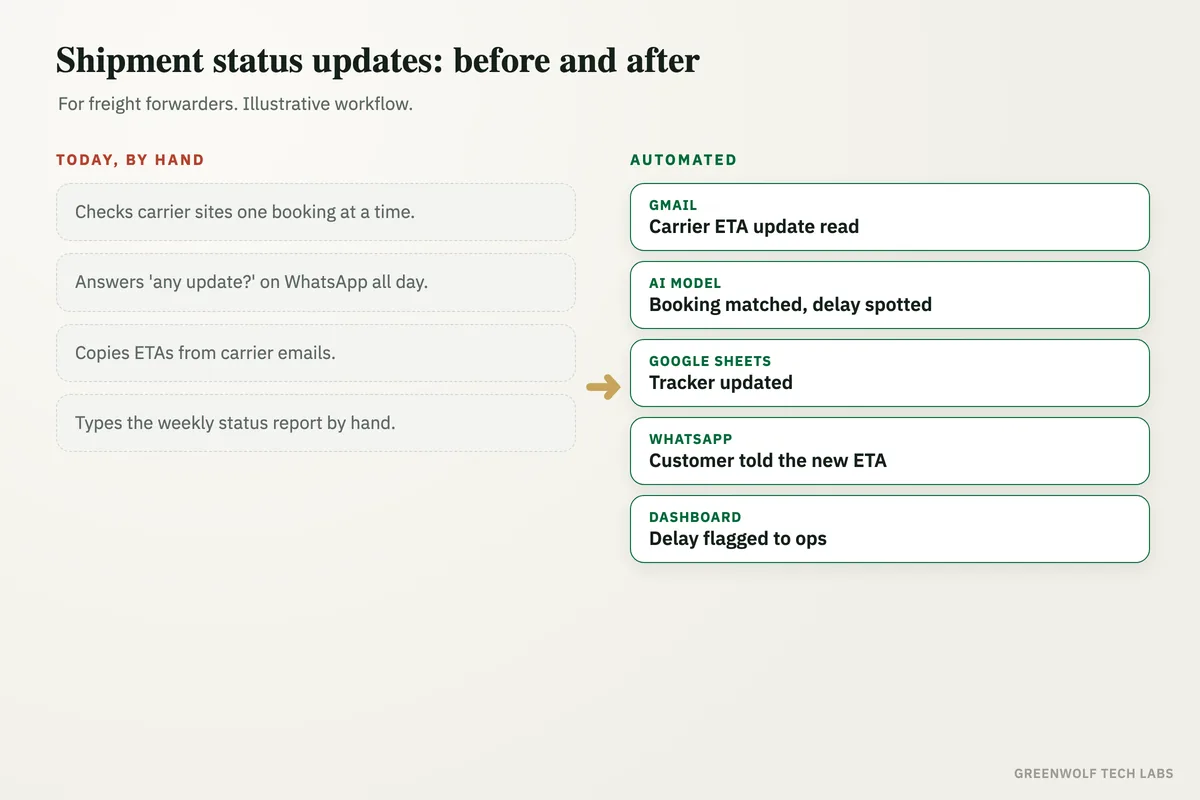
What gets automated
Carrier updates captured
Arrival notices, ETA changes and milestone emails from carriers and shipping lines are read as they land, along with tracking feeds where the carrier offers one.
- Carrier and line emails read
- Tracking pages or feeds checked on a schedule
- Booking and container numbers picked out
Bookings matched
An AI model reads each update, pulls out the booking, container, vessel and dates, and matches it to the right shipment in your tracker.
- Works on emails and PDFs
- Unclear matches sent to a person
- Nothing copied by hand
Tracker kept current
The shipment sheet or CRM record is updated with the new milestone, ETD, ETA and remarks, so everyone in the office sees the same status.
- Milestones with time stamps
- Old and new ETA kept
- One source of truth
Customers told first
Each customer gets a short update on WhatsApp or email when something changes: sailed, transshipped, arrived, delayed or cleared.
- Their booking, vessel and new date
- WhatsApp or email per customer
- Consignee copied if you choose
Delays flagged early
When an ETA slips past a set limit or a milestone goes quiet, the shipment lands on the ops list with the customer and the reason.
- Slip beyond your limit flagged
- No update in a set time flagged
- Owner assigned per shipment
Weekly report built
The status report that used to take a morning is built from the tracker and sent to each key account on a fixed day.
- Per customer status list
- Delays and reasons included
- Sent on schedule
How the workflow runs
Gmail or Outlook: carrier update read
A new arrival notice, ETA change or milestone email lands in the shared ops mailbox and the workflow picks it up.
AI model: booking matched
The booking, container, vessel and dates are pulled out and matched to the shipment, and any change in ETA is measured.
Google Sheets or your CRM: tracker updated
The shipment row gets the new milestone and date, with the previous ETA kept for the record.
WhatsApp: customer told
The customer gets a short, clear update with their reference, the vessel and the new date, before they think to ask.
Dashboard: delays flagged
Slipped or silent shipments move to the ops list with an owner, and the weekly status report builds itself from the same data.
Who it is for
What you need to start
You do not need a new freight system. The workflow works with what the office already runs: the shared ops mailbox in Gmail or Outlook, the shipment tracker in Excel, Google Sheets or a CRM such as Zoho or HubSpot, and a WhatsApp Business number. If you use a freight platform, it can read from and write to that as well.
The data is what your team already keeps: booking number, container or AWB number, carrier, vessel or flight, ETD, ETA, customer, customer contact and the person who owns the shipment. Tools like n8n, Zapier or Make connect the pieces, and an AI model reads carrier emails and PDFs that do not follow a fixed format.
A first version, carrier emails read into the tracker with a WhatsApp update to the customer, is usually a matter of days to a couple of weeks depending on how many carriers you work with. Delay alerts and the weekly report follow once the team trusts the tracker.
Questions about shipment status updates
How do you automate shipment status updates for customers?
Can shipment updates be sent on WhatsApp?
What if the carrier changes the ETA without telling us?
Do we need to replace our freight software?
What happens when an update cannot be matched to a booking?
Where do your shipment updates get stuck?
Tell us how carrier updates reach your tracker and your customers today and we will map it in a short digital audit, then show what sending updates automatically would look like for your desk.
Part of our Supply Chain and Procurement hub. Start with our supply chain automation.