

Why matching the bank still takes days
Bank reconciliation automation fixes a job every business does, whatever it sells: putting the bank statement next to the invoice list and working out which payment belongs to which invoice. On a normal month that is a few hundred bank lines against a few hundred invoices, and someone in accounts ticks them off one by one in Excel, Tally or QuickBooks.
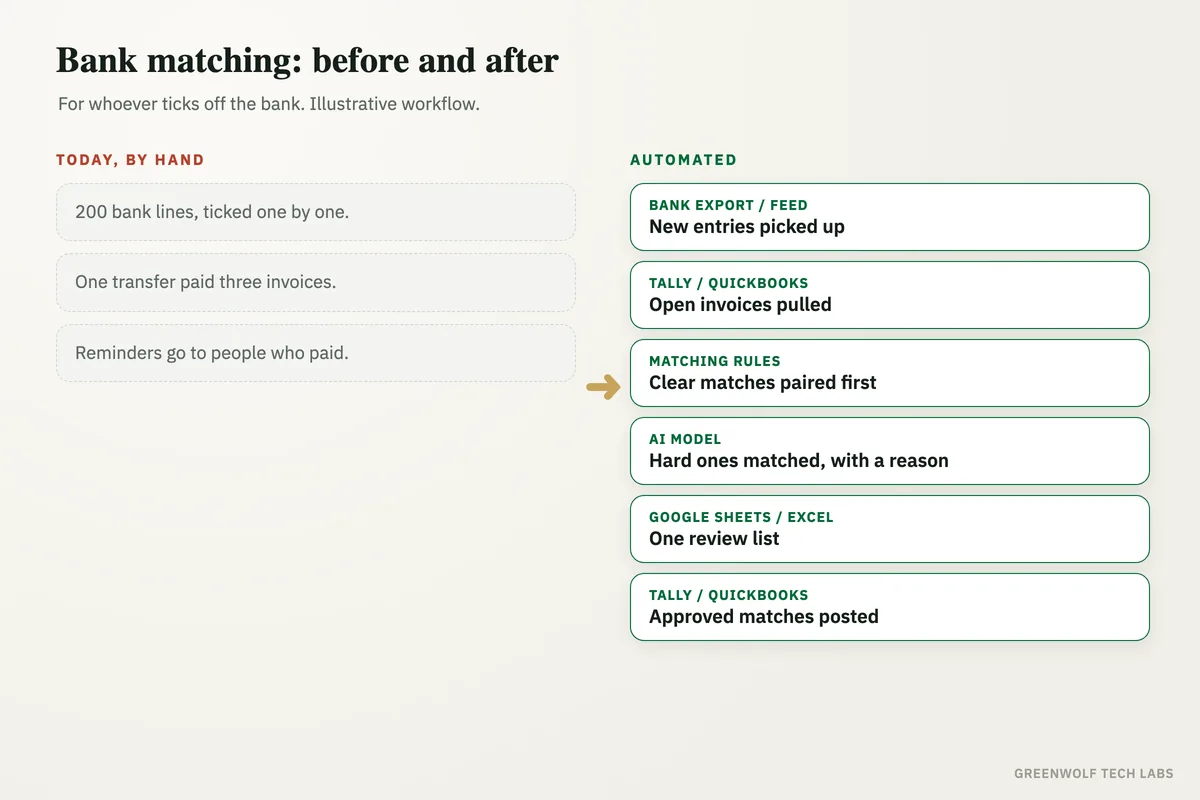
The clear ones are fine. The hard ones eat the days: a customer who paid three invoices in one transfer, a payment that arrived short because of bank charges or tax deducted, a reference that says "PAYMENT" and nothing else, the same amount from two different customers. Until those are sorted, nobody can say for sure who still owes you money, so reminders go to people who already paid and real overdue invoices sit unnoticed.
This workflow reads the bank statement and the open invoices, matches every entry it can by amount, date, reference and customer name, handles part payments and combined payments, and leaves only the entries it cannot match for a person, each with a short reason. Nothing is posted to your books until someone in accounts approves it.
What gets automated
Reading the bank statement
Every bank line is picked up from the bank's export or feed, with date, amount, reference and the payer's name cleaned into one format.
- CSV or Excel export
- Bank feed
- Several accounts
Matching each entry
Each bank line is matched to an open invoice by amount, date, invoice number in the reference and the customer's name, even when the name is written differently.
- Amount
- Reference
- Customer name
Part and combined payments
One transfer that pays three invoices, or one invoice paid in two parts, is split and matched correctly instead of being left as a mismatch.
- One to many
- Many to one
- Short payments
Only the odd ones left
Entries that cannot be matched with confidence are listed for a person with the reason: no reference, two possible invoices, or an amount that does not fit.
- Reason for each
- Best guess shown
- Nothing hidden
Who still owes you
Once the bank is matched, the list of unpaid invoices is accurate, so reminders only go to customers who really have not paid.
- True overdue list
- No wrong reminders
- Same day
Done every day, not at month-end
The match runs daily or weekly, so month-end starts with the bank already reconciled instead of a pile of lines to tick.
- Daily or weekly
- Month-end ready
- One log
How the workflow runs
Bank export or feed: the new entries come in
The bank statement arrives as a CSV or Excel export, or through the bank feed your accounting software already uses, for one account or several.
Tally, QuickBooks or Zoho: the open invoices are pulled
The list of unpaid and part-paid invoices, with customer names, amounts and due dates, is read from your accounting software.
Matching rules: the clear matches first
Exact matches on amount plus invoice number or customer name are paired by fixed rules, so the simple majority never needs a judgement call.
AI model: the hard ones
ChatGPT or Claude reads what is left: vague references, names spelt differently, combined and short payments. It suggests the most likely invoice with a reason, or marks the entry as unclear.
Google Sheets or Excel: one review list
Matched entries, suggested matches and unmatched entries land in one sheet. Accounts approves the suggestions and looks only at the unmatched lines.
Tally, QuickBooks or Zoho: approved matches posted
Approved matches are recorded against the invoices, and a short summary of what was matched and what is still open goes to the owner or the accounts head by email or WhatsApp.
Who it is for
What you need to start
You keep the bank and the books you already use: a bank statement export or feed, and your invoices in Tally, QuickBooks, Zoho Books or Xero. The workflow runs on n8n, Make or Zapier, an AI model such as ChatGPT or Claude handles the entries that fixed rules cannot, and a Google Sheet or Excel workbook holds the review list. A WhatsApp summary needs the WhatsApp Business API through a provider such as WATI or Twilio; otherwise it arrives by email.
The most important part of the build is agreeing the matching rules with your accounts team: how close an amount must be to count, how bank charges and tax deducted at source are treated, which customers pay on behalf of others, and when a suggestion needs a person. We test those rules on a few months of your past statements before anything is posted to your books. Once the bank is matched, payment reminder automation can chase only the invoices that are really unpaid, and the same accurate data feeds your weekly report.
A typical build is planned around your real statements, tested on past months until the matches agree with what your accounts team would have done, and goes live over a few weeks.
Questions about bank reconciliation automation
What is bank reconciliation automation?
Can AI handle part payments and one payment for several invoices?
Does it work with Tally and QuickBooks?
Will it post entries to my books without checking?
Is it safe to give bank data to an AI model?
How many bank entries are still unticked this month?
Book a digital audit. We will look at how your team matches the bank today and show what a reconciliation that leaves only the odd entries would look like for you.
Part of our AI Automation hub. Start with our AI automation agency.