

Why good customers quietly stop buying
Customer win-back automation looks through the sales records you already keep, finds the customers who used to buy regularly and have gone quiet, and sends each of them a personal message before they are gone for good. Every business has these customers. The salon client who came every month and has not booked since spring. The shop that reordered every few weeks and has not placed an order in two months. The client who renewed every year and did not this time.
Nobody notices when it happens, because a customer who leaves quietly does not complain. They simply stop showing up in the sales report, and the team is busy with new enquiries. By the time someone looks at the list, months have passed and the customer is buying somewhere else. A short, friendly message at the right time is often all it takes to bring them back, but no one has the time to check every customer's last purchase by hand.
This workflow does the checking for you. Every week it compares each customer's last purchase with how often they normally buy, picks out the ones who are overdue, writes a personal message that mentions what they bought, sends it on WhatsApp or email, and puts every reply in front of the right person on your team.
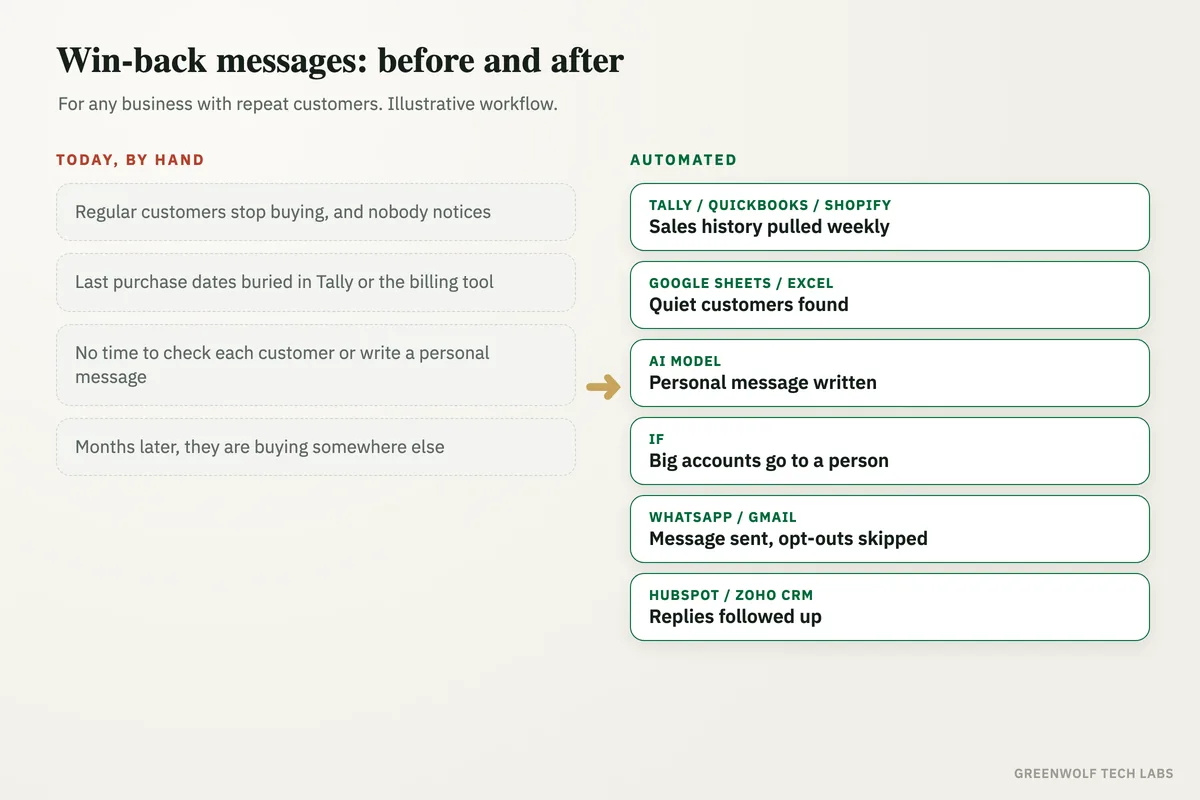
What gets automated
Reading the sales history
Every customer's purchases are pulled from your accounts or billing tool, with dates, items and amounts, so there is one clean list to work from.
- Tally
- QuickBooks
- Shopify
- Zoho
Spotting who went quiet
Each customer's normal gap between purchases is worked out, and anyone well past it is marked as quiet, so a monthly buyer and a yearly buyer are judged fairly.
- Google Sheets
- Excel
A personal message for each
AI writes a short message in your tone that mentions what they last bought and asks one easy question, instead of a generic offer sent to everyone.
- ChatGPT
- Claude
Big accounts go to a person first
Your largest customers, and anyone with an open complaint, are sent to the owner or salesperson to call personally instead of getting an automatic message.
- Owner
- Sales
Sent on WhatsApp or email
Messages go out on WhatsApp Business or email at a sensible time of day, and customers who asked not to be contacted are always skipped.
- Gmail
- Outlook
Replies and results tracked
Every reply is logged against the customer with a follow-up task, and each month you see who was contacted and who bought again.
- HubSpot
- Zoho CRM
- Power BI
How the workflow runs
Tally, QuickBooks, Shopify or Zoho: the sales history is pulled
Once a week the workflow exports every sale from your accounts, billing or store tool: customer, date, items and amount. Customers are matched by phone number or email so the same person is not counted twice.
Google Sheets or Excel: quiet customers are found
For each customer, the sheet works out how often they usually buy and when they last bought. Anyone past their usual gap by the margin you choose is marked as quiet, along with what they bought most.
AI model: a personal message is written
ChatGPT or Claude writes a short message for each quiet customer, in your tone, that mentions their last purchase and asks one simple question, such as whether they still need it or if anything went wrong. Offers or discounts are only added if your rules allow them.
If step: big accounts and complaints go to a person
Customers above a value you set, and anyone with a recent complaint or unpaid invoice, are not messaged automatically. They go to the owner or the account manager as a call list with the drafted message attached.
WhatsApp or Gmail: the message is sent
The rest are sent on WhatsApp Business, through a provider such as WATI or Twilio using an approved message template, or by Gmail or Outlook. Customers who opted out are skipped, and no one gets more than one win-back message in the window you set.
HubSpot, Zoho CRM or Google Sheets: replies are followed up
Replies are logged against the customer and turned into a follow-up task for the right person. At month-end you get a short report of who was contacted, who replied and who bought again.
Who it is for
What you need to start
You keep the tools you already use: your accounts or billing tool (Tally, QuickBooks, Zoho Books, Shopify or a POS system) as the source of sales, Google Sheets or Excel for the customer list, WhatsApp Business connected through a provider such as WATI or Twilio or a Gmail or Outlook address for sending, and a CRM such as HubSpot or Zoho CRM if you have one. The workflow runs on n8n, Make or Zapier, with an AI model such as ChatGPT or Claude to write the messages.
The data that matters is clean customer details: a phone number or email for each customer and sales that are recorded against the right name. You also decide a few rules: how long a gap counts as quiet, which customers should get a call instead of a message, and whether an offer is ever included. Win-back works best next to the rest of the customer journey, such as review requests after every sale and quote follow-ups, so no customer falls through the gaps.
A typical build starts by running the rules over your past year of sales, so you can see which customers it would have flagged before anything is sent, and then goes live in stages over a few weeks.
Questions about customer win-back automation
What is customer win-back automation?
How does it decide a customer has gone quiet?
Can win-back messages be sent on WhatsApp?
Do I have to offer a discount to win customers back?
Does it work with Tally, QuickBooks or Shopify?
How many of last year's customers have not bought this year?
Book a digital audit. We will look at your sales records and how you follow up with past customers today, and show what customer win-back automation would look like with your own tools and rules.
Part of our Sales and Marketing Automation hub. Start with our marketing automation services.