

Why wrong supplier bills get paid
Invoice matching automation checks every supplier bill against the purchase order and the delivery before anyone pays it. In most small and mid-sized businesses that check does not happen. Bills arrive by email, on WhatsApp and on paper, the accounts person enters them, and they get paid when the supplier calls. Nobody has the time to open the order and the delivery note for each one.
That is how small errors slip through: a rate a little higher than the one you agreed, 500 units billed when 450 arrived, freight that was never part of the deal, or the same bill sent twice from two different email addresses. None of these are big on their own. Across a year of bills from dozens of suppliers, they add up, and once the money is paid, getting it back is slow and awkward.
This workflow reads every bill as it arrives, finds its purchase order and delivery record, and compares price, quantity, tax and charges line by line. Bills that match go to the payment list. Bills that do not are held, the reason is written down, and the supplier gets a polite message asking for a corrected bill. Your team only looks at the exceptions.
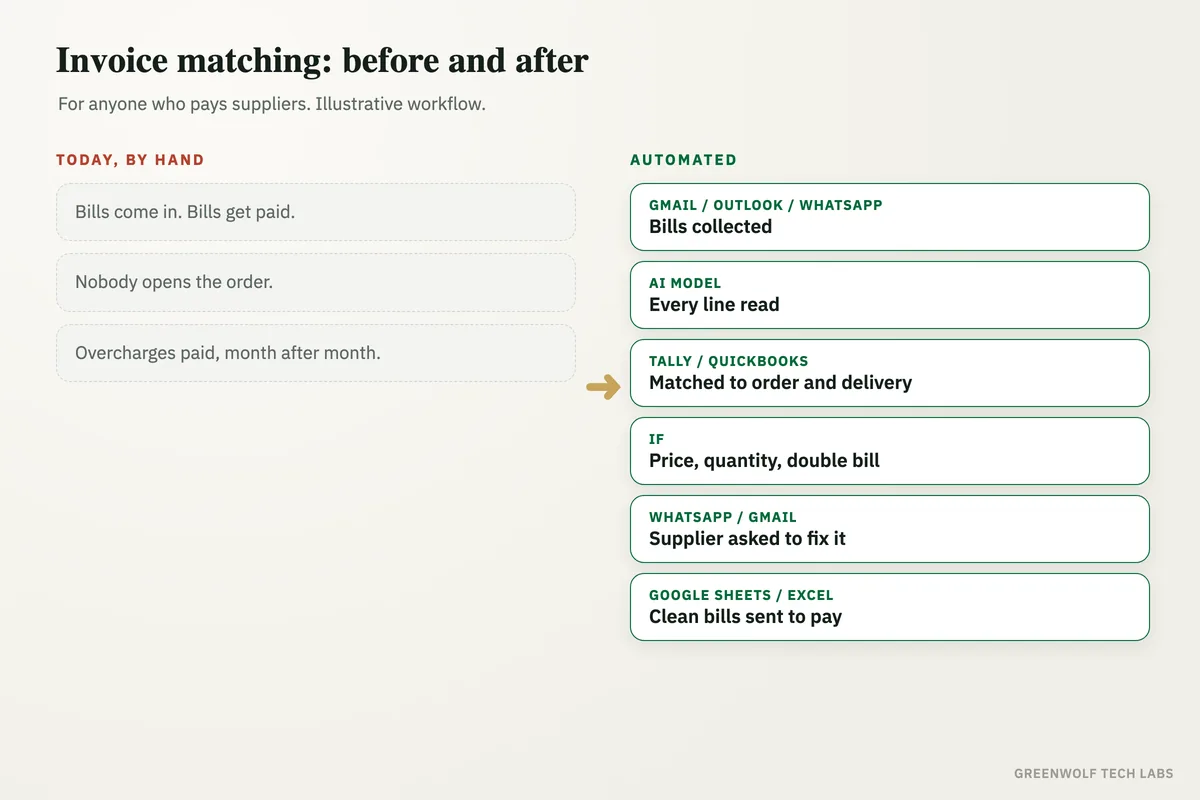
What gets automated
Collecting every bill
Bills sent to the accounts inbox, a WhatsApp number or a shared folder are picked up in one place, whatever the format: PDF, photo or scan.
- Gmail
- Outlook
Reading each line
AI reads the supplier, bill number, date, items, quantities, rates, tax and extra charges, and turns them into clean rows.
- Items
- Rates
- Tax
- Charges
Matching to the order and delivery
Each bill is matched to its purchase order and the goods received note in Tally, QuickBooks, Zoho or your order sheet.
- Purchase order
- Delivery
- Tally
- QuickBooks
Catching the gaps
A higher rate than agreed, more units billed than received, charges nobody approved and bills already paid are flagged with the exact difference.
- Price
- Quantity
- Duplicates
Asking the supplier to fix it
The supplier gets a short, polite WhatsApp or email naming the bill, the line and what the order says, with a request for a corrected bill.
A clean payment list
Matched bills go on the payment list for approval, and held bills stay visible with their reason until they are fixed.
- To pay
- On hold
How the workflow runs
Gmail, Outlook or WhatsApp: bills are collected
Every bill sent to the accounts email, a WhatsApp Business number (through a provider such as WATI or Twilio) or a shared Google Drive or OneDrive folder is picked up and saved with the supplier's name.
AI model: each bill is read line by line
ChatGPT or Claude reads the PDF or photo and fills fixed fields: supplier, bill number, date, order number, each item with quantity and rate, tax and any extra charges.
Tally, QuickBooks or Zoho: the order and delivery are found
The bill is matched to its purchase order and goods received note by order number, or by supplier, items and dates when the order number is missing.
If step: price, quantity, tax and duplicates are checked
Fixed rules compare each line: billed rate against the order rate, billed quantity against what was received, tax against the right rate, and the bill number and amount against bills already entered.
WhatsApp or Gmail: the supplier is asked for a corrected bill
For each held bill, the supplier gets a short message naming the bill, the line and the difference. Replies and corrected bills are linked back to the same record.
Google Sheets or Excel: the payment list is ready for approval
Matched bills appear on the payment list with their due dates for a person to approve. Held bills stay on a separate tab with the reason until they are fixed, and approved bills are posted to Tally or QuickBooks.
Who it is for
What you need to start
You keep the tools you already use: your accounting system (Tally, QuickBooks, Zoho Books or Xero), wherever your purchase orders live (the same system, Google Sheets or Excel), the email inbox or WhatsApp number suppliers send bills to, and Google Sheets or Excel for the payment list. The workflow runs on n8n, Make or Zapier, with an AI model such as ChatGPT or Claude to read the bills.
The data that matters most is your purchase orders and delivery records. If orders are placed on WhatsApp with no written order, the first step of the build is a simple order sheet so every bill has something to be checked against. We then set the rules with your accounts head: how much difference is allowed, which charges are normal, and who approves what. Once bills are clean, invoice data entry automation posts them to your books, and purchase order follow up chases suppliers for delivery dates.
A typical build is tested on a few months of your past bills and orders, so the rules catch real errors and leave correct bills alone, and goes live over a few weeks.
Questions about invoice matching automation
What is invoice matching?
What is three-way matching?
Can AI read supplier bills that come as photos or scans?
How does it catch duplicate bills?
Does it work with Tally and QuickBooks?
How many supplier bills did you pay last month without checking?
Book a digital audit. We will look at how your bills, orders and deliveries flow today, and show what invoice matching would look like on your own suppliers and accounting system.
Part of our Supply Chain and Procurement hub. Start with our supply chain automation.