

Why purchase order follow up still eats the purchase team's day
Purchase order follow up is the quiet job that decides whether a factory runs on time. A purchase order goes out from Tally, an ERP or an Excel sheet, and then someone has to keep asking the supplier: did you get it, when will it ship, is the quantity full, where is the invoice. In most growing manufacturers that someone is one purchase executive with a phone, a WhatsApp list and a sheet of open POs.
The sheet is never quite current. A supplier says Friday on WhatsApp, another sends a revised date by email, a third says nothing at all. Dates live in chats and inboxes, not in the sheet. Production finds out a raw material is late when the line is already waiting for it, and the owner hears about it last.
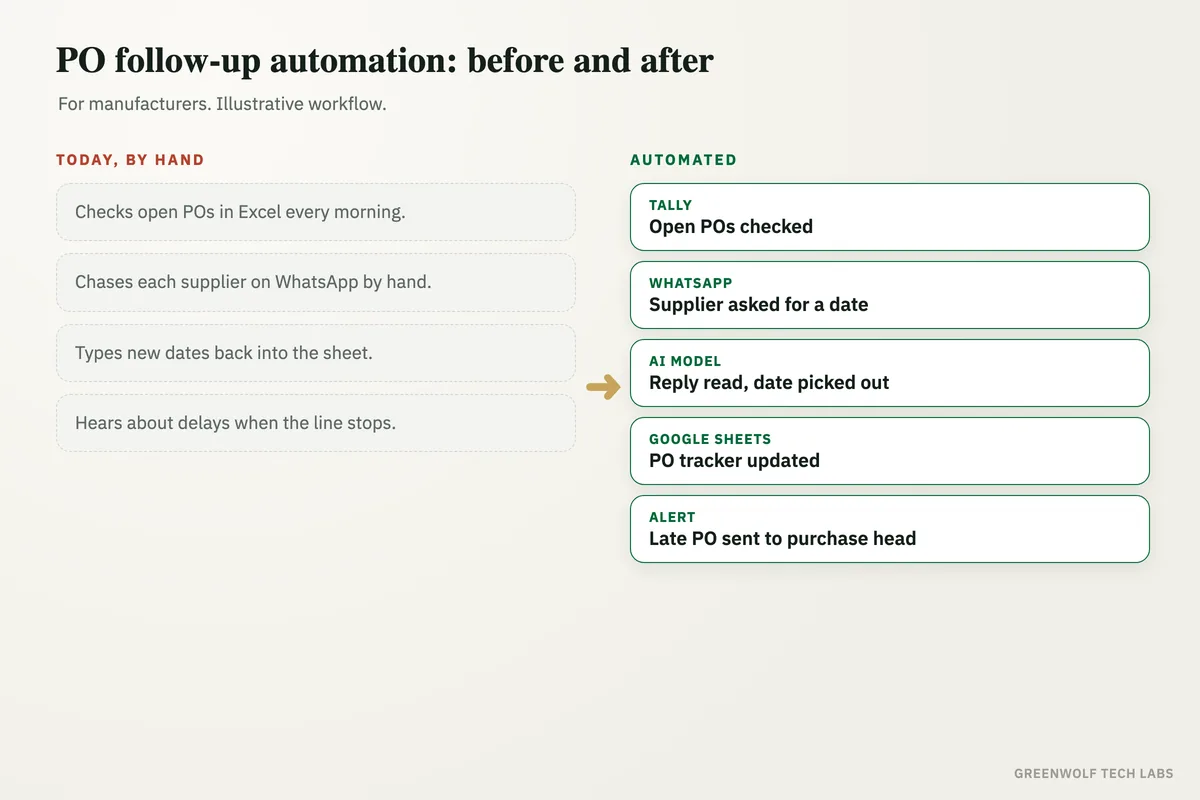
This workflow reads your open purchase orders every morning, asks each supplier for a confirmed dispatch date before it is due, reads the reply with an AI model, updates the PO tracker and flags anything late or unanswered to the right person. Your purchase team handles the problem suppliers. The routine chasing runs on its own.
What gets automated
Open POs checked every morning
Every open purchase order is read from Tally, your ERP or the PO sheet, with its supplier, items, quantity and promised date.
- Tally, Zoho or Excel
- Due dates tracked
- Part deliveries counted
Suppliers asked before the due date
Each supplier gets a short WhatsApp or email a few days before delivery, asking them to confirm the dispatch date and quantity.
- WhatsApp or email
- PO number included
- Polite repeat if silent
Replies read and logged
Supplier replies, whether a line of text, a revised date or a forwarded email, are read by an AI model and written into the tracker.
- New dates captured
- Short quantities noted
- Original message kept
Delays flagged early
When a date slips past the date production needs the material, the purchase head and the planner get an alert with the PO and the supplier's reply.
- Late dates flagged
- Silent suppliers listed
- Linked to production need
Receipts closed off
When goods are received and entered, the PO is closed or marked part received, so nobody chases material that has already arrived.
- GRN matched to PO
- Balance quantity tracked
- No duplicate chasing
Supplier record on one screen
Open POs, confirmed dates, delays and on-time history for each supplier show on one dashboard for the owner and the purchase team.
- Open POs by supplier
- Late POs this week
- On-time history
How the workflow runs
Tally or Excel: open POs read
Every morning the open purchase orders are pulled with supplier, items, quantity and promised date.
WhatsApp or Gmail: supplier asked
Suppliers with deliveries due soon get a message with the PO number asking them to confirm the dispatch date.
AI model: reply read
The supplier's reply is read and the confirmed date, quantity and any issue are picked out of it.
Google Sheets: PO tracker updated
The tracker shows the new date and the reply against the right PO, with no typing by the team.
Alert: delays sent to purchase
Late dates and suppliers who have not replied go to the purchase head and planner with the details ready.
Dashboard: every PO on one screen
Open, confirmed, late and received POs show on one view, by supplier and by material.
Who it is for
What you need to start
You keep the tools you already use: Tally, Zoho, Busy or the ERP you raise purchase orders in, or the Excel or Google Sheets file your purchase team keeps. Supplier messages go through a WhatsApp Business number and your purchase inbox in Gmail or Outlook. The workflow sits between them, built on tools such as n8n or Make with an AI model to read the replies.
The data is what you already have: your open purchase orders with promised dates, a supplier list with a WhatsApp number and email for each, and, if you have it, the date production needs each material. If your PO sheet has gaps, filling them is the first part of the build.
A first version that reads open POs, sends the reminders and logs replies for a person to check usually takes a couple of weeks. Delay alerts tied to production dates, receipt matching and the supplier dashboard follow once the team trusts the tracker.
Questions about purchase order follow up
How do you follow up on a purchase order with a supplier?
Can it work with POs raised in Tally?
Will suppliers need a new app or portal?
What happens when a supplier does not reply?
Can it tell us which suppliers are usually late?
Where do your purchase orders go quiet?
Book a digital audit. Tell us where you raise POs today and how you chase suppliers, and we will map what automating purchase order follow up would look like for your factory.
Part of our Supply Chain and Procurement hub. Start with our supply chain automation.