

Why staff leave turns into a monthly mess
Leave management automation takes the leave requests your team already sends, on WhatsApp, by email or in passing, and turns each one into an approved, recorded entry without anyone keeping a register by hand. In most small and mid-sized businesses there is no real leave system. Someone texts the manager "I need Friday off", the manager says fine, and the request lives in one chat on one phone.
The problems show up later. Two people from the same team are off on the same day and nobody noticed. A staff member says they have leave left and the office manager has no way to check. At month-end, payroll has to piece together who was absent from chats, memory and a half-filled sheet, so unpaid leave gets missed or deducted wrongly, and the argument that follows costs more than the day off.
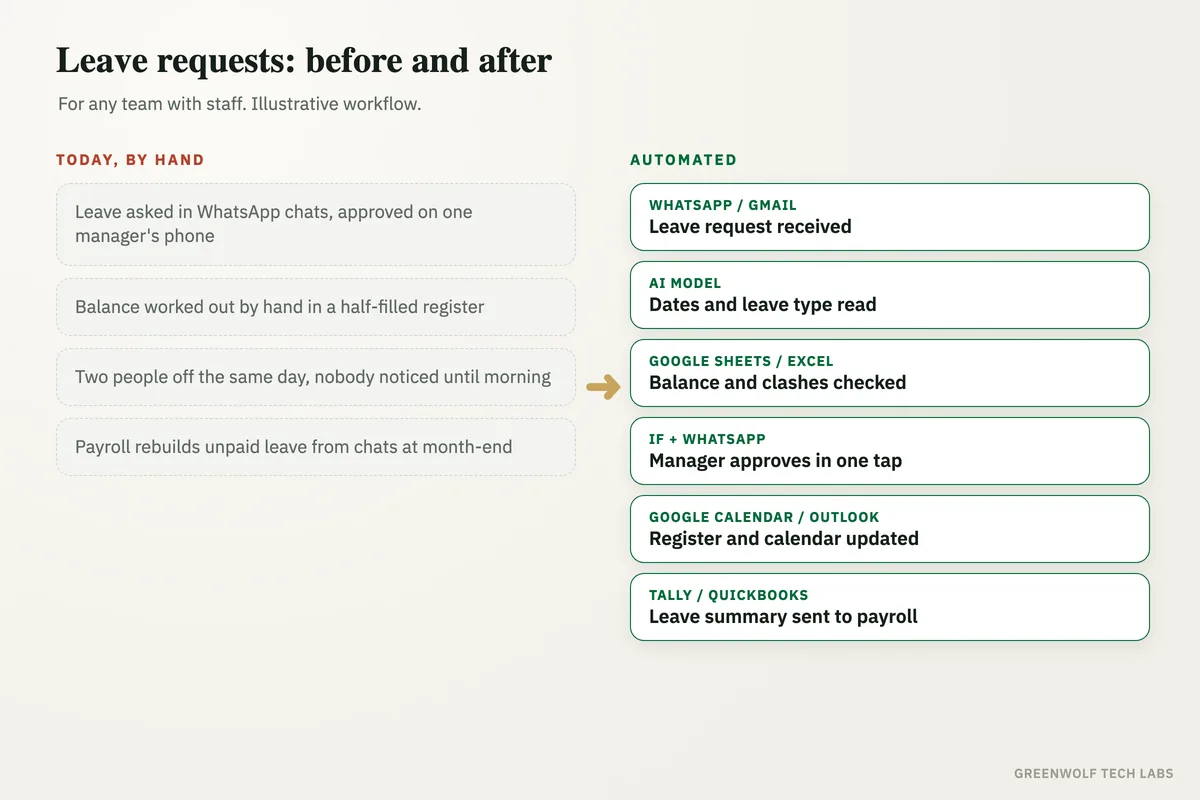
This workflow keeps the habit your team already has. Staff still send a message. The system reads it, checks the person's balance and who else is off, asks the manager to approve with one tap, updates the leave register and the team calendar, and hands payroll a clean leave summary at the end of the month.
What gets automated
Collecting every request
Leave requests sent on WhatsApp, by email or through a short form land in one place, whoever they were sent to.
- Gmail
- Outlook
- Form
Reading the message
AI turns a normal message like "off Friday and Monday for a wedding" into dates, number of days, half days and the type of leave.
- Dates
- Days
- Leave type
Checking balance and clashes
Each request is checked against the person's remaining leave and against who else in the same team is already off that day.
- Balance
- Team calendar
One-tap approval
The manager gets a short WhatsApp or email with the request, the balance and any clash, and approves or rejects it in one tap.
- Approve
- Reject
Register and calendar updated
Approved leave is written to the leave register and the shared calendar, and the staff member gets a confirmation.
- Google Sheets
- Excel
- Calendar
Leave summary for payroll
At month-end, payroll gets one summary per person: paid leave, unpaid leave and half days, ready for the salary run.
- Tally
- QuickBooks
- Zoho
How the workflow runs
WhatsApp, Gmail or a form: the request is received
A staff member messages a WhatsApp Business number (through a provider such as WATI or Twilio), emails a leave address, or fills a Google Form or Microsoft Form. Every request is saved with the person's name and the time it arrived.
AI model: the message is turned into a leave entry
ChatGPT or Claude reads the message and fills fixed fields: start date, end date, half day or full day, number of working days and leave type. If anything is unclear, the staff member is asked a short question instead of the system guessing.
Google Sheets, Excel or Zoho People: balance and clashes are checked
The workflow looks up the person's remaining leave for the year and checks the team calendar for anyone else off on the same days, using the minimum staffing rule you set for each team.
If step and WhatsApp: the manager approves
The manager gets one message with the request, the balance left and any clash, with Approve and Reject buttons. Requests over the balance or below minimum staffing are marked clearly so the manager decides with all the facts.
Google Calendar or Outlook: everyone sees who is off
Approved leave is added to the leave register and the shared team calendar, the staff member gets a confirmation, and each morning the team gets a short list of who is off today.
Tally, QuickBooks, Zoho Payroll or Gusto: payroll gets the summary
At month-end, a summary per person (paid leave, unpaid leave, half days) goes to whoever runs payroll in Tally, QuickBooks, Zoho Payroll or Gusto, so salary deductions match what was approved.
Who it is for
What you need to start
You keep the tools you already use: WhatsApp Business (connected through a provider such as WATI or Twilio) or a shared email address for requests, Google Sheets or Excel for the leave register (or Zoho People if you already have it), Google Calendar or Outlook for the team calendar, and your payroll tool, whether that is Tally, QuickBooks, Zoho Payroll or Gusto. The workflow runs on n8n, Make or Zapier, with an AI model such as ChatGPT or Claude to read the messages.
The data that matters is your leave policy: how many days of each type every person gets, how leave carries over, which holidays apply, and how many people each team needs on a given day. If your policy lives only in someone's head, the first step of the build is writing it down as simple rules. Once leave is clean, the same records can feed new hire onboarding for joiners and the employee exit checklist when someone leaves, so final settlements use the right balance.
A typical build is tested against a few months of your past leave requests, so the rules match how your team actually asks, and goes live team by team over a few weeks.
Questions about leave management automation
What is leave management automation?
Can staff request leave on WhatsApp?
Do we need HR software for this?
How does it stop too many people being off on the same day?
Does it work with payroll in Tally or QuickBooks?
How many leave requests are sitting in WhatsApp chats right now?
Book a digital audit. We will look at how leave is asked for, approved and paid in your business today, and show what leave management automation would look like with your own policy and tools.
Part of our Business Process Automation hub. Start with our business automation services.