

Why collecting documents takes weeks
Document verification automation fixes a job every business does by hand: checking the papers a new client, supplier or employee sends you. An ID, a tax number, bank proof, a signed agreement, an address proof. They arrive as WhatsApp photos, email attachments and PDFs with names like scan001, spread over days.
Someone has to open each file, work out what it is, tick it off a list, check the name matches and the date has not expired. Then they write back asking for what is missing, and the reply brings half of it. The same new client gets three or four messages, the account or the first payment waits, and one expired document slips through anyway.
This workflow reads every file as it arrives, works out which document it is, checks it against the list you set for that type of client, supplier or hire, and sends the sender one clear message with exactly what is still missing or out of date. Your team only sees the files that need a human decision.
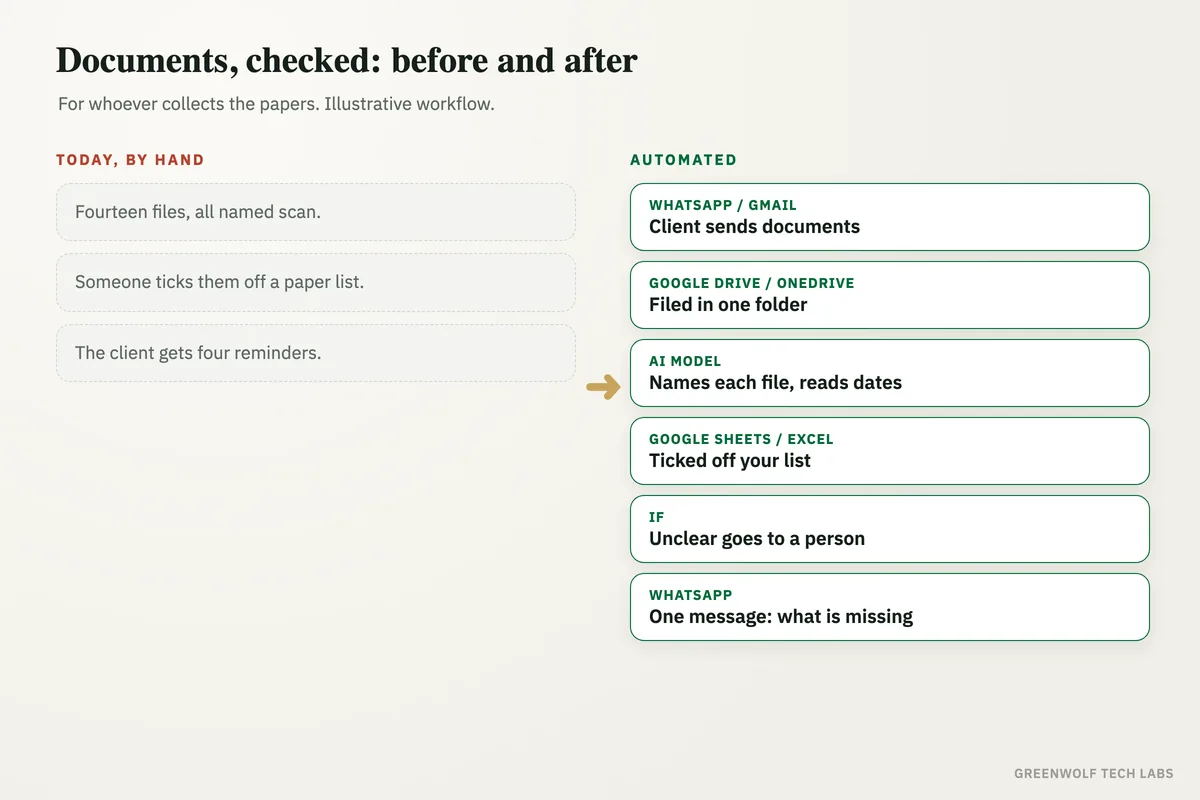
What gets automated
Collecting every file
Photos and PDFs sent on WhatsApp, by email or through an upload form are saved into one folder per client, supplier or hire in Google Drive or OneDrive.
- Upload form
Knowing what each file is
AI reads each file and names it: ID card, tax registration, cancelled cheque, bank letter, agreement. Badly named scans and phone photos are no problem.
- ID
- Tax number
- Bank proof
Checking against your list
Each document is ticked off the required list for that type of record, so a supplier, a customer and a new hire each get checked against their own list.
- Your list
- Per type
- Ticked off
Dates and names
Expiry dates are read and compared with today, and the name on each document is matched with the name on the account, so mismatches show up early.
- Expiry date
- Name match
- Signatures
One message for what is missing
The sender gets a single WhatsApp or email listing exactly what is still missing or expired, instead of a new message for every gap.
- One message
- Exact list
- Polite reminder
A person for the hard ones
Unclear photos, mismatched names and anything the AI is not sure about go to a person with the file and the reason attached. Nothing is approved on a guess.
- Blurry
- Mismatch
- Unsure
How the workflow runs
WhatsApp, Gmail or a form: the documents arrive
Files come in on the business WhatsApp number through the WhatsApp Business API (via a provider such as WATI or Twilio), in Gmail or Outlook, or through an upload form.
Google Drive or OneDrive: filed in one place
Every file is saved into the folder for that client, supplier or employee, renamed so anyone can find it later.
AI model: each document is read
ChatGPT or Claude works out what each file is and reads the key fields: name, number, issue date and expiry date.
Google Sheets or Excel: checked against the list
The required list for that record type is ticked off. Missing, expired and mismatched documents are marked with a reason.
If step: complete or not
A complete file goes to the right person for sign-off. Anything unclear goes to a person with the reason attached.
WhatsApp or Gmail: one message to the sender
The sender gets one clear message listing what is still needed, with a polite reminder if nothing comes back in a few days.
Who it is for
What you need to start
You keep the tools you already use: your WhatsApp business number and email, a shared folder in Google Drive or OneDrive, and a Google Sheet or Excel file as the tracker. The workflow runs on n8n, Make or Zapier, an AI model such as ChatGPT or Claude reads the documents, and WhatsApp runs through the WhatsApp Business API with a provider such as WATI or Twilio.
The most important part of the build is your rules: the list of documents for each type of client, supplier or hire, which dates must be checked, what counts as a name match and what must always go to a person. We test the workflow on past files until its checks match what your team would decide. If you run an accounting practice, accounting workflow automation covers the monthly papers for each filing, and new joiners can flow on into new hire onboarding.
A typical build is planned around your real document lists, tested on past files, and goes live over a few weeks.
Questions about document verification automation
What is document verification automation?
Can AI read phone photos of documents?
Does this replace a proper KYC or ID check?
Is it safe to send ID documents through AI?
Can it work for suppliers, customers and employees at once?
How many new clients are waiting on one missing document right now?
Book a digital audit. We will look at how documents reach you today and show what document verification automation would look like on your own lists and files.
Part of our Business Process Automation hub. Start with our business automation services.