

Why bills get paid late, or twice
Vendor payment automation keeps one list of every bill your business owes, reminds you before each one is due, gets the owner's approval in one tap and records the payment the moment it goes out. Every business pays bills: suppliers, rent, electricity, software, freight, contractors and tax. Paying them is not hard. Knowing which ones are due this week, which are already approved and which were paid last Tuesday is.
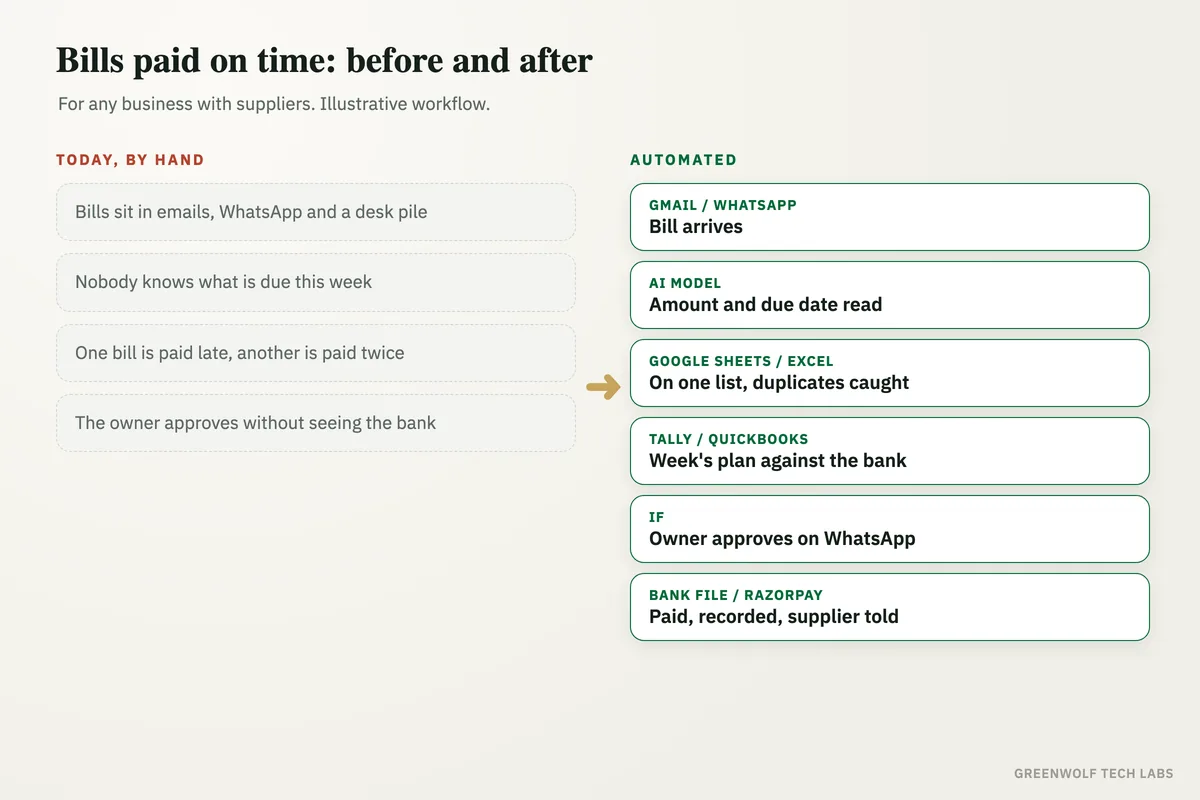
In most businesses the bills live in five places at once: supplier emails, WhatsApp photos, a pile on the accountant's desk, Tally or QuickBooks, and the owner's memory. The weekly payment run starts with someone asking "what do we owe?" on a Friday afternoon. A bill slips and a supplier puts the next order on hold. Another is paid twice because two people saw the same email. A tax or rent date is missed and a late fee lands. And the owner signs off payments without seeing the bank balance next to them.
This workflow puts every bill on one dated list as soon as it arrives, builds the week's payment plan against the cash in the bank, sends it to the owner for approval on WhatsApp, prepares the payment file or payment links, and tells each supplier when they have been paid. Nobody chases, nothing is paid twice, and the owner sees exactly where the money is going before it goes.
What gets automated
Every bill on one list
Supplier bills from email, WhatsApp photos and your accounts system land on one list with the supplier, amount, due date and status, so no bill lives only in an inbox.
- Gmail
- Outlook
- Google Sheets
Duplicates caught before payment
The same bill sent twice, or already paid last week, is flagged before it reaches the payment list, so you never pay one bill two times.
- Tally
- QuickBooks
- Zoho Books
Due dates watched for you
Supplier terms, rent, utilities, subscriptions and tax dates are tracked in one calendar, with a reminder a few days before each one, not after.
- Google Calendar
- Outlook
A weekly payment plan against your cash
Each week the bills due are listed next to the bank balance and expected collections, so the owner can see what can be paid now and what should wait.
- Excel
- Google Sheets
- Power BI
Owner approval in one tap
The payment plan goes to the owner on WhatsApp or email. Approve all, hold one, or ask a question, without opening the accounts system.
Paid, recorded and confirmed
Approved bills go into a bank payment file or payment links, the payment is recorded in the books, and each supplier gets a short note with the amount and reference.
- Bank portal
- Razorpay
- Stripe
How the workflow runs
Gmail, Outlook or WhatsApp: the bill arrives
Bills emailed to your accounts address, photos sent to your WhatsApp Business number (through a provider such as WATI or Twilio) and bills already entered in Tally, QuickBooks or Zoho Books all feed the same list.
AI model: the bill is read
ChatGPT or Claude reads each bill and fills in the supplier, bill number, amount, tax and due date. Anything it cannot read clearly is marked for a person to check instead of guessed.
Google Sheets or Excel: the payables list is updated
The bill is added to one dated list and checked against bills already on it and payments already made in Tally or QuickBooks, so duplicates and already-paid bills are caught here.
Every Monday: the week's payment plan is built
Bills due in the next 7 days, plus rent, utilities, subscriptions and tax dates, are listed in due-date order next to the bank balance and the collections you expect, with anything overdue at the top.
If step and WhatsApp: the owner approves
The plan goes to the owner on WhatsApp or email. Approved bills move on. Held bills stay on the list with a note, and bills over a set amount or from a new supplier always need a second look.
Bank file, books and supplier note
Approved bills become a bulk payment file for your bank portal or payment links through Razorpay or Stripe. Once paid, the payment is recorded in Tally, QuickBooks or Zoho Books and each supplier gets a WhatsApp or email with the amount and reference.
Who it is for
What you need to start
You keep the tools you already use: a Gmail or Outlook address where suppliers send bills, a WhatsApp Business number connected through a provider such as WATI or Twilio, Google Sheets or Excel for the payables list, and Tally, QuickBooks or Zoho Books as your books. Payments go through your bank's bulk payment upload, or through Razorpay or Stripe where payment links make sense. The workflow runs on n8n, Make or Zapier, with an AI model such as ChatGPT or Claude to read the bills.
The rules are yours to set: who approves, the amount above which a second person must check, which suppliers are paid first when cash is tight, and the day of the week you pay. If bills are still typed in by hand, invoice data entry automation handles that step, and invoice matching checks each bill against the order and delivery before it reaches the payment list. The cash flow checklist is a good place to decide your payment rules.
A typical build starts with the bill list and the weekly plan, runs next to your current process for a few payment cycles so the reading and duplicate checks can be compared with your own records, and then adds owner approval, the bank file and supplier notes over a few weeks.
Questions about vendor payment automation
What is vendor payment automation?
Does the system pay suppliers without my approval?
Can it work with Tally or QuickBooks?
How does it stop a bill being paid twice?
Can it remind me about rent, tax and subscription payments too?
Do you know every bill your business owes this week?
Book a digital audit. We will look at how bills arrive, get approved and get paid in your business today, and show what vendor payment automation would look like with your own tools, bank and team.
Part of our Supply Chain and Procurement hub. Start with our supply chain automation.