

Why good items still run out
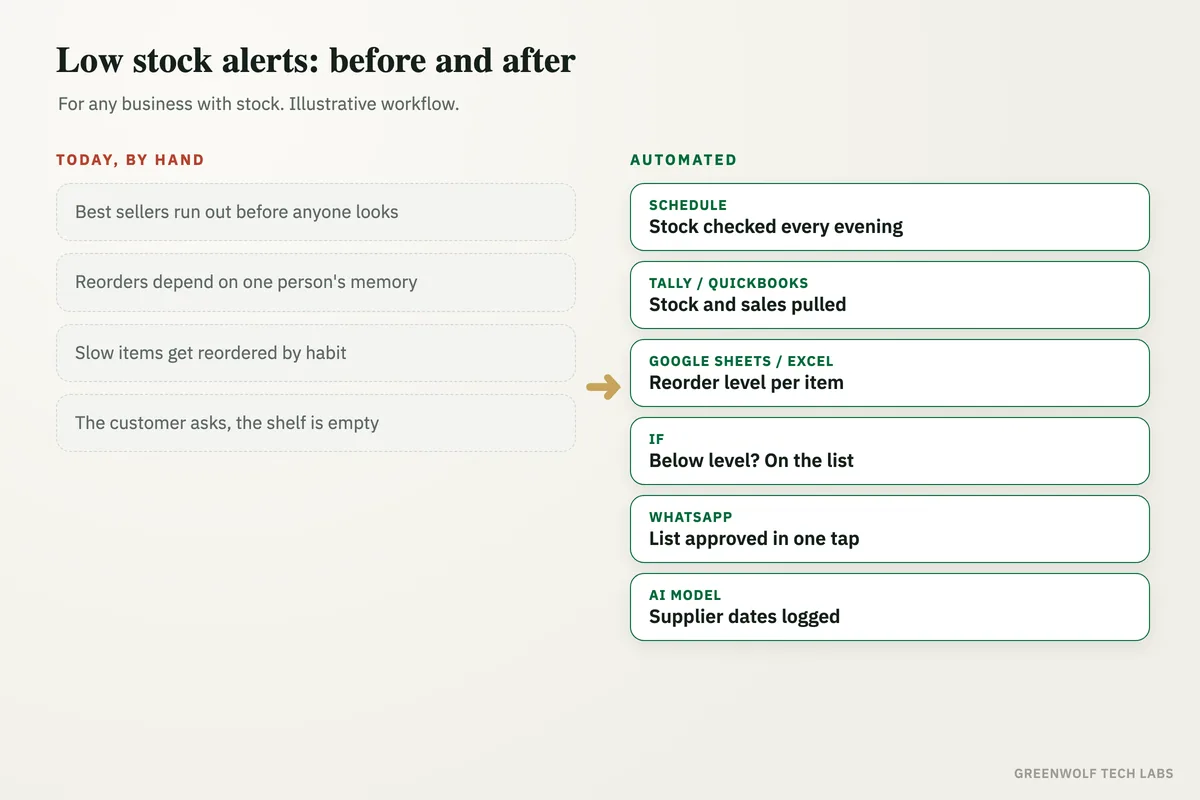
A low stock alert tells you an item is running short while there is still time to reorder it, instead of when a customer asks and the shelf is empty. Shops, restaurants, clinics, pharmacies, distributors and workshops all live with the same problem: the stock count sits in Tally, QuickBooks, Zoho, Shopify or a spreadsheet, but nobody looks at it until something is gone. The best sellers run out first, because they move fastest.
In many businesses, reordering still depends on one person's memory and a walk around the store. Someone notices the last carton, sends a WhatsApp to the supplier, and hopes it arrives before the weekend rush. Meanwhile slow items keep getting reordered out of habit, so cash sits on the shelf in things nobody is buying, while the things people want are missing.
This workflow checks every item every day against a reorder level based on how fast it actually sells and how long each supplier takes to deliver. It builds one reorder list grouped by supplier, sends it to the owner or purchase person for approval in one tap, and drafts the purchase orders, so reordering happens on time without anyone counting shelves.
What gets automated
A daily stock check
Every evening the current stock of each item is pulled from your accounting or inventory software, or from the stock sheet your team already keeps.
- Tally
- QuickBooks
- Zoho Inventory
- Shopify
- Google Sheets
Reorder levels that follow sales
Each item's reorder level is worked out from its sales over the last few weeks and the supplier's delivery time, and updates itself as demand changes.
- Google Sheets
- Excel
One alert, not fifty
Items below their level are gathered into one reorder list grouped by supplier, with the suggested quantity for each, instead of a separate alert for every product.
- Gmail
- Outlook
Approval in one tap
The owner or purchase person sees the list on WhatsApp or email, changes a quantity if needed, and approves it.
Purchase orders drafted
Approved lines become draft purchase orders in your books and go to each supplier on WhatsApp or email, and the supplier's reply with a delivery date is read and logged.
- Tally
- QuickBooks
- Zoho Books
- AI model
Slow stock flagged
Once a month, items that have not sold for weeks are listed with the stock and value tied up in them, so you stop reordering them.
- Google Sheets
- Power BI
How the workflow runs
Schedule: the stock is checked every evening
After closing, the workflow pulls the current stock of every item from Tally, QuickBooks, Zoho Inventory, Shopify or your stock sheet in Google Sheets or Excel, along with the sales of the last few weeks.
Google Sheets or Excel: each item gets its reorder level
For every item the sheet works out how many units sell per day and how many days the supplier takes to deliver, adds a small safety buffer, and sets the reorder level. Fixed rules do this, so the numbers are the same every time and you can check how each one was worked out.
If step: is anything below its level?
Items at or below their reorder level go on the reorder list with a suggested quantity, grouped by supplier. Items that are out of stock, or selling much faster than usual, are marked as urgent at the top.
WhatsApp or email: the list goes for approval
The owner or purchase person gets one message with the list for each supplier and approves it, or changes a quantity first. Messages go out through a provider such as WATI or Twilio, or by Gmail or Outlook.
Tally, QuickBooks or Zoho: purchase orders are drafted and sent
Approved lines become draft purchase orders in your books, and each supplier gets their order on WhatsApp or email. An AI model such as ChatGPT or Claude reads the supplier's reply and logs the promised delivery date next to the order.
Alert: anything late or stuck reaches a person
If a supplier does not confirm, or a promised date passes, the purchase person gets a reminder. Once a month the owner gets a short list of slow items and the stock value sitting in them.
Who it is for
What you need to start
You keep the tools you already have: your stock and sales in Tally, QuickBooks, Zoho Inventory, Zoho Books, Shopify or a Google Sheets or Excel stock sheet, a list of your suppliers with their usual delivery times, and WhatsApp or email to send the list. The workflow runs on n8n, Make or Zapier, with an AI model such as ChatGPT or Claude to read supplier replies, and sends WhatsApp messages through a provider such as WATI or Twilio.
You set the rules: how many days of buffer each item gets, who approves which supplier, which items are never reordered automatically, and how big an order needs a second look. The stock figures are only as good as the entries behind them, so the build starts by checking that sales and purchases are being recorded every day. For the stock sheet itself, see the inventory spreadsheet checklist, and for chasing open orders, purchase order follow up.
A typical build starts with your top sellers and two or three main suppliers, runs alongside your current way of reordering for a few weeks so the reorder levels can be tuned, and then adds the rest of the items, the purchase orders and the monthly slow stock report.
Questions about low stock alerts
How do I set up a low stock alert?
How is the reorder level calculated?
Can I get low stock alerts from Tally or QuickBooks?
Will it order from suppliers on its own?
Does it work for a business with more than one branch?
Which of your best sellers will run out next week?
Book a digital audit. We will look at how stock is counted and reordered in your business today, and show what a daily reorder list would look like for your own items and suppliers.
Part of our Supply Chain and Procurement hub. Start with our supply chain automation.