

Why quotations go out late
An AI quotation generator fixes a delay almost every business has, whatever it sells: the salesperson knows exactly what the customer wants, but the quotation goes out a day or two later. After a site visit or a call, the details live in a WhatsApp voice note, a few lines on paper or the salesperson's head. Someone back at the office has to listen to it, open the rate card, work out the prices and type the quotation in Word, Excel, Tally, QuickBooks or Zoho.
By then the customer has asked twice for an update, or taken the first quote that arrived. Items get missed, an old rate gets used, and discounts are promised on the phone that nobody approved.
This workflow takes the salesperson's voice note as it is. AI writes it out, pulls out each item, quantity, size and request, prices every line from your own rate card, flags anything that breaks your rules, and sends the draft to you on WhatsApp. You approve it with one tap and the customer gets a clean PDF quotation the same day.
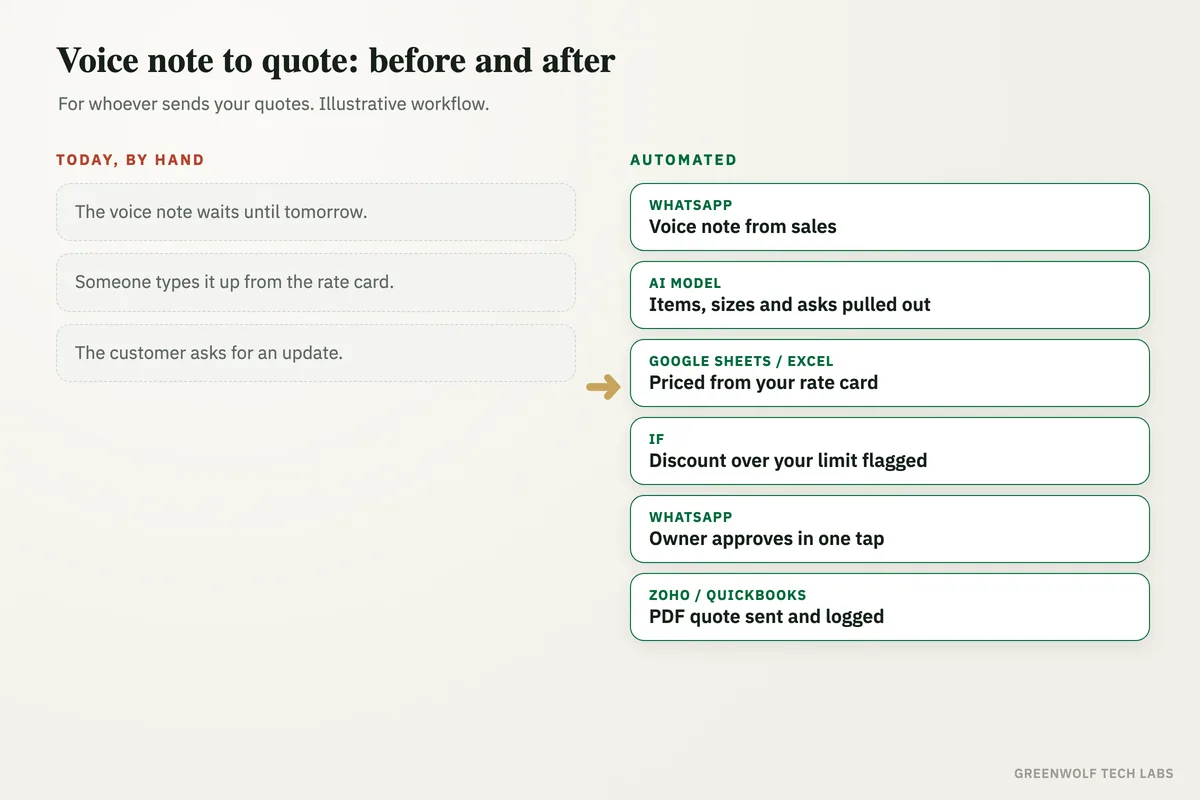
What gets automated
Picking up the voice note
The salesperson sends a voice note or a quick text on WhatsApp, as they already do, naming the customer and what they want.
- Voice note
- Text or photo
- Any language mix
Pulling out the items
AI writes out the note and lists each item, quantity, size, colour, delivery date and any special request, so nothing said on the call is lost.
- Items and quantities
- Dates
- Special requests
Pricing from your rate card
Every line is priced from your own rate card or price list in Google Sheets, Excel or your accounting software, never from a guess.
- Your prices only
- Taxes added
- Delivery and fitting
Flagging what breaks your rules
A discount over your limit, an item not on the rate card or a missing detail is flagged with a short reason before anything is sent.
- Discount limits
- Unknown items
- Missing details
One-tap approval
The draft arrives on your WhatsApp with the total and any flags. Approve it, change the discount or send it back to the salesperson.
- Approve
- Edit
- Send back
PDF sent and logged
The approved quotation goes to the customer as a PDF by WhatsApp or email and is logged, so follow-ups can start and no quote goes cold.
- Branded PDF
- Quote number
- One quote log
How the workflow runs
WhatsApp: the voice note comes in
The salesperson sends a voice note to the business number after a visit or call. The message arrives through the WhatsApp Business API, via a provider such as WATI or Twilio.
AI model: items and requests pulled out
A speech-to-text step writes out the note, and ChatGPT or Claude lists the customer, each item, quantity, size, delivery date and anything the customer asked for.
Google Sheets or Excel: priced from the rate card
Each line is matched to your rate card and priced, with taxes, delivery and fitting added. Items that are not on the card are marked, not guessed.
If step: anything outside your rules
A discount above your limit, an unknown item or a missing detail such as a size or date is flagged with a short reason for you to decide.
WhatsApp: you approve in one tap
The draft with its total and flags comes to the owner or sales head on WhatsApp. One tap approves it; a reply changes it or sends it back to the salesperson.
Zoho, QuickBooks or Tally: PDF sent and logged
The quotation is created with its own number in your accounting or CRM software, sent to the customer as a PDF by WhatsApp or email, and logged so follow-ups can start.
Who it is for
What you need to start
You keep the tools you already use: WhatsApp for the salesperson's notes, your rate card in Google Sheets or Excel, and quotations in Zoho, QuickBooks, Tally or a Google Docs template. The workflow runs on n8n, Make or Zapier, a speech-to-text step and an AI model such as ChatGPT or Claude read the note, and WhatsApp messages run through the WhatsApp Business API with a provider such as WATI or Twilio.
The most important part of the build is your pricing rules: how the rate card is organised, which items have size or quantity breaks, what discount each person may give, and what must always be on a quotation. We test the workflow on your past voice notes and quotations until its drafts match what your team would have sent. Once quotes go out the same day, quote follow-up automation can chase the quiet ones until the customer says yes or no.
A typical build is planned around your real rate card and quotations, tested on past notes, and goes live over a few weeks.
Questions about AI quotation generators
What is an AI quotation generator?
Can AI understand a WhatsApp voice note?
Will the AI make up prices?
Does it work with Zoho, QuickBooks and Tally?
Can I control discounts?
How many quotations are waiting to be typed right now?
Book a digital audit. We will look at how your team quotes today and show what a voice note to quotation system would look like on your own rate card.
Part of our Sales and Marketing Automation hub. Start with our marketing automation services.