

Templates and trackers
OSHA 300 Log in Excel: 300, 300A and 301 Recordkeeping
OSHA 300 log in Excel with an automatic 300A summary, 301 details and TRIR and DART rates, plus 1904 rules: what to record, 7 days, posting and ITA.
For safety managers, HR and small business owners
OSHA 300 Log Excel Workbook
$19USD · one-time purchase · instant download
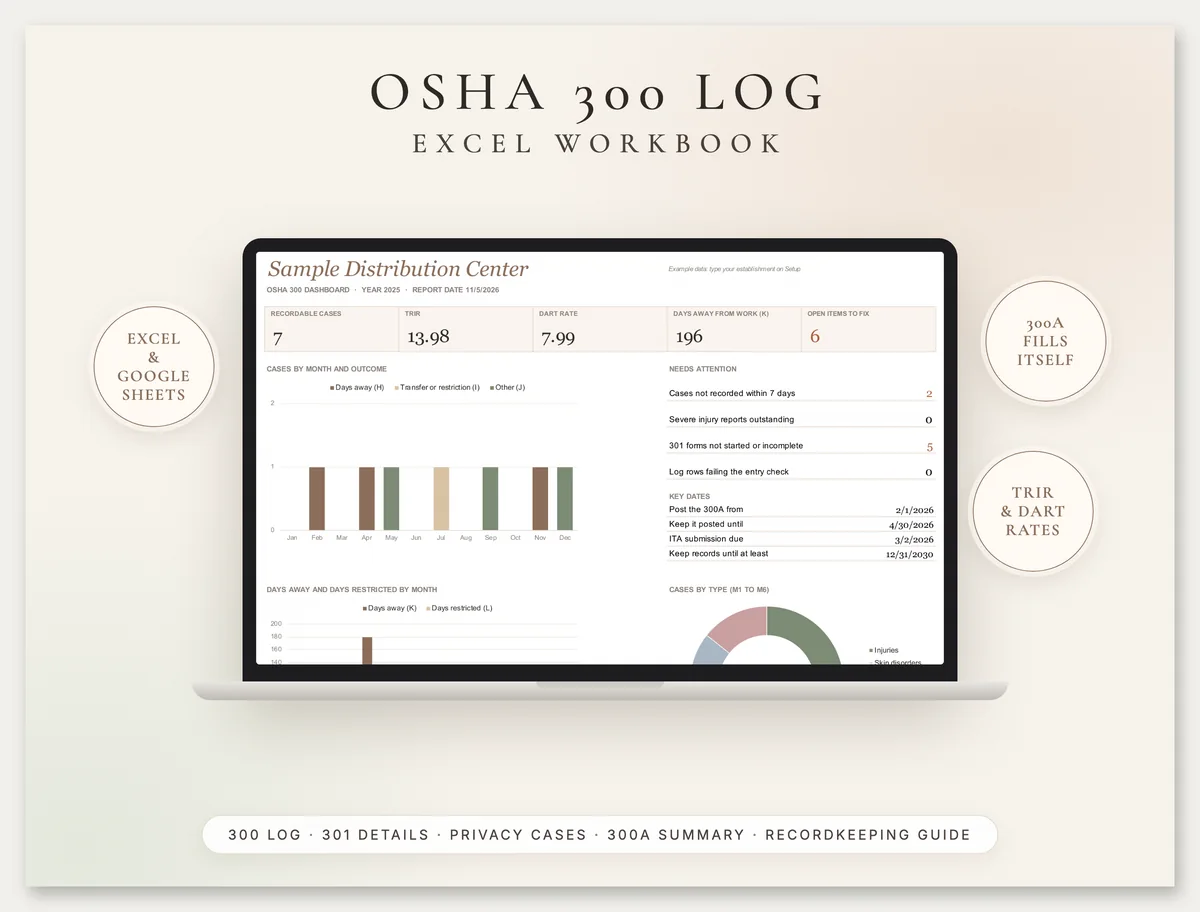
Keep your OSHA 300 log in Excel or Google Sheets with every column from A to M, the 301 details for each case and a separate privacy case list, and let the workbook total the 300A summary and work out your TRIR and DART rates.
- 300 log with OSHA columns A to M: pick the most serious outcome and the type, and the G to M columns fill in, with the 180-day cap applied
- 7-day recording check, entry checks and 8-hour and 24-hour severe injury reporting flags on every case
- 301 details tab with the Form 301 fields and a Complete or Incomplete status for each case
- Automatic 300A summary: column totals, annual average employees, total hours, TRIR, DART and days away rates
- Hours and employees worksheet by pay period, the same method as OSHA's own worksheet
- Setup that tells you whether you must submit through OSHA's Injury Tracking Application, plus a 4-page recordkeeping guide (PDF)
You get: Excel workbook · Google Sheets-ready · 4-page recordkeeping guide (PDF, US Letter)
Secure checkout by Razorpay. Cards accepted worldwide, charged in US dollars. Files arrive on screen and by email. Refund policy
02
What is the OSHA 300 log?
The OSHA 300 log, the Log of Work-Related Injuries and Illnesses, is the record US employers covered by 29 CFR Part 1904 keep of every recordable work-related injury and illness at an establishment: one line per case, with the outcome, days away or restricted, and the type of injury or illness.
It works with two other forms. The OSHA Form 301 Injury and Illness Incident Report holds the details of each case, and the Form 300A Summary totals the year and is posted for employees from February 1 to April 30. Under 1904.29 you may use the OSHA forms or equivalent forms, and you may keep the records on a computer if it can produce equivalent forms when they are needed, which is what this workbook does.
This page explains who must keep the log, how to decide whether a case is recordable, how to fill in each column, privacy cases, the 300A and its deadlines, electronic submission through OSHA's Injury Tracking Application (ITA) including the rule for establishments with 100 or more employees, and how to calculate TRIR and DART rates. Every rule links to the regulation.
Last reviewed: 30 October 2026.
03
Free printable OSHA 300A year-end checklist (PDF)
Download a page from the recordkeeping guide free: OSHA 300A year-end checklist (PDF, 1 page, US Letter). It lists each task from reviewing the log in January to posting the certified 300A from February 1 to April 30, the March 2 ITA deadline and the 5-year retention rule, with worksheets for the average number of employees, total hours worked and your TRIR and DART rates.
The full product adds the Excel and Google Sheets workbook and the rest of the guide: an is-it-recordable decision page with the complete first aid list, a page on classifying cases, counting days and privacy cases, and an incident information worksheet for collecting 301 details on the day.
04
Who must keep an OSHA 300 log
Most employers with more than 10 employees at any time during the last calendar year must keep OSHA injury and illness records, unless the establishment is in a partially exempt industry.
| Situation | Keep a 300 log? | Rule |
|---|---|---|
| Company had 10 or fewer employees at all times last calendar year (whole company, peak) | No, unless OSHA or BLS tells you in writing | 1904.1 |
| Establishment in an industry listed in appendix A to subpart B | No, unless OSHA or BLS tells you in writing | 1904.2 |
| Everyone else covered by the OSH Act | Yes, a separate log for each establishment expected to operate for a year or longer | 1904.29, forms instructions |
| Any employer, including partially exempt ones | Report a work-related fatality within 8 hours, and an in-patient hospitalization, amputation or loss of an eye within 24 hours | 1904.39 |
The size exemption is based on the whole company's peak employment; the industry exemption applies establishment by establishment. Use the NAICS code for each establishment to check the appendix. State Plan states can have their own recordkeeping rules, so check yours as well.
05
Is it recordable? The four questions
Under 1904.4, record a case if it is a work-related injury or illness, a new case, and meets a general recording criterion or one of the specific criteria for needlesticks, medical removal, hearing loss or tuberculosis.
- Work-related? An event or exposure in the work environment caused or contributed to it or significantly aggravated a pre-existing condition. It is presumed work-related unless an exception in 1904.5(b)(2) applies.
- New case? Not a continuation of a case you already recorded.
- General criteria (1904.7): death, days away from work, restricted work or job transfer, medical treatment beyond first aid, loss of consciousness, or a significant injury or illness diagnosed by a physician or other licensed health care professional, which always includes cancer, chronic irreversible disease, a fractured or cracked bone and a punctured eardrum.
- First aid only? Not recordable. First aid is a complete list of 14 treatments, including non-prescription medication at non-prescription strength, tetanus shots, cleaning wounds, bandages and Steri-Strips, hot or cold therapy, non-rigid supports, removing splinters by simple means, finger guards, massages and drinking fluids for heat stress. Sutures, staples, prescription medication, rigid splints and physical therapy are medical treatment.
Once a case is recordable, you have seven calendar days from receiving the information to enter it on the 300 log and complete the 301 details.
06
How to fill in the OSHA 300 log, column by column
Each line of the log is one case. Classify it by the single most serious outcome, from G (death, the most serious) to J (other recordable cases, the least).
| Column | What to enter | In the workbook |
|---|---|---|
| (A) Case no. | A number that matches the 301 for the case | You type it; the 301 tab looks the case up by this number |
| (B) Employee's name | The name, or Privacy case for a privacy concern case | Flags a privacy case that still shows a name |
| (C) to (F) | Job title, date of injury or onset, where it happened, and a description: injury or illness, body part and object or substance | Gold input columns |
| (G) to (J) | One check only: death, days away from work, job transfer or restriction, other recordable case | Choose the outcome from a list; the check marks fill in |
| (K) and (L) | Calendar days away and days of transfer or restriction, starting the day after the injury; you may stop at 180 days in total | Applies the 180-day cap to the two columns combined |
| (M) 1 to 6 | Injury, skin disorder, respiratory condition, poisoning, hearing loss, or all other illnesses | Choose the type; one check fills in |
If the outcome changes, for example a restricted-work case turns into days away, update the line. Stored logs must be updated for 5 years for newly discovered cases and changed classifications (1904.33).
07
Privacy concern cases
For a privacy concern case, do not enter the employee's name on the 300 log: write Privacy case instead, and keep a separate confidential list of case numbers and names (1904.29(b)(6)). The list is complete; no other case types qualify:
- An injury or illness to an intimate body part or the reproductive system
- An injury or illness resulting from a sexual assault
- Mental illnesses
- HIV infection, hepatitis or tuberculosis
- Needlestick injuries and cuts from sharp objects contaminated with another person's blood or other potentially infectious material
- Other illnesses, if the employee voluntarily asks for the name to be left off
If the description could still identify the person, you may describe the case more generally, as long as it shows the cause and general severity. The workbook keeps the confidential list on its own tab and checks that each listed case shows Privacy case on the log. Employees, former employees and their representatives can ask for a copy of the log, which you must give by the end of the next business day (1904.35).
08
OSHA 300A summary: certify, post and submit
At the end of each year, review the log, total it on the Form 300A, have a company executive certify it, and post it from February 1 to April 30 (1904.32). Every establishment covered by Part 1904 completes the summary, even with no cases, by writing zeros.
| Step | Deadline or rule |
|---|---|
| Review the log and correct it | End of the calendar year |
| Annual average employees and total hours worked | Average = employees paid in all pay periods divided by the number of pay periods, rounded up; hours actually worked, not paid leave |
| Certify | An owner (sole proprietorship or partnership), a corporate officer, the highest ranking official at the establishment, or that person's immediate supervisor |
| Post | No later than February 1, kept up until April 30, where employee notices are usually posted |
| Submit electronically, if required | By March 2 through the Injury Tracking Application (1904.41) |
| Keep | Log, privacy case list, 300A and 301s for 5 years after the end of the year (1904.33) |
Who submits through ITA. Establishments with 20 to 249 employees at any time in the previous year in an industry listed in appendix A to subpart E, and all establishments with 250 or more employees that must keep records, submit their 300A data every year. Since a final rule effective 1 January 2024 (88 FR 47254), establishments with 100 or more employees in an industry listed in appendix B to subpart E also submit information from their 300 and 301 forms, without employee names or addresses. Part-time, seasonal and temporary workers each count as one employee. OSHA does not accept forms by email or mail. The workbook is your organiser: you still sign and post the official Form 300A and type or upload the data into ITA yourself.
09
How to record a case in 5 steps
Decide if it is recordable
Work-related, a new case, and beyond first aid or another general criterion. If it is a death, or an in-patient hospitalization, amputation or eye loss, report it to OSHA within 8 or 24 hours as well.
Enter it within 7 days
Add a line to the 300 log with the case number, name (or Privacy case), job title, date, place and description. The 7-day status shows the record-by date.
Classify the outcome and type
Choose the most serious outcome and the injury or illness type. Enter days away and restricted days as calendar days from the day after the injury.
Complete the 301 details
Fill in the 301 fields for the same case number: what the employee was doing, what happened, the injury and the object or substance, treatment and times.
Keep it up to date
Update the days when the employee returns, change the outcome if it gets more serious, and check the dashboard for overdue items.
10
Worked example: TRIR and DART for a 50-person warehouse
Sample figures, for illustration only. A distribution center paid 1,286 employee-pay-periods across 26 biweekly pay periods in 2025, so its annual average is 1,286 / 26 = 49.46, rounded up to 50 employees. Payroll shows 100,115 hours actually worked.
- Seven recordable cases: three with days away (H), one with job transfer or restriction (I) and three other recordable cases (J).
- One fractured foot kept an employee off for 200 days. The log counts 180 (the cap), and because the cap is on the two day columns combined, that case's 30 restricted days are not counted. Total days away (K): 12 + 180 + 4 = 196.
- TRIR = 7 x 200,000 / 100,115 = 13.98 recordable cases per 100 full-time workers.
- DART = (3 + 1) x 200,000 / 100,115 = 7.99.
- With 58 people employed at some point in the year and an appendix A industry, the establishment submits its 300A data through ITA by 2 March 2026. It is under 100, so 300 and 301 data are not routinely required.
The 200,000 in the formula is 100 employees working 40 hours a week for 50 weeks, as the OSHA forms package explains. Compare your rates with BLS injury and illness rates for your industry. These are the exact sample rows in the workbook, so you can check every figure before you enter your own.
11
Common OSHA 300 log mistakes
12
What is inside
300 Log and 301 Details
1,000 cases a year with OSHA columns A to M, automatic G to M check marks, the 180-day cap, a 7-day check and the Form 301 fields per case.
Privacy Cases
The separate confidential list of names for privacy concern cases, with a check that the log shows Privacy case.
300A Summary and rates
Every 300A total, average employees and hours from the pay-period worksheet, TRIR, DART and days away rates, and your posting and ITA dates.
Dashboard and guide
Rates, cases by month and anything overdue, plus a 4-page PDF guide with the recordability questions and the year-end checklist.
13
Related templates and services
Browse all our compliance templates and record kits. If you track incidents across several sites and want them in one system with mobile reporting and approvals, we also build custom safety and incident apps in AppSheet.
14
OSHA 300 log questions
Can I keep the OSHA 300 log in Excel?
What is the difference between OSHA 300, 300A and 301?
How long do I have to record an injury on the 300 log?
When must the OSHA 300A be posted?
Who has to submit OSHA 300A data electronically?
How long do OSHA 300 logs have to be kept?
How do you calculate TRIR and DART?
15
Important
This workbook organises and totals your injury and illness records. It is not the official OSHA form and not legal advice. A company executive must still certify and post the official OSHA Form 300A, and if you are required to submit, you must do so through OSHA's Injury Tracking Application. Rules quoted are from 29 CFR Part 1904 as read on eCFR on 30 October 2026 and the OSHA forms package; State Plan states can have additional requirements. Greenwolf Tech Labs is not affiliated with OSHA or any government agency. See our terms and refund policy.
Part of our Compliance Templates hub. Start with our compliance templates.
Compliance Templates
More on compliance templates
RFI Log Template, Submittal Log and Change Order Log (Excel)
RFI log template with submittal log and change order log for Excel and Google Sheets: due dates, ball in court, at-risk submittals and contract sum.
Controlled Substance Log and Narcotic Count Sheet
Controlled substance log and free narcotic count sheet (PDF): running balance, witnessed waste and a DEA biennial inventory sheet under 21 CFR 1304.
Food Cost Calculator and Recipe Costing Template (Excel)
Food cost calculator and recipe costing template for Excel and Google Sheets: yield, plate cost, food cost % formula, menu pricing and menu engineering.
Forklift Inspection Checklist (OSHA Daily, Free PDF)
Free forklift inspection checklist (PDF) for electric and LPG trucks, plus OSHA 1910.178 rules: daily checks, out of service and 3-year evaluations.
Fridge Temperature Log: Printable Sheets and Workbook
Free printable fridge temperature log (PDF) plus a freezer and food temperature log workbook in °F or °C. FDA 41 °F and FSA 8 °C rules explained.
Tell us where the week goes
A senior consultant will map where the time goes, name what is worth automating and what it takes. No obligation after it.