

Templates and trackers
RFI Log Template, Submittal Log and Change Order Log (Excel)
RFI log template with submittal log and change order log for Excel and Google Sheets: due dates, ball in court, at-risk submittals and contract sum.
For general contractors, project managers, engineers and owner's reps
Construction RFI Log, Submittal Log and Change Order Log Pack
$29USD · one-time purchase · instant download
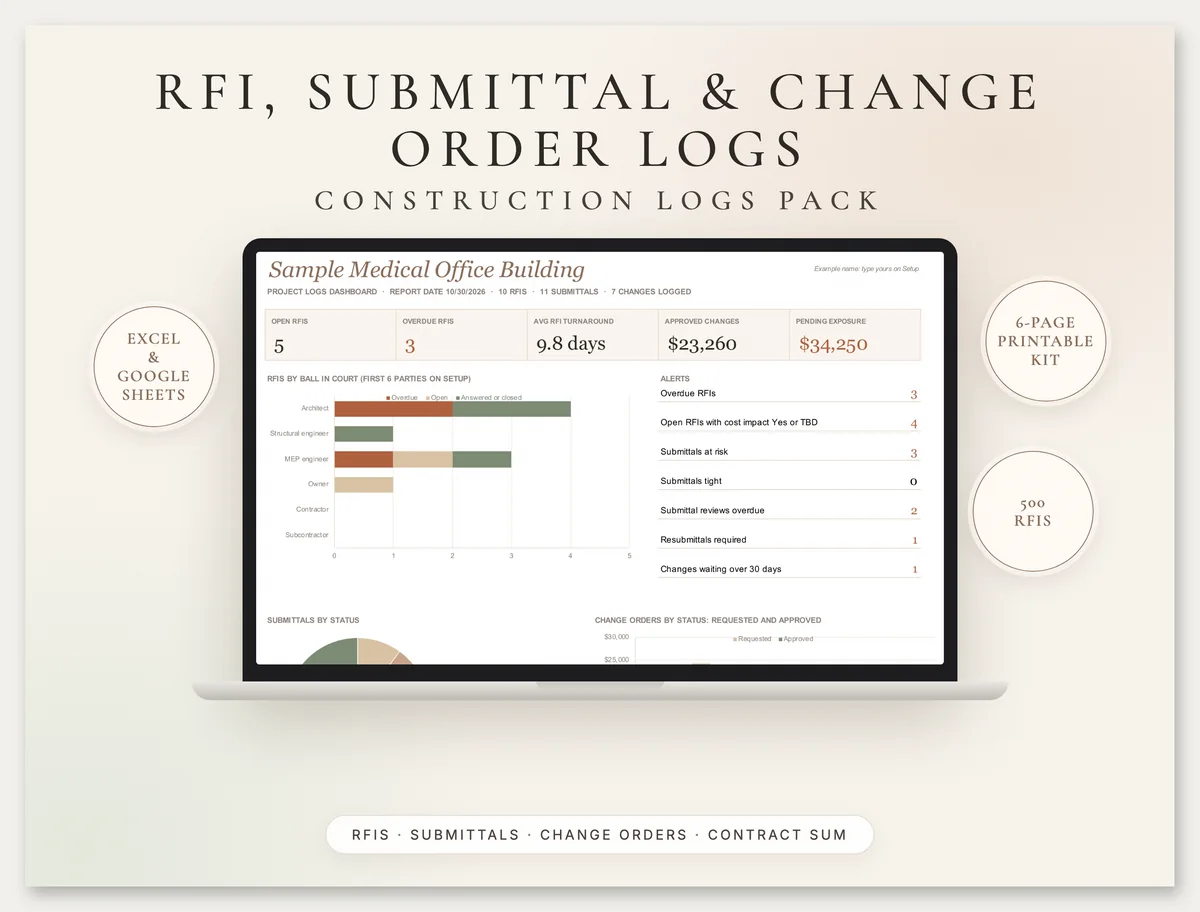
Three linked construction logs in one workbook. Every RFI gets a due date, days open and an overdue flag; every submittal gets a review due date and a forecast on-site date against when it is needed; every change rolls into a running contract sum. The dashboard shows who holds the ball.
- RFI log for 500 RFIs: spec section, drawing, ball in court, required-by date, response, cost and schedule impact, days open and overdue flag
- Submittal log (register) for 500 submittals and revisions with review due dates, review actions, lead times and an at-risk flag against the need-on-site date
- Change order log for 300 changes tracking PCO, COR and CO numbers, CCDs, requested vs approved amounts and days, and the running contract sum
- Dashboard: open and overdue RFIs by party, average turnaround, submittals at risk, approved changes, pending exposure and revised contract sum and time
- Setup tab for the parties and your project manual's spec sections, feeding every dropdown
- 6-page printable kit: RFI form, RFI log, submittal log, change order request form and change order log
You get: Excel workbook · Google Sheets-ready · 6-page printable PDF (US Letter)
Secure checkout by Razorpay. Cards accepted worldwide, charged in US dollars. Files arrive on screen and by email. Refund policy
02
What is an RFI log?
An RFI log is the running list of every request for information on a construction project: what was asked, when, which spec section and drawing it concerns, who owes the answer, when it is due, when it was answered and whether the answer affects cost or schedule. It is how a contractor proves questions were asked in time.
It sits beside two other logs. The submittal log, often called a submittal register, tracks shop drawings, product data and samples through review so materials can be ordered in time. The change order log tracks every potential change from first notice through pricing to a signed change order, with the effect on the contract sum and time. Problems in one usually show up in the others: a slow RFI answer holds a submittal, and an answer that changes the design becomes a change order.
This page explains how AIA's standard general conditions describe RFIs, submittals and changes, which dates to track, how to flag a submittal that will arrive late, and how PCO, COR and CO numbers fit together. The template puts all three logs and a dashboard in one Excel and Google Sheets workbook.
Last reviewed: 30 October 2026.
03
Free construction RFI template (PDF)
Download the RFI form from the kit for free: construction RFI template (PDF, 1 page, US Letter). It has fields for the project, RFI number, date, who it is to and from, spec section, drawing reference and response-required-by date, boxes for the question, a suggested solution and the response, possible cost and schedule impact, and sign-off lines for both sides.
The paid pack adds the workbook with the RFI log, submittal log and change order log, which calculate due dates, days open, overdue flags, at-risk submittals and the running contract sum, plus printable RFI, submittal and change order logs and a change order request form.
04
RFIs, submittals and change orders in AIA A201
AIA Document A201-2017, the General Conditions of the Contract for Construction, is the standard terms used on many US projects. It treats RFIs, submittals and changes as three separate processes, and only Article 7 changes the contract sum or time. The summary below describes the published 2017 edition by section number; it does not reproduce the text, which is licensed from AIA (A201-2017 at AIA Contract Documents). Your own contract may modify any of it.
| Topic | A201-2017 section | What it covers |
|---|---|---|
| Errors and omissions found by the contractor | 3.2.2, 3.2.3 | The contractor compares the documents and reports errors, inconsistencies, omissions and code nonconformities it finds, as a request for information |
| Cost or time from an RFI answer | 3.2.4 | If a clarification adds cost or time, the contractor submits a claim under Article 15 |
| Answering RFIs | 4.2.14 | The architect reviews and responds in writing, within any agreed time limits or otherwise with reasonable promptness, and may issue supplemental drawings |
| Submittal schedule | 3.10.2 | The contractor submits a submittal schedule for approval, coordinated with the construction schedule and allowing the architect reasonable review time |
| Shop drawings, product data and samples | 3.12.1 to 3.12.5 | Defines the three, states they are not contract documents, and has the contractor review, approve and submit them per the schedule |
| Architect's review | 4.2.7 | Review is for the limited purpose of checking conformance with the design concept, per the submittal schedule or with reasonable promptness |
| Deviations in submittals | 3.12.8 | Approval of a submittal does not approve a deviation unless it was flagged and accepted as a minor change, change order or CCD |
| Ways to change the work | 7.1.1, 7.1.2 | Change Order (owner, contractor and architect agree), Construction Change Directive (owner and architect) or order for a minor change (architect alone) |
| Change Order and CCD | 7.2.1, 7.3.1 | A change order records agreement on the change, the sum and the time; a CCD directs a change before that agreement |
| Minor changes | 7.4 | Written orders consistent with the documents that do not change the sum or time |
AIA's own guidance names the forms: G701 for a change order and G714 for a construction change directive (AIA: change orders vs CCDs). The terms PCO (potential change order) and COR (change order request), and submittal stamps such as Approved as noted or Revise and resubmit, are common industry practice rather than A201 definitions; A201 says the architect will review and approve or take other appropriate action.
05
Submittal log: review times, lead times and the at-risk flag
A submittal is late when the date it is approved plus the supplier's lead time falls after the date the item is needed on site. The submittal log works that out for every live submittal and flags it At risk, or Tight when it is within a buffer you set.
| Date or field | How the template uses it |
|---|---|
| Sent for review | Starts the review clock; review due = sent + your default review days, or a date you type |
| Returned and review action | Approved, Approved as noted and For information only close the item; Revise and resubmit or Rejected means a new revision row |
| Revision | Each resubmittal is a new row with the same number; only the latest revision counts toward open items and risk |
| Lead time | Days from approval to delivery, from the supplier |
| Needed on site | From your schedule: when the item must be on site to avoid delay |
| Forecast on site | Approved: return date + lead time. In review: later of today and the review due date + lead time. Not sent or to be resubmitted: today + a full review + lead time |
| Order by | Needed on site - lead time: the last day approval can arrive |
Number submittals by specification section so the register lines up with the project manual. CSI MasterFormat numbers sections in pairs of digits for division, section and subsection, so 08 71 00 is a section in Division 08, Openings. The Whole Building Design Guide describes the structure: at least 6 digits and up to 10, organized in 50 divisions (WBDG on MasterFormat); the current numbers and titles are published by CSI (CSI MasterFormat). The template's sample sections are examples: type in the ones from your own specifications.
06
How to run the three logs each week
Log every question the day it goes out
Give it the next RFI number, the spec section and drawing, who holds the ball and the date you need the answer, from the contract or the schedule.
Chase by ball in court
Before the weekly meeting, sort open RFIs by party and days open. The dashboard lists overdue RFIs and who owes them.
Build the submittal register early
List every submittal the specifications call for with lead times and need dates as soon as you have the schedule, not when the sub sends it.
Open a PCO for anything that may cost money
When an RFI answer, owner request or site condition may change cost or time, open a PCO, price it as a COR and track it until a change order or CCD is signed.
Report the numbers
Print the dashboard for the owner-architect-contractor meeting: open items, at-risk submittals, approved and pending changes and the revised contract sum.
07
Worked example: a sample medical office building
Sample data, included in the workbook with a report date of 10/30/2026. The project has an original contract of $4,850,000 and 420 days, a 7-day default RFI response time and 14-day submittal reviews.
- RFIs: 10 logged, one void. 5 are open, 3 of them overdue; RFI-005 on the elevator shaft wall rating was sent 9/30, was due 10/7 and has been open 30 days. Answered RFIs took 9.8 days on average.
- Submittals: structural steel went back for revision, and rev 1 was approved as noted on 9/16; with a 42-day lead time it is forecast on site 10/28/2026, ahead of the 11/16 need date. The door hardware schedule has been in review since 10/1 with a 56-day lead time, so its forecast is 12/25/2026 against a need date of 12/7: At risk. The panelboards have not even been sent, and 14 days of review plus 70 days of lead time puts them at 1/22/2027 against 1/18/2027. 3 submittals are at risk in all.
- Changes: two change orders add $17,900 and $9,860 and an allowance credit removes $4,500, so approved changes total $23,260 and the revised contract sum is $4,873,260. A further $34,250 is pending: one COR submitted, one change proceeding under a CCD and one still being priced.
The meeting agenda writes itself: chase the architect on the overdue RFIs, get the door hardware and panelboards approved this week or find shorter lead times, and settle the price of the CCD work.
08
Common RFI, submittal and change order log mistakes
09
What is inside
RFI Log
500 RFIs with due dates from your default response time or an override, days open, overdue flags, turnaround, cost and schedule impact and related PCO.
Submittal Log
500 submittals and revisions with review due, review action, latest-revision logic, forecast on-site date, order-by date and At risk or Tight flags.
Change Order Log
300 PCOs with COR and CO numbers, CCD status, requested vs approved amounts and days, days waiting and running contract sum and time.
Dashboard and printable kit
Open and overdue items by party, contract summary, change status table and risk lists, plus a 6-page US Letter kit.
10
Related templates and services
Browse all our compliance templates and record kits. Contractors who want site updates from WhatsApp turned into a daily report can see our construction daily report automation, and firms that want RFIs and submittals on phones with photos and notifications can have a custom construction app built in AppSheet.
11
RFI, submittal and change order log questions
What should an RFI log include?
What is the difference between an RFI and a change order?
What is a submittal log or submittal register?
What do PCO, COR and CO mean?
How long does the architect have to answer an RFI?
How are spec sections numbered?
Does it work in Google Sheets?
12
Important
These logs help you track RFIs, submittals and changes. They are not legal advice and do not change your contract: notice periods, review times and change procedures in your own contract documents govern, and any claim should follow your contract's procedure. The AIA sections described here are from the 2017 edition of A201; your contract may modify them. Greenwolf Tech Labs is not affiliated with the American Institute of Architects or the Construction Specifications Institute. See our terms and refund policy.
Part of our Compliance Templates hub. Start with our compliance templates.
Compliance Templates
More on compliance templates
Food Cost Calculator and Recipe Costing Template (Excel)
Food cost calculator and recipe costing template for Excel and Google Sheets: yield, plate cost, food cost % formula, menu pricing and menu engineering.
OSHA 300 Log in Excel: 300, 300A and 301 Recordkeeping
OSHA 300 log in Excel with an automatic 300A summary, 301 details and TRIR and DART rates, plus 1904 rules: what to record, 7 days, posting and ITA.
Rent Roll Template (Excel and Google Sheets) with Example
Rent roll template for Excel and Google Sheets with a worked example: what a rent roll is, the fields lenders require, occupancy and arrears aging.
Controlled Substance Log and Narcotic Count Sheet
Controlled substance log and free narcotic count sheet (PDF): running balance, witnessed waste and a DEA biennial inventory sheet under 21 CFR 1304.
Fridge Temperature Log: Printable Sheets and Workbook
Free printable fridge temperature log (PDF) plus a freezer and food temperature log workbook in °F or °C. FDA 41 °F and FSA 8 °C rules explained.
Tell us where the week goes
A senior consultant will map where the time goes, name what is worth automating and what it takes. No obligation after it.