

Why attendance turns into an argument every month
Staff attendance automation records when each person starts and ends the day, spots who is late or missing while there is still time to act, and gives payroll a finished attendance sheet at month-end, without anyone keeping a register by hand. Every business with staff tracks attendance somehow: a biometric machine at the door, a paper register, a "reached" message in the team WhatsApp group, or the manager's memory.
The trouble is that none of these talk to each other. The machine's data sits in its own software until someone exports it. The WhatsApp messages scroll away. Field staff and people at a second site are not on the machine at all. Nobody notices that a shop counter is empty at 10:30 until a customer complains. And at month-end someone spends two days adding up late marks, half days and overtime, then has the same argument with three people about what the numbers say.
This workflow keeps the habit your team already has. Staff still punch in on the machine or send a check-in on WhatsApp. The system puts every check-in on one register, compares it with the shift and the approved leave, tells the manager by mid-morning who is late or absent, sends the owner a one-line summary, and closes the month with days worked, late marks and overtime ready for payroll.
What gets automated
Check-ins from every place on one register
Punches from the biometric machine, WhatsApp check-ins with live location and entries from a simple form all land on one register with the name, time and place.
- Biometric export
- Google Forms
Shifts compared automatically
Each check-in is compared with that person's shift, so late arrivals, early exits, half days and overtime are marked the same way for everyone.
- Google Sheets
- Excel
Late and absent flagged by mid-morning
Anyone who has not checked in a set time after their shift starts gets a polite WhatsApp, and the manager sees who is missing while cover can still be arranged.
Leave and holidays taken out first
Approved leave, weekly offs and public holidays are checked before anyone is marked absent, so nobody gets a wrong late message on a day off.
- Leave register
- Google Calendar
- Outlook
A daily summary for the owner
One WhatsApp message each morning with how many are in, late, absent and on leave, per branch or team, plus a monthly view of patterns.
- Power BI
- Looker Studio
Payroll-ready at month-end
Days worked, paid and unpaid leave, late marks and overtime per person go to payroll as one clean sheet, and each person can see their own record.
- Tally
- QuickBooks
- Zoho Payroll
- Gusto
How the workflow runs
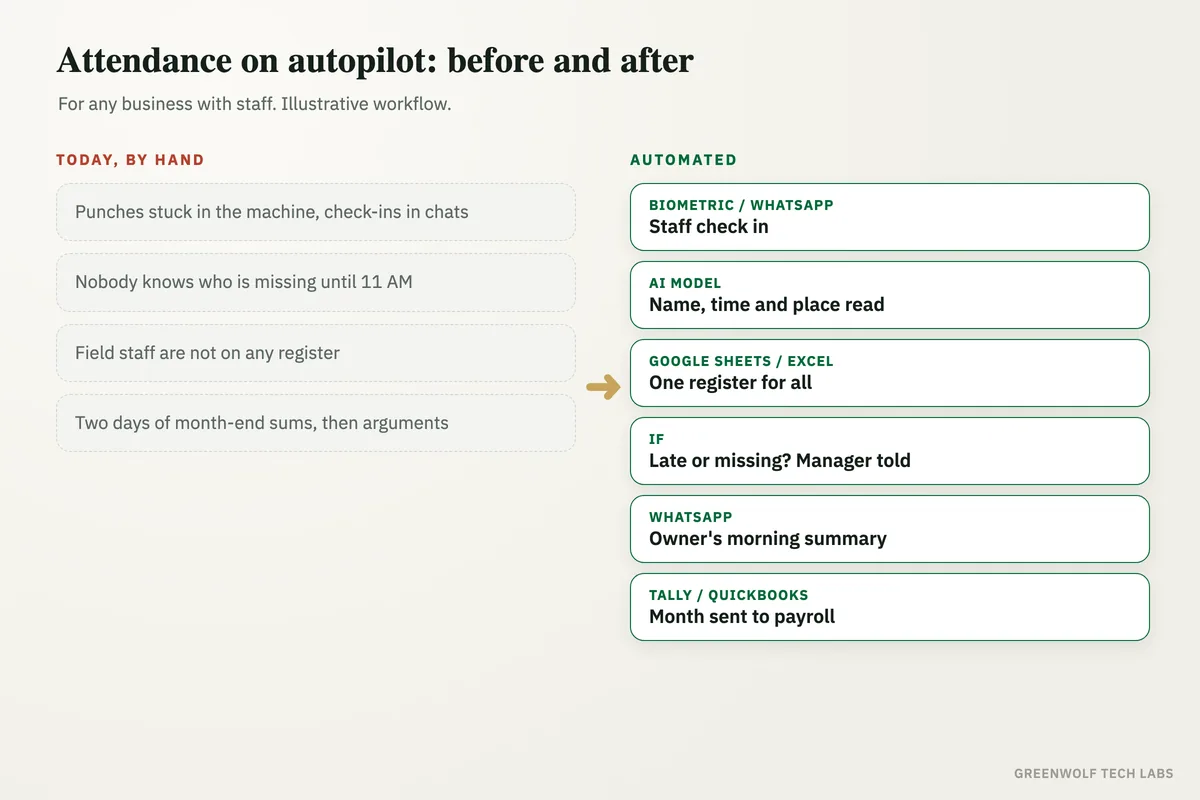
Biometric machine, WhatsApp or form: staff check in
Office and shop staff punch in on the machine as usual. Field staff and people at other sites send "IN" with their live location to your WhatsApp Business number, connected through a provider such as WATI or Twilio, or fill a one-question form.
AI model and rules: each check-in is read
The sender is matched to the staff list by phone number or employee ID. Messages like "reached site, stuck in traffic earlier" are read by ChatGPT or Claude into a time and a note, and a location far from the expected site is marked for a person to check.
Google Sheets or Excel: the register updates
Every check-in and check-out is written to one register with the time, place and source. Machine exports are pulled in on a schedule, so the register shows all staff, not just the ones at the door.
If step: on time, late or missing
Each person is compared with their shift and the approved leave list. On time is simply recorded. Late beyond a grace period gets a late mark. No check-in at all by a set time sends the person a WhatsApp and alerts their manager.
WhatsApp: the owner's morning summary
By mid-morning the owner or branch manager gets one message: in, late, absent and on leave, per team or branch, with names for the last three. A weekly note shows repeat late marks, so a pattern is a conversation, not a surprise.
Month-end: the attendance sheet goes to payroll
On the last day the system totals days worked, half days, paid and unpaid leave, late marks and overtime per person, sends each person their own summary to confirm, and passes the final sheet to Tally, QuickBooks, Zoho Payroll or Gusto.
Who it is for
What you need to start
You keep what you already have: the biometric machine at the door if there is one (most can export punches to Excel or CSV), a WhatsApp Business number connected through a provider such as WATI or Twilio, a staff list with phone numbers and shifts, and Google Sheets or Excel for the register. Payroll stays in Tally, QuickBooks, Zoho Payroll or Gusto. The workflow runs on n8n, Make or Zapier, with an AI model such as ChatGPT or Claude to read free-text messages.
The rules are yours to set: shift times, the grace period, what counts as a half day, when overtime starts, who gets the late alert and what time the owner's summary arrives. If leave requests still come in by chat, leave management automation keeps the leave list this workflow checks against, and expense claim automation handles the other staff paperwork that lands at month-end. Tell staff clearly what is recorded and why; location is only read at check-in, never tracked through the day.
A typical build starts with the register and the morning summary, runs next to your current register for a full pay cycle so the late marks and totals can be compared with your own, and then adds alerts, the month-end sheet and the payroll handover over a few weeks.
Questions about staff attendance automation
What is staff attendance automation?
Can staff mark attendance on WhatsApp?
Does it work with our existing biometric machine?
Is it fair to staff to track location?
Can it send attendance to Tally, QuickBooks or Gusto for payroll?
Do you know who is at work right now, without calling anyone?
Book a digital audit. We will look at how attendance is recorded, checked and paid in your business today, and show what staff attendance automation would look like with your own machines, shifts and payroll.
Part of our Business Process Automation hub. Start with our business automation services.