

Why filing dates still get missed
Tax deadline reminders keep track of every filing date your business has, from GST or sales tax returns to payroll tax, TDS or 1099 forms, advance or estimated tax and licence renewals, and make sure the right person has the right documents before each one is due. Most owners rely on the accountant to remember, and the accountant relies on the owner to send the papers on time. When either side is busy, a date slips, and the business pays a late fee or interest for something that was ready all along.
The dates are not a secret. They repeat every month, quarter or year, and they are written in the tax calendar for your country and state. What goes wrong is the chase around them: the sales register is still with the billing team, the purchase bills are in someone's email, the bank statement was never downloaded, and nobody notices until two days before the deadline.
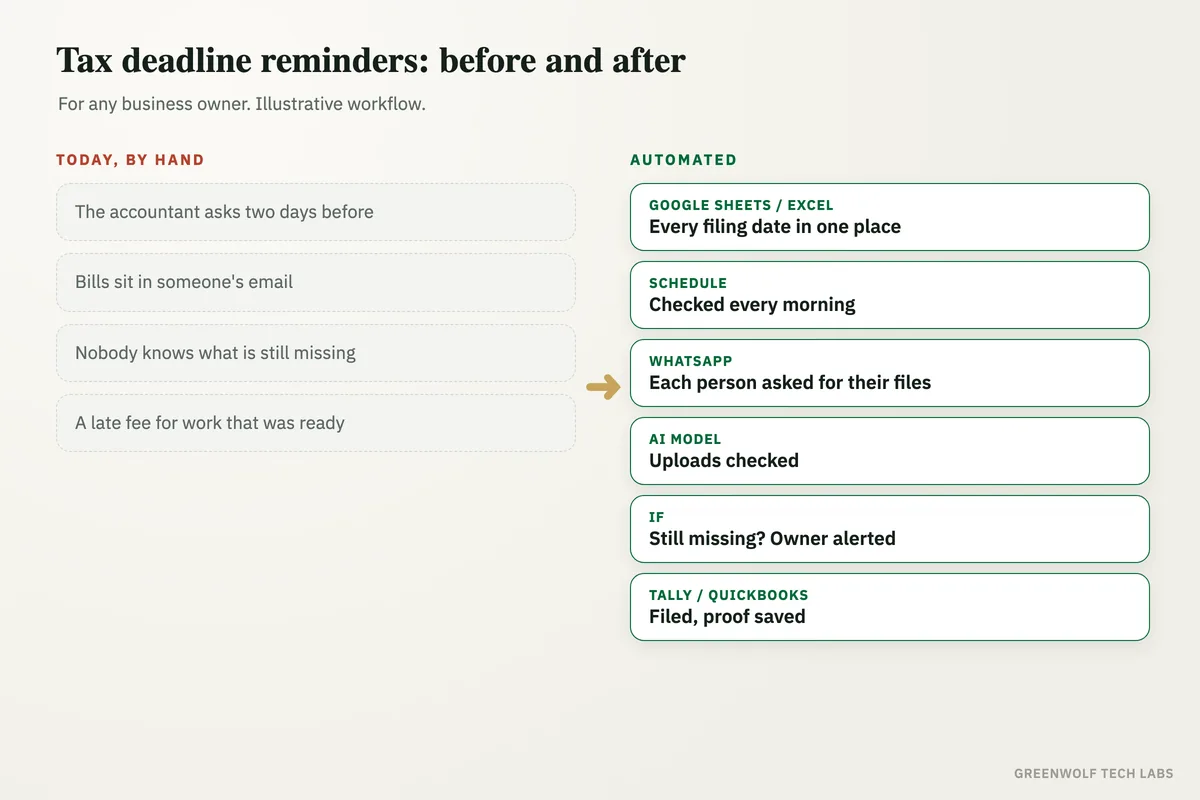
This workflow turns those dates into a calendar that runs itself. It warns the right people well ahead, asks each person for exactly the documents it needs, follows up when they do not arrive, and records when each filing is done with its reference number, so the owner sees one list of what is filed, what is pending and what is at risk.
What gets automated
One calendar of every filing date
GST or sales tax, payroll tax, TDS or 1099, advance or estimated tax, annual returns and licence renewals sit in one sheet with their due dates, who owns them and which documents they need.
- Google Sheets
- Excel
Reminders that start early
The owner of each filing gets a reminder 15, 7 and 2 days before the due date on WhatsApp or email, with the documents still missing listed in the message.
- Gmail
- Outlook
Documents asked for by name
The billing team is asked for the sales register, purchases for the bills, HR for the payroll sheet, each with a date, so the accountant is not left chasing everyone.
- Google Drive
- OneDrive
Uploads checked as they arrive
An AI model reads each uploaded file and checks it is the right document for the right period, and the calendar ticks it off.
- AI model
- Google Drive
Escalation before it is too late
If documents are still missing a few days before the deadline, the owner gets an alert with who has not sent what.
Filed, with proof
When the accountant marks a filing done, the acknowledgement or confirmation number is saved next to it, and the next due date is set for the following period.
- Tally
- QuickBooks
- Zoho Books
- Google Sheets
How the workflow runs
Google Sheets or Excel: the compliance calendar is set up once
Every filing your business has goes in one sheet: what it is, how often it repeats, the due date, who files it, who sends the documents and which documents are needed. Your accountant confirms the list for your country and state.
Schedule: the calendar is checked every morning
Each morning the workflow looks for filings due in the next 15 days and works out which documents are still missing for each one.
WhatsApp or email: each person is asked for their documents
The person who holds each document gets a short message with what to send, for which period, and an upload link to a shared Google Drive or OneDrive folder. Messages go out through a provider such as WATI or Twilio, or by Gmail or Outlook.
AI model: every upload is checked
An AI model such as ChatGPT or Claude reads each file and checks it is the right document for the right month or quarter. A wrong file goes back to the sender with a note; a right one is ticked off in the calendar.
If step: is anything still missing close to the date?
A few days before the deadline, anything still missing is escalated to the owner with the name of the person who has not sent it. When everything is in, the accountant gets one message that the filing is ready to prepare.
Tally, QuickBooks or Zoho: filed and recorded
Once the accountant marks it filed, the acknowledgement or confirmation number and the date are saved, the next period's due date is created, and the owner's weekly summary shows what was filed, what is pending and what is coming up.
Who it is for
What you need to start
You keep the tools you already have: a list of your filings and due dates from your accountant, Google Sheets or Excel for the calendar, a shared Google Drive or OneDrive folder for documents, and your accounting software such as Tally, QuickBooks, Zoho Books or Xero. The workflow runs on n8n, Make or Zapier, with an AI model such as ChatGPT or Claude to check uploads, and sends reminders on WhatsApp through a provider such as WATI or Twilio, or by Gmail or Outlook.
You set the rules: how many days before each date the reminders start, who owns each filing, who must send which document, and when the owner is told. The workflow does not file anything itself; your accountant still prepares and files each return, with everything in hand on time. For the month-end work around it, see accounting workflow automation and the month-end close checklist.
A typical build starts with the calendar and the reminders for your most frequent filings, runs for one cycle next to your accountant's own list so nothing is missed, and then adds document requests, upload checks and the weekly summary.
Questions about tax deadline reminders
What is a compliance calendar for a small business?
How do I get reminders for GST or sales tax due dates?
Can the reminders also collect documents from my team?
Does this replace my accountant?
Does it work for businesses in India and the US?
Do you know every filing date your business has this quarter?
Book a digital audit. We will look at how filing dates and documents are tracked in your business today, between you, your team and your accountant, and show what an automated compliance calendar would look like for your own filings.
Part of our Business Process Automation hub. Start with our business automation services.