

Why owners find out about a cash gap too late
Cash flow forecast automation builds a week-by-week view of the cash coming in and going out of your business for the next 13 weeks, and rebuilds it every Monday from your accounting software and bank, without anyone keeping the spreadsheet by hand. Every owner knows the feeling: sales look good, the books show a profit, and yet salaries are due on Friday and the bank balance does not cover them.
The information to see that coming already exists. Unpaid invoices and their due dates sit in Tally, QuickBooks or Zoho. Supplier bills, rent, salaries, loan payments and tax dates are known weeks ahead. The bank balance is one login away. The trouble is that nobody puts them together often enough. A forecast built once in Excel goes out of date within a week, because a client paid late, a big order came in or a supplier bill arrived early.
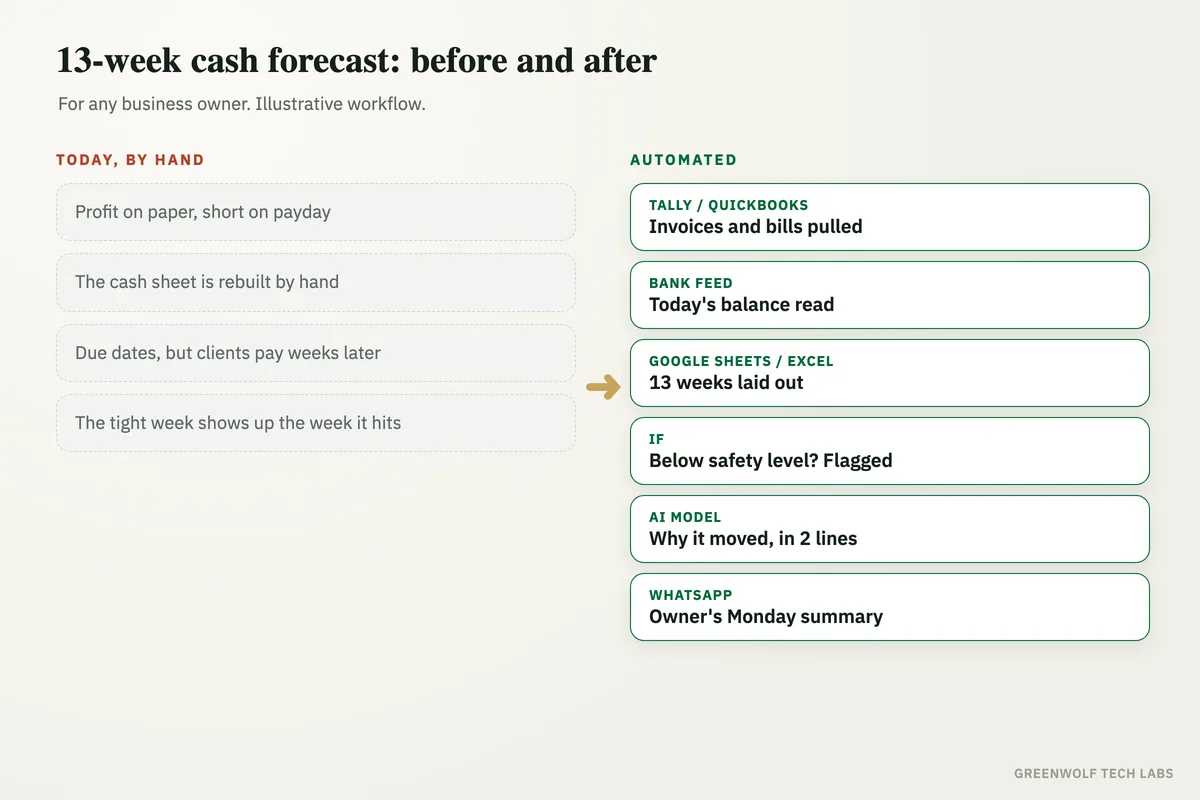
This workflow keeps the forecast current. Every week it pulls what customers owe and when they usually pay, what you owe and when it is due, and what is in the bank, then lays it out week by week. It marks the first week where cash falls below the level you set, tells you why, and sends the owner a short message with the three numbers that matter.
What gets automated
Money in and out pulled every week
Open customer invoices, supplier bills and the bank balance are read from your accounting software and bank every Monday, so the forecast starts from real numbers.
- Tally
- QuickBooks
- Zoho Books
- Xero
Real payment dates, not due dates
Each customer's invoices are placed in the week they usually pay, based on how late they paid before, so the forecast reflects how clients actually behave.
- Google Sheets
- Excel
Fixed costs added on their dates
Salaries, rent, loan payments, subscriptions and GST or sales tax are added on the days they fall due, from a simple list you keep once.
- Google Sheets
- Excel
The tight week flagged early
The first week where cash drops below your safety level is marked, with the invoices and bills that cause it, weeks before it arrives.
Forecast checked against what happened
Last week's forecast is compared with the bank, and the gap is explained in plain words, so the forecast gets more accurate over time.
- AI model
- Google Sheets
A Monday message for the owner
Cash today, the lowest week ahead and the three invoices worth chasing first arrive on WhatsApp or email, with the full sheet a tap away.
- Gmail
- Outlook
- Power BI
How the workflow runs
Tally, QuickBooks or Zoho: open invoices and bills are pulled
Every Monday morning the workflow reads every unpaid customer invoice and supplier bill with its amount and due date from your accounting software, plus the latest bank balance from the bank feed or a statement export.
Google Sheets or Excel: each invoice gets a likely pay week
Past payments are used to work out how many days late each customer usually pays. A client who pays 20 days after the due date is placed 20 days later, not on the date printed on the invoice.
Fixed list: salaries, rent, loans and tax are added
A short list you keep once holds the regular payments and their dates: payroll, rent, loan EMIs, software, GST or sales tax and advance tax. They are added to the right weeks automatically.
The 13-week view is built
Cash in, cash out and the closing balance are laid out for each of the next 13 weeks. Large one-off items, such as a machine purchase or a big order, can be added by hand and stay until they happen.
If step: is any week below the safety level?
If a week drops below the level you set, the workflow marks it and lists what causes it: which invoices are late, which bills cluster that week. An AI model such as ChatGPT or Claude writes a two-line note on why it moved since last week.
WhatsApp or email: the owner's Monday summary
The owner and the accounts head get one message: cash today, the lowest week ahead and its date, and the invoices worth chasing first. Overdue invoices can go straight to your payment reminder workflow.
Who it is for
What you need to start
You keep the tools you already have: your accounting software (Tally, QuickBooks, Zoho Books or Xero) with invoices and bills entered, access to the bank balance through a bank feed or a weekly statement export, and Google Sheets or Excel for the forecast. The workflow runs on n8n, Make or Zapier, with an AI model such as ChatGPT or Claude to write the weekly notes, and sends the summary on WhatsApp through a provider such as WATI or Twilio, or by Gmail or Outlook.
You set the rules: the safety level of cash you never want to go below, which payments are fixed, who gets the Monday message, and how far back to look at customer payment habits. If late invoices are the main cause of tight weeks, payment reminder automation chases them, and vendor payment automation plans which supplier bills to pay each week. For the habits around the forecast, the cash flow checklist lists fifteen to start with.
A typical build starts with the 13-week sheet and the Monday summary, runs next to your accountant's own view for a few weeks so the numbers can be compared, and then adds customer payment habits, the safety alert and the weekly notes.
Questions about cash flow forecast automation
What is a cash flow forecast?
What is a 13-week cash flow forecast?
Can a cash flow forecast be automated from Tally or QuickBooks?
How accurate is an automated cash flow forecast?
How often should a small business update its cash flow forecast?
Do you know your lowest cash week this quarter?
Book a digital audit. We will look at how cash is tracked in your business today, from your books and bank to the sheet someone rebuilds by hand, and show what an automated 13-week forecast would look like with your own numbers.
Part of our Business Process Automation hub. Start with our business automation services.