

Templates and trackers
Vaccine Temperature Log: Printable Sheets and Workbook
Free vaccine temperature log (PDF) and a vaccine fridge log workbook: daily min/max checks, excursion flags and data logger calibration, per the CDC toolkit.
For clinics, pharmacies, practices and school health rooms that store vaccines
Vaccine Temperature Log
$12USD · one-time purchase · instant download
Log the current, minimum and maximum temperature of every vaccine refrigerator and freezer at the start of each workday, flag every excursion, track data logger calibration certificates and record each excursion from discovery to the manufacturer's answer.
- Built-in CDC ranges: refrigerators 2 °C to 8 °C (36 °F to 46 °F), freezers -50 °C to -15 °C, ultra-cold -90 °C to -60 °C, with per-unit overrides
- Daily log that flags an excursion if the current, minimum or maximum is out of range, and asks for an incident reference
- Storage unit and data logger register with calibration certificate due dates and warnings for primary and backup loggers
- Excursion incident log: duration from logger times, vaccines and lots, doses, funding, Do Not Use, who was contacted and the outcome
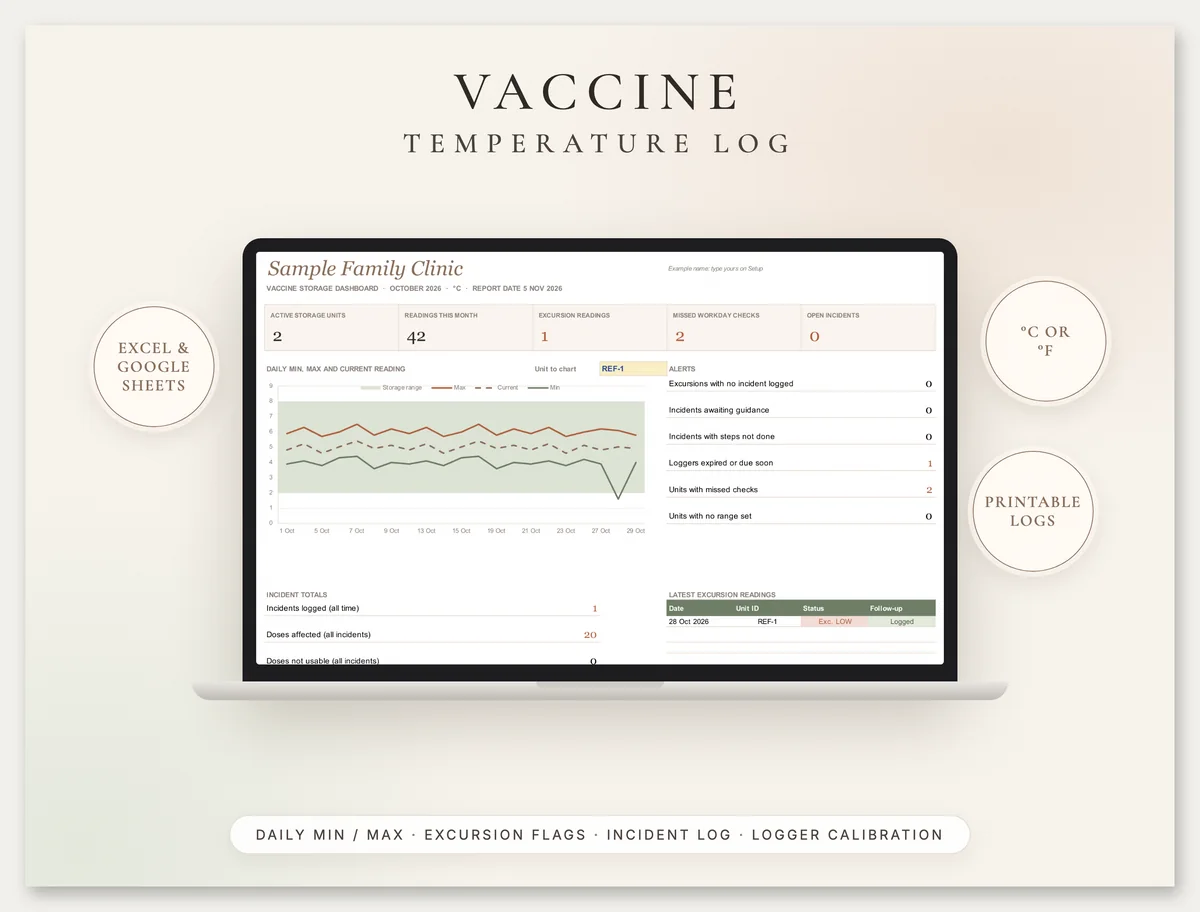
- Monthly summary with missed workday checks, lowest and highest readings and excursions per unit, plus a dashboard
- Printable monthly refrigerator and freezer logs in °F (US Letter) and °C (A4), an excursion report and Do Not Use labels
You get: Excel workbook · Google Sheets-ready · 5-page printable PDF in °F (US Letter) · 5-page printable PDF in °C (A4)
Secure checkout by Razorpay. Cards accepted worldwide, charged in US dollars. Files arrive on screen and by email. Refund policy
02
What is a vaccine temperature log?
A vaccine temperature log is the daily record of each vaccine refrigerator and freezer: the date, time, current temperature, the minimum and maximum since the last reading, who checked, and what was done if any reading fell outside the storage range. It is how a clinic proves the cold chain held, dose by dose.
The CDC Vaccine Storage and Handling Toolkit (updated 14 July 2026) asks providers to check and record minimum and maximum temperatures at the start of each workday and to keep temperature logs for 3 years. In the UK, Green Book chapter 3 asks for the maximum, minimum and current temperature to be recorded at least once each working day. Vaccines exposed to the wrong temperature can lose potency in a way you cannot see, so the log is often the only evidence a dose was stored correctly.
This page explains the ranges, what a compliant daily check looks like, what a digital data logger needs, how to respond to an excursion and a worked example, with links to the CDC and UK sources.
Last reviewed: 30 October 2026.
03
Free printable vaccine temperature log (PDF)
Download one page from the kit for free: the monthly vaccine refrigerator temperature log in °F (PDF, 1 page, US Letter). Each day has columns for time, initials, current, minimum and maximum temperature and a min/max reset tick, end-of-day columns for devices without a min/max display, an excursion box and an action column for the incident reference. The 36 °F to 46 °F range is printed at the top.
The full kit adds the freezer log, the same sheets in °C on A4, a temperature excursion report form, cut-out Do Not Use labels, a data logger calibration record, and the Excel and Google Sheets workbook that flags excursions and tracks calibration certificates.
04
Vaccine storage temperature ranges
The CDC toolkit says storage units must keep refrigerated vaccines between 2 °C and 8 °C (36 °F and 46 °F) and frozen vaccines between -50 °C and -15 °C (-58 °F and +5 °F) at all times, with ultra-cold freezers between -90 °C and -60 °C (-130 °F and -76 °F).
| Unit | Range | Thermostat setting suggested | Source |
|---|---|---|---|
| Refrigerator | 2 °C to 8 °C (36 °F to 46 °F) | Factory setting or midpoint, e.g. 5 °C (41 °F) | CDC toolkit, Section 3; Green Book chapter 3 (+2 °C to +8 °C) |
| Freezer | -50 °C to -15 °C (-58 °F to +5 °F) | Midpoint, e.g. -20 °C (-4 °F) | CDC toolkit |
| Ultra-cold freezer | -90 °C to -60 °C (-130 °F to -76 °F) | Per the manufacturer | CDC toolkit |
Some products have narrower ranges. The CDC gives the example of a frozen RSV vaccine that must stay between -40 °C and -15 °C, so a freezer that holds it alongside other vaccines must not fall below -40 °C. The package insert or EUA fact sheet always wins: the workbook lets you override the range for a single unit.
The CDC says never to use dormitory-style or bar-style combined refrigerator/freezer units for vaccines, even temporarily. The Green Book says specialised pharmaceutical refrigerators must be used and ordinary domestic refrigerators must not.
05
How often to check and what to record
Check and record the minimum and maximum temperatures at the start of each workday. If your device does not show a minimum and maximum, record the current temperature at least twice per workday, at the start and the end. That is the CDC routine; the Green Book's version is the same idea, at the same time every working day.
| Record | CDC toolkit | Green Book chapter 3 |
|---|---|---|
| When | Start of each workday | At least once each working day, same time every day |
| What | Min/max temperature, date, time, name of the person, actions taken for any excursion | Max, min and current temperature, signed entry on a standard form |
| Reset | Reset min/max if your device needs it, per the manufacturer | Reset after each reading (the four Rs: read, record, reset, react) |
| Missed reading | Leave a blank entry in the log | Not specified: leave it blank and note why |
| Review | Review and analyse temperature data at least weekly | React to anything outside +2 °C to +8 °C and document it |
| Keep logs | 3 years; publicly funded providers check program rules | At least one year; five years covers the full storage history |
The CDC also suggests checking the temperature each time vaccines are accessed. The workbook's Daily Log accepts as many rows per day as you need, and only counts missed checks against workdays.
06
Digital data logger requirements
The CDC recommends a digital data logger (DDL) in every vaccine storage unit and transport unit, with at least one backup, because it records temperatures at set intervals and shows how long an excursion lasted. The toolkit lists these features:
- A detachable probe that best reflects vaccine temperature, buffered with glycol, glass beads, sand or Teflon
- An alarm for out-of-range temperatures and a low battery indicator
- A display of current, minimum and maximum temperature, readable outside the unit
- Recommended uncertainty of plus or minus 0.5 °C (1 °F)
- A logging interval you can program
Calibration testing should be done every 2 to 3 years or per the manufacturer's schedule. A certificate of calibration testing should show the model or device name or number, the serial number, the date of calibration, an uncertainty of plus or minus 0.5 °C (1 °F) or less and confirmation the instrument passed. A device that is not accurate within 0.5 °C must be replaced. In the UK, the Green Book asks for at least one max-min thermometer independent of mains power, calibrated annually.
Place the buffered probe in the centre of the vaccines, away from walls, floor, vents and door. The Units and Loggers tab stores each logger's serial number and certificate due date and turns amber before it expires.
07
What to do in a vaccine temperature excursion (CDC steps)
Notify
Whoever hears the alarm or sees the excursion tells the primary or backup vaccine coordinator or a supervisor at once.
Label Do Not Use and separate
Label exposed vaccines as do not use, temperature excursion, keep them in correct storage in a separate container. Do not discard them.
Document
Date and time, unit and room temperature, min/max, the reporter, what happened, how long (from the logger), vaccines and lots, public or private stock, and other items in the unit.
Correct the unit
Follow your SOPs to bring the unit back into range. At minimum, check the probe sits in the centre of the vaccines.
Contact and record the guidance
Contact your immunization program or the manufacturers per your SOP with the logger data. Record what they said and what happened to the vaccines.
08
Worked example: a low excursion overnight
Sample data, for illustration only. A clinic logs a refrigerator (REF-1) and a freezer (FRZ-1) in °C at 8:15 AM each workday from Thursday 1 October.
- Wednesday 28 October: REF-1 shows current 5.0, max 6.1 but min 1.6. The low limit is 2.0, so the Status column shows EXCURSION LOW even though the current reading is fine. That is why the min and max matter: a current-only check would have missed it.
- The logger download shows the temperature below 2 °C from 19:40 to 21:10 the evening before. The incident row works out the duration: 1.5 hours.
- The response: 20 doses across two lots are labelled Do Not Use and kept in the refrigerator. The coordinator calls the immunization program and both manufacturers with the logger data. The answer comes back that the doses can be used; the outcome and case references are recorded and the incident closes on 29 October.
- The month: by Friday 30 October, each unit has 21 readings against 22 workdays, so the summary shows 1 missed check each until Friday's reading goes in. The backup logger's certificate falls due on 2 November, so it shows Due within 60 days.
The outcome in this example is invented. In real life, only the manufacturer or your immunization program can tell you whether exposed doses can be used.
09
Common vaccine log mistakes
10
What is inside
Units and Loggers
Up to 40 storage units with type, grade and range, plus primary and backup logger serials, calibration dates and certificate status.
Daily Log
3,000 rows of current, min and max readings with reset tick. Status flags EXCURSION HIGH or LOW and asks for an incident reference.
Excursion Incidents
Duration from logger times, vaccines, lots, doses, funding, Do Not Use, coordinator, manufacturer and program contacts, outcome and closing date.
Summary, dashboard and printables
Missed workdays and extremes per unit each month, plus printable logs in °F (Letter) and °C (A4), an excursion form and labels.
11
How to use the workbook
Set it up
Choose °C or °F, workdays and the report month. List each unit and its loggers from the calibration certificates.
Log each workday
Current, min and max at the start of the day, or twice a day if your device has no min/max.
Respond to flags
Every excursion gets an incident row and its reference in the log, then the guidance and outcome.
Review
Check the Monthly Summary and Dashboard weekly, renew certificates before they expire, and keep logs as long as your program asks.
12
Related templates
Browse all our compliance templates and record kits. Food businesses use the fridge temperature log, built on the FDA Food Code and FSA rules. Practices that hold controlled drugs use the controlled substance log and narcotic count sheet.
13
Vaccine temperature log questions
What temperature should a vaccine fridge be?
How often should vaccine temperatures be recorded?
What counts as a temperature excursion?
What do I do with vaccines after a temperature excursion?
How long should vaccine temperature logs be kept?
How often does a vaccine data logger need calibration?
Can I use this for VFC?
14
Important
This log helps you record and review vaccine storage temperatures. It is not medical, clinical or legal advice and does not decide whether any vaccine can be used: follow your immunization program, the current CDC Vaccine Storage and Handling Toolkit or Green Book chapter 3, and each manufacturer's instructions. Greenwolf Tech Labs is not affiliated with the CDC, UKHSA, any immunization program or any vaccine manufacturer. See our terms and refund policy.
Part of our Compliance Templates hub. Start with our compliance templates.
Compliance Templates
More on compliance templates
Fridge Temperature Log: Printable Sheets and Workbook
Free printable fridge temperature log (PDF) plus a freezer and food temperature log workbook in °F or °C. FDA 41 °F and FSA 8 °C rules explained.
Controlled Substance Log and Narcotic Count Sheet
Controlled substance log and free narcotic count sheet (PDF): running balance, witnessed waste and a DEA biennial inventory sheet under 21 CFR 1304.
Guardianship Accounting and Annual Report Workbook
Guardianship accounting explained: what the annual accounting and guardian annual report need, state deadlines, a worked example that balances and a free form.
OSHA 300 Log in Excel: 300, 300A and 301 Recordkeeping
OSHA 300 log in Excel with an automatic 300A summary, 301 details and TRIR and DART rates, plus 1904 rules: what to record, 7 days, posting and ITA.
PAT Testing Register: Record Sheet, Log and Intervals (UK)
Free PAT user check form (PDF) and a PAT testing register: appliance list, test log, next-due dates from HSE intervals, failed items. UK, A4.
Tell us where the week goes
A senior consultant will map where the time goes, name what is worth automating and what it takes. No obligation after it.