

Why customer complaints get lost
Complaint management automation catches every customer complaint the moment it arrives, on WhatsApp, email, a call or a review, gives it one named owner and a deadline, and keeps following up until the customer says it is fixed. Every business gets complaints: a late delivery, a wrong item, a billing mistake, a rude call, a job that was not finished properly. The complaint itself is rarely what loses the customer. The silence after it is.
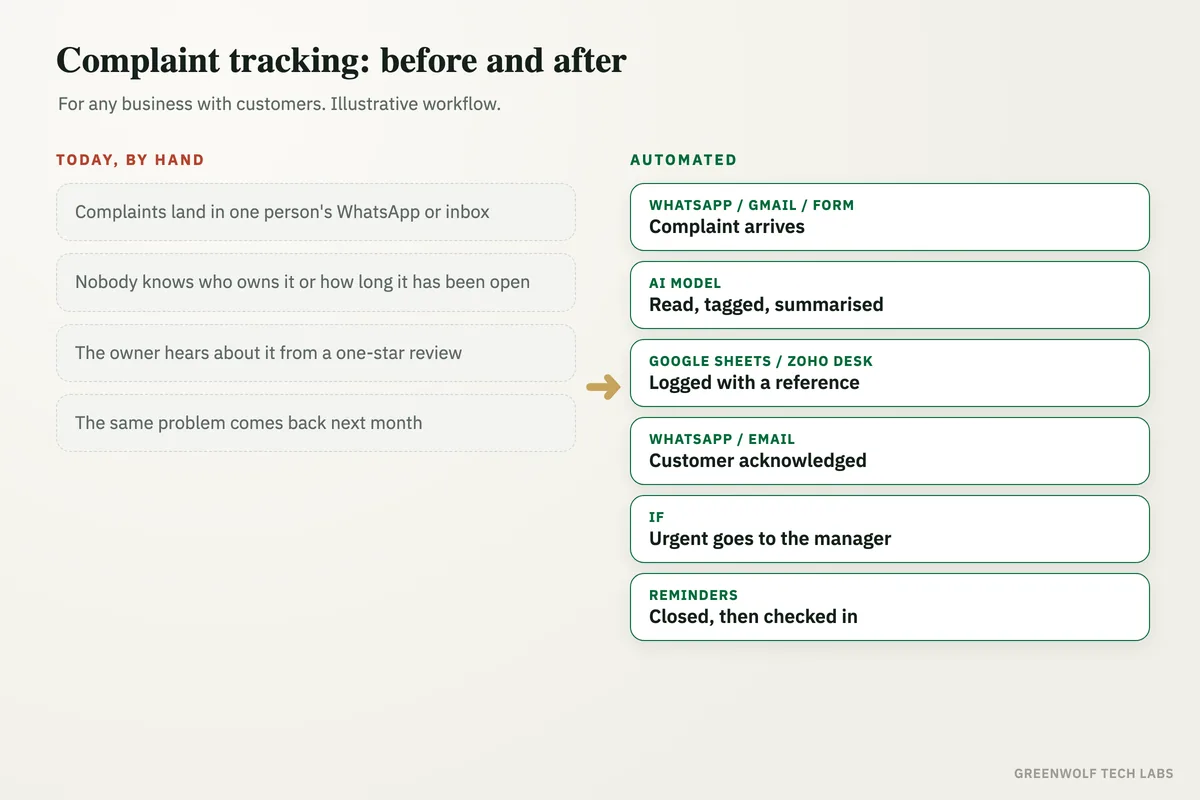
In most businesses a complaint lands in one person's WhatsApp, a shared inbox or a note from a phone call. Someone replies "we will look into it", and then it depends on memory. Nobody knows who owns it, nobody knows how long it has been open, and the owner only hears about it when the customer posts a one-star review or stops buying. The same problem comes back the next month, because nobody ever counted how often it happened.
This workflow puts every complaint in one register, no matter where it came from. The customer gets an acknowledgement straight away, the right person gets the complaint with the details already filled in, the deadline is chased for them, anything urgent reaches the owner, and the customer is asked a few days later whether it is really sorted.
What gets automated
Every complaint in one register
Complaints from WhatsApp, email, web forms, call notes and Google reviews land in one register with the customer, order and date, so nothing lives only in someone's phone.
- Gmail
- Outlook
- Google Sheets
Read and sorted by AI
AI reads each message, pulls out the order number, what went wrong and how upset the customer is, and tags the type: delivery, quality, billing or service.
- ChatGPT
- Claude
An instant acknowledgement
The customer gets a polite reply with a reference number and when to expect an update, in seconds, even at night or on a holiday.
One named owner for each
Each complaint is given to the right person by type, branch or account, with the details and order history attached, so nobody has to ask twice.
- Zoho Desk
- Freshdesk
- HubSpot
Deadlines chased, urgent ones escalated
Owners are reminded before the deadline, and anything overdue, repeated or from a big account goes straight to the manager or owner.
- Slack
- Teams
Follow-up and a monthly pattern report
After closing, the customer is asked if it is really fixed. Each month you see the top causes, the slowest teams and the customers at risk.
- Google Sheets
- Power BI
How the workflow runs
WhatsApp, Gmail or a form: the complaint arrives
Messages on your WhatsApp Business number (through a provider such as WATI or Twilio), your support email in Gmail or Outlook, a web form and call notes all feed the same workflow. New low-star Google reviews can be added too.
AI model: the complaint is read and tagged
ChatGPT or Claude reads the message and fills in the customer, order or invoice number, the type of problem, a one-line summary and how urgent it sounds. Anything it is unsure about is marked for a person to check.
Google Sheets, Zoho Desk or Freshdesk: it is logged with a reference
A new row or ticket is created with a reference number, and the order history is pulled from Tally, QuickBooks, Shopify or Zoho, so the owner sees the full picture without searching.
WhatsApp or email: the customer is acknowledged
The customer gets a short reply with the reference number and when they will hear back. It is written in your tone and sent on the same channel they used.
If step: the right owner, or straight to the manager
Routine complaints go to the person who handles that type or branch, with a deadline. Repeat complaints, big accounts, refund or legal words and anything rated urgent go to the manager or owner at once.
Reminders, close-out and a check-in
Owners get a reminder before the deadline and the manager sees anything overdue. When the owner marks it done, the customer is told what was fixed, and a few days later they are asked one question: is it fully sorted? A no reopens the complaint.
Who it is for
What you need to start
You keep the tools you already use: a WhatsApp Business number connected through a provider such as WATI or Twilio, a Gmail or Outlook support address, and Google Sheets or Excel as the register, or a helpdesk such as Zoho Desk, Freshdesk or HubSpot if you have one. Order and invoice details come from Tally, QuickBooks, Zoho or Shopify. The workflow runs on n8n, Make or Zapier, with an AI model such as ChatGPT or Claude to read and sort the messages.
The decisions that matter are yours: the types of complaint you see, who owns each type, how fast each one should be answered and fixed, and what counts as urgent. If you have not written that down yet, our customer complaint checklist is a good place to start. Complaint handling also works best next to WhatsApp auto-replies and review requests, so happy customers are heard as clearly as unhappy ones.
A typical build starts with one channel, usually WhatsApp, runs alongside your team for a short period so the sorting and routing rules can be checked against real complaints, and then adds the other channels and the monthly report over a few weeks.
Questions about complaint management automation
What is complaint management automation?
Can complaints on WhatsApp be tracked automatically?
Do I need a helpdesk tool for this?
Will customers be talking to a bot?
How does it stop the same complaint happening again?
How many complaints are sitting in someone's WhatsApp right now?
Book a digital audit. We will look at where complaints arrive in your business and how they are handled today, and show what complaint management automation would look like with your own tools and team.
Part of our Sales and Marketing Automation hub. Start with our marketing automation services.