


Healthcare
Medical Records Organization and Indexing, Automated
Medical records read, renamed by condition and filed automatically, with PHI kept inside your own drive.
Get a free proposal
Tell us what you need. A consultant replies within one working day.
01
Medical records that file themselves
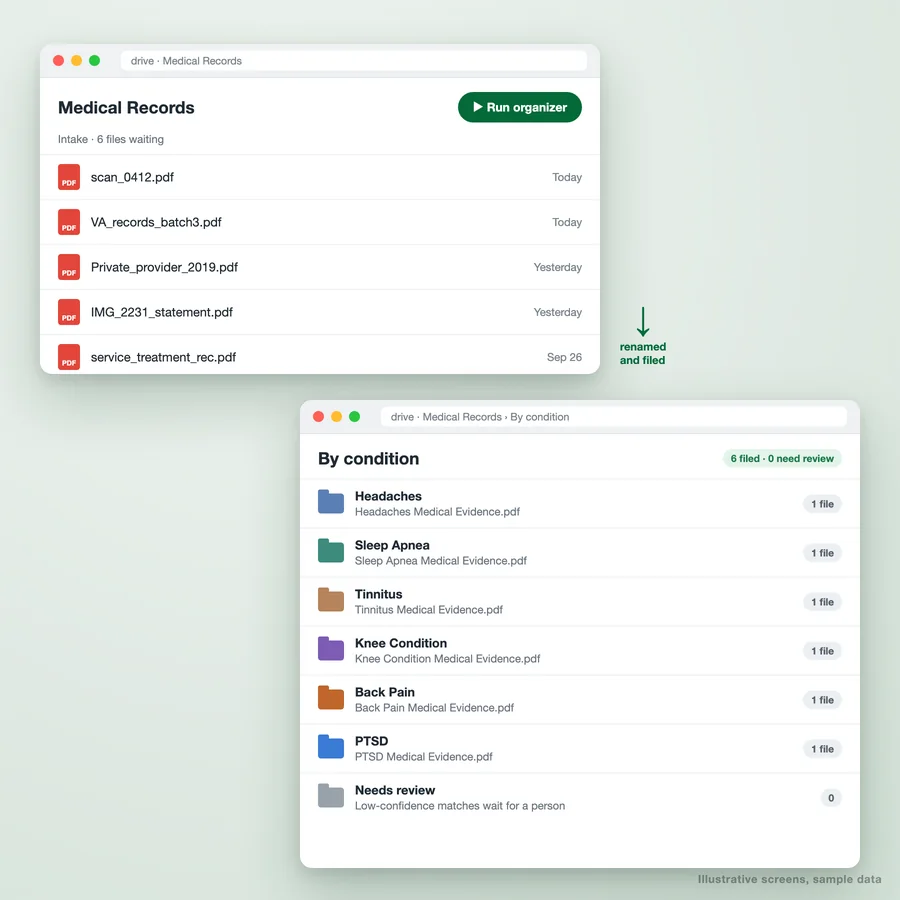
Claims consultants, law firms and practices all end up with the same folder: hundreds of scanned PDFs called scan_0412.pdf, arriving from VA systems, private providers and fax machines. Someone opens each one, works out what it is, renames it and drags it to the right place. It is slow, it is easy to get wrong, and every file holds protected health information.
We automate that step. Staff drop records into one intake folder and press a button. Each PDF is read, matched to a condition, provider or date, renamed to a consistent pattern such as Headaches Medical Evidence, and moved into the matching folder. Anything the system is not sure about waits in a review folder for a person.
02
What the organizer does
Reads every record
Text is extracted from each PDF, including scans, so the content decides where it goes, not the file name it arrived with.
Matches it to a condition
Records are matched to your own list of conditions, providers or claim issues, so the categories are yours, not a generic taxonomy.
Renames consistently
Every file follows one naming pattern, for example condition plus "Medical Evidence", so anyone can find anything.
Files it in the right folder
The renamed PDF moves from the intake folder into its condition folder, created automatically the first time it is needed.
Holds back what it is unsure of
Low-confidence matches go to a Needs review folder with the reason, instead of being filed in the wrong place quietly.
Runs when you say so
A start button for staff, so nothing moves the moment a file is uploaded. It can also run on a schedule if you prefer.
03
Who uses it
04
How we build it
Agree the categories and names
Your list of conditions or document types, and the exact naming pattern each file should follow.
Build inside your drive
The organizer runs in your own Google Workspace or Microsoft 365 account, under your BAA. Records never leave it.
Test on de-identified files
We tune matching on sanitized or synthetic records only, never live patient files, and show you the results.
Hand over with a run button
Staff get a start button and a short guide. You own the script, the folders and the data.
05
Questions about automated records organization
Where does the processing happen?
What happens when a record covers more than one condition?
Can it read scanned or handwritten records?
Why a run button instead of running on upload?
How long does it take to set up?
Send us your folder structure, not your files
Describe how records arrive and how you want them organized. We will come back with how the organizer would work and what it takes to build.
Please do not send any patient records. A description or de-identified sample is all we need.
Part of our Healthcare Practice Automation hub. Start with our healthcare workflow automation.
Healthcare Practice Automation
More on healthcare workflow automation
AI Workflow Automation, Built and Run for You
AI workflow automation services: we build AI workflows that read, classify and act across your systems, then run, monitor and improve them for a monthly fee.
Dental Appointment Reminders That Cut No-Shows and Fill the Chair
Automated dental appointment reminders over WhatsApp and SMS that confirm visits, fill recall gaps and cut no-shows, using the tools your clinic already runs.
Case Study - Clinician Submission Portal (PTC Portal)
Metric Before After Submission errors High Significantly reduced Time clinicians spent entering data 10-15 mins/day < 3 mins/day Admin review effort Heavy Lightweight & structured...
Link EMR/EHR Data with Insurance Claims Through Automation
Link EMR/EHR Data with Insurance Claims Through Automation Healthcare providers and insurers often face the challenge of fragmented data. While Electronic Medical Records (EMR) and Electronic...
ABA Practice Management, Built Around Your Clinic
Custom ABA practice management: session notes against authorized hours, caseloads, BSPs and quarterly reports, built on Google Workspace for your clinic.